The Windows 11 context menu (the menu that pops up when you right-click) is probably one of the most controversial design changes in Windows 11. AlthoughMicrosoftAlthough it has been solvedSomePain points, like adding labels for common file operations, but the menus are still slow, cluttered, and confusing (like the particularly bad "Show more options"). And the latest update doesn't make things any better. Quite the opposite.
Microsoft has released an update to the Copilot app and added a new entry in the ever-expanding context menu, adding features like editing in apps like Notepad/Clipchamp/Photos/Paint. You can now select the new "Ask Copilot" command when you right-click on a file. It will launch the Copilot app, copy the file, and allow you to ask some relevant questions such as summarizing the document, drafting an email based on the file, explaining something, and more.
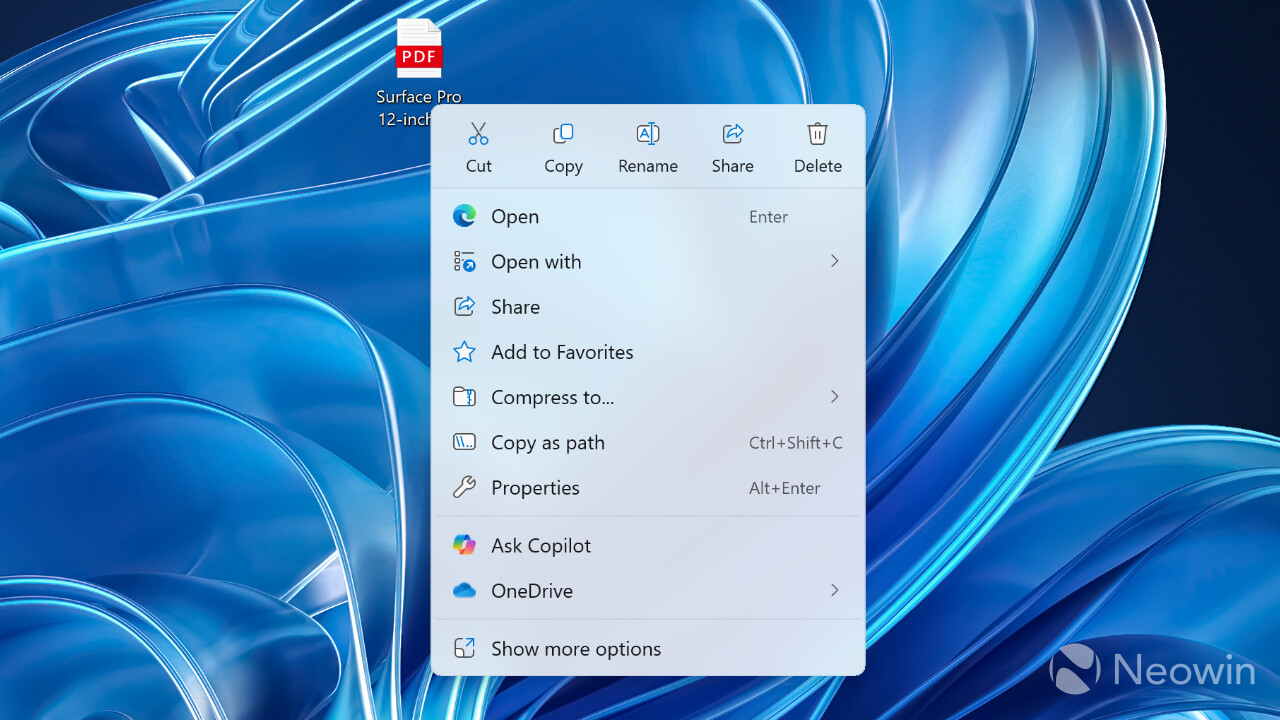
Of course, some people may find this new feature useful. At the same time, it's not hard to imagine that many users will be unhappy with yet another feature that clutters the already slow context menus, which are supposed to be less crowded than they were in Windows 10.
The new "Ask Copilot" option is part of app version 1.25044.93.0 released today. Returning to the previous version removes the context menu button, just like uninstalling Copilot completely. However, "Ask Copilot" can be removed from the context menu with a simple tweak in the system registry. You just open Notepad and paste the following text (method from ElevenForum):
Windows Registry Editor Version 5.00 [HKEY_CURRENT_USERSoftwareMicrosoftWindowsCurrentVersionShell ExtensionsBlocked] "{CB3B0003-8088-4EDE-8769-8B354AB2FF8C}"="Ask Copilot"
After that save the file, change its extension from txt to reg and double click on it. Confirm the changes in the registry and restart the computer. However, there are more features to come. This week, Microsoft announced that you'll be able to trigger AI-driven actions by right-clicking a file in Windows 11's File Explorer.
As for more positive changes, Windows 11 also gets a major revamp of the Start menu.