Recently, WeChat Windows and Mac released the official version 4.1.10 update, which added a "write while translating" function and fixed some known issues. It is understood that the WeChat mobile version has long supported translation while writing, but the computer version has not followed suit before.
When users reply to foreign language messages on their computers, they often need to copy them into translation software and then paste them back into the chat window, which is a cumbersome operation.

After the official version of WeChat PC version 4.1.10 is launched, writing and translating finally comes to Windows and Mac platforms.
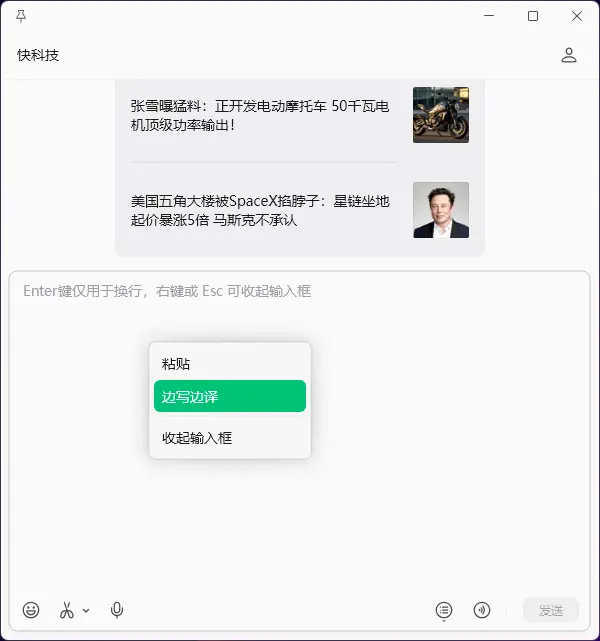
The method of use is also very simple,Open any chat window, right-click the mouse in the input box, and you will see the "Translate while writing" option in the menu, which can be turned on after clicking it.
After turning it on, the user can type normally in the input box, and the corresponding foreign language translation will be displayed simultaneously above the input box.
After confirming that the translated content is correct, click "Use" in the upper right corner, and the translated text will automatically fill in the input box.Then you can send it.
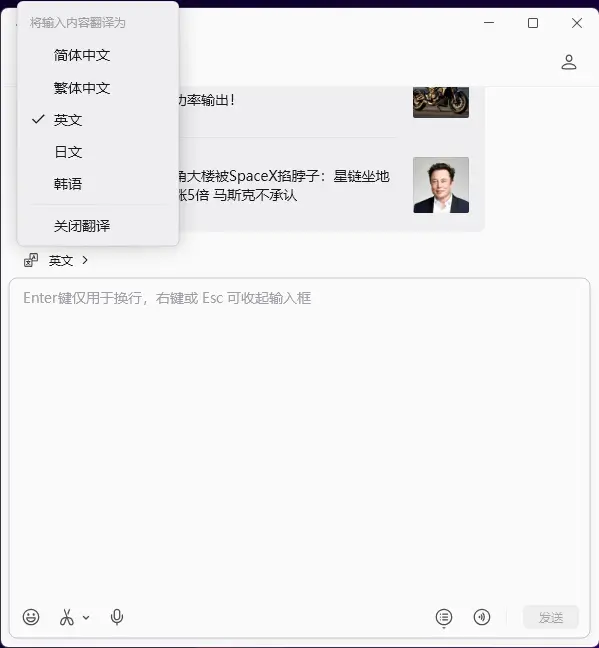
By default, this function will translate the content into English. If you need to switch to other languages, you can click the "English" icon in the upper left corner of the input box to select.
at present,WeChat’s computer version “Write and Translate” supports 5 languages: Simplified Chinese, Traditional Chinese, English, Japanese, and Korean.