
Abstract:
ASUS China has recently updated the official instructions for graphics card installation, listing the mandatory requirements for graphics card installation and disassembly. From power outage, card insertion to power supply wiring and disassembly, the power supply interface and slot buckle are marked as the links most prone to problems.
ASUS explicitly requires thatthe power must be turned off and the power cord completely removed from the socket before installing or removing the graphics card.
The Alienware replacement guide released by Dell at the same time also gives the same requirements and emphasizes the need to use ESD anti-static devices during operation.
The consensus among PC manufacturers is clear: live operation is a rigid red line for hardware damage and personal injury.
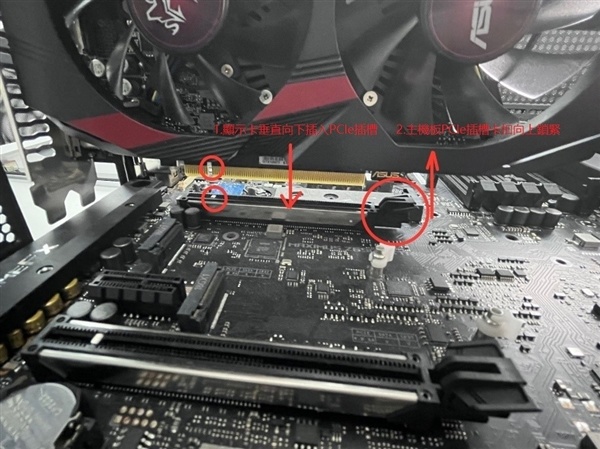
In terms of the card loading sequence, ASUS recommends first removing the slot cover corresponding to the graphics card position on the chassis, then aligning the notch of the graphics card's golden finger with the PCIe slot protrusion on the motherboard, and pushing it vertically downward. When a click sound is heard, the slot buckle has been automatically locked, and then secure the graphics card with screws.
The power supply section is the most detailed part of the entire description. The PCIe plug at the power end must be connected to the independent power supply port of the graphics card; if the graphics card is equipped with an additional power adapter cable, it must be connected through the adapter cable. After completing the connection, you need to confirm one by one whether the three latches are in place: the power interface, the graphics card interface, and the adapter cable interface.
ASUS specifically warns that when the graphics card has two or more independent power plugs, an independent system power supply port must be used. The same power supply port cannot be connected to two or more independent power plugs.
At the same time, the page lists six power connector specifications. The 16-pin specification provides five connection methods, including direct connection, two 8-pin adapters, three 8-pin adapter cables, and four 8-pin adapter cables.
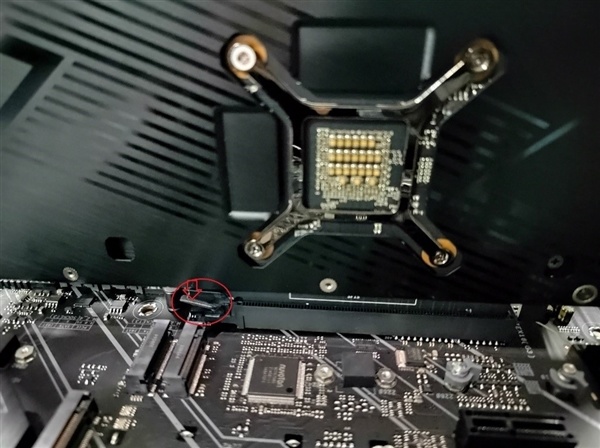
The card removal process is a four-step process: unplug the power PCIe plug, unscrew the chassis fixing screws, press down on the end buckle of the motherboard PCIe slot, and finally take out the graphics card vertically. ASUS emphasizes that you must use appropriate force when pressing the buckle and cannot pull it out by force.
For heavier graphics cards, ASUS recommends removing the individual packaging before transportation to avoid bumps when moving the case. You can also install a graphics card bracket inside the case. The official reference model of the bracket is ROG Herc.
ASUS also reminds that if there is no display or abnormal display when booting, you should first remove the system power cord, re-plug the graphics card and power PCIe plug, and then confirm.
Comments