
Abstract:
DeepSeek has released two pieces of news in the past two days. When viewed together, it is somewhat dumbfounding. On November 13, DeepSeek announced the opening of a complete set of application APIs. Developers can access their products for Internet search, deep thinking search, PDF reading, web page reading, speech recognition and speech synthesis.
Even the ready-made chat client code has been officially open sourced
.
Two days later, a group of users found that their old DeepSeek conversations suddenly "could no longer continue."
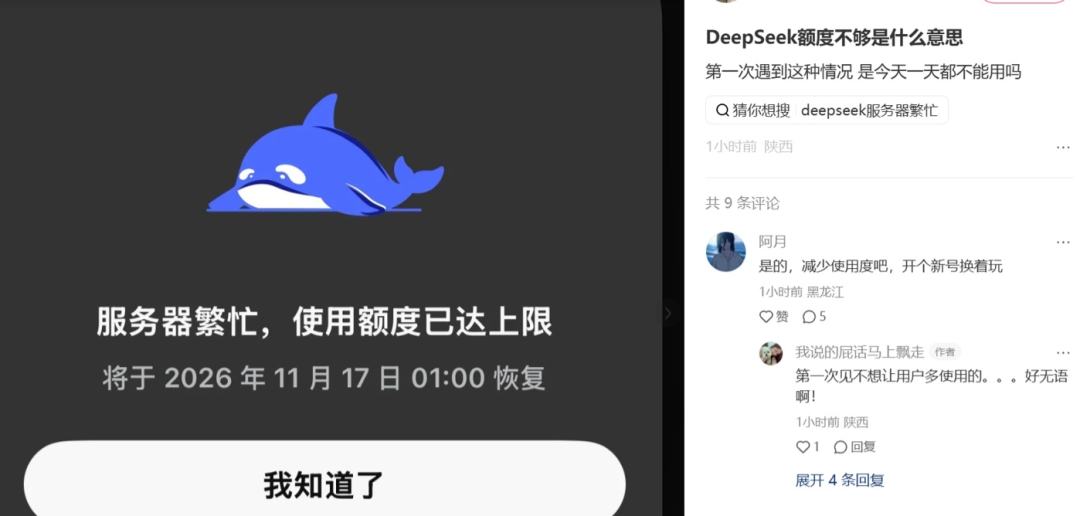
Starting from November 15th, limit reminders will appear on the App and web pages. Some users received "insufficient computing power" and long conversations that have been inactive for more than 72 hours are temporarily unavailable. Others saw a period of 7 days.
The pop-up window also included a sentence:
"History records can be exported to other apps for use."
Today, feedback such as inputting about 40,000 words in a single time and suspending use after the daily quota reaches the top have also appeared.
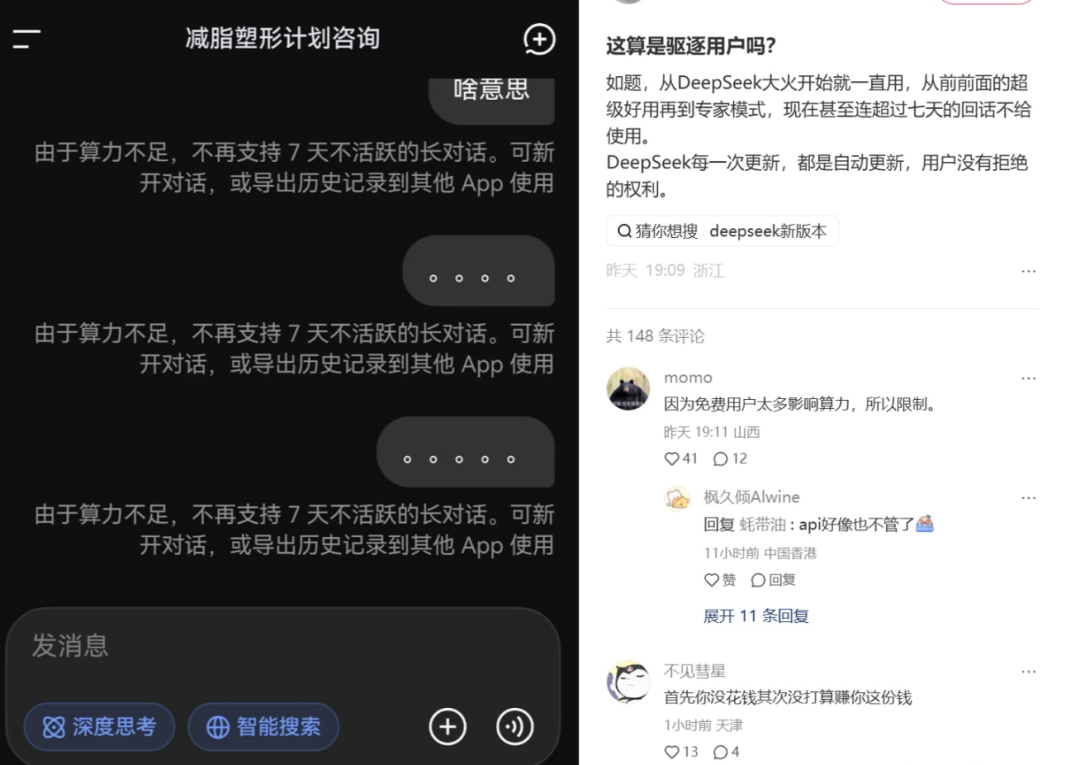
The chat history is still there, but it’s troublesome to continue chatting
ifeng.com Technology searched online posts and found that most users currently report that the old DeepSeek chat window can still be opened and previous questions and answers can be viewed, but messages can no longer be sent.
In Reddit's DeepSeek community, a user said that the multiple chat windows he had accumulated were restricted, and only a few could still be used.
Another user started looking for ways to transfer history. He first exported the ZIP from DeepSeek, then asked ChatGPT to help split it into JSON files, trying to migrate the original chat content there.
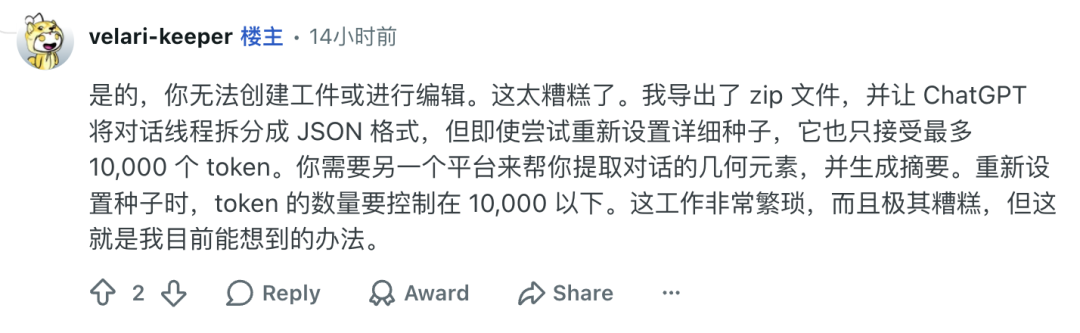
But exporting the file does not mean restoring the conversation.
The original chat record is too long and the new platform cannot receive the entire content at once. The user can only use other models to repeatedly organize, compress the historical records in segments, extract important information, and then gradually put it into a new chat window.
Some users encountered even more embarrassing situations:
I wanted DeepSeek to help summarize what we had talked about before, as background material for the new conversation, but found that
the old window could no longer be replied to
, can't even do this last step.
Ifeng Technology searched its own DeepSeek and found that as of press time, conversation records in January 2025 can still send messages normally and get corresponding contextual replies.
People who have used AI for a long time may have similar experiences. A conversation lasts for dozens of rounds, and the information, modification requirements, and eliminated solutions that have been explained before are usually not repeated again later.
For example, if DeepSeek is used to continuously revise an article, the user may have spent several days telling it which expressions cannot be used and which paragraphs have been finalized. If you start over in another window, these requirements will have to be rearranged.
Although chat records can be exported, it is not so easy for another model to fully absorb the context and continue the previous work.
Why did DeepSeek start setting limits on long conversations?
DeepSeek has experienced multiple service abnormalities in the past two months.
There is a detail about this limit: some of the affected ones are
long conversations that have not been used for some time
.Technically, this may be related to the computational cost of long contexts.
A chat window that has been used for several months may have accumulated dozens or even hundreds of rounds of questions and answers. If the user reopens the window and continues to ask questions, how much history the model needs to process depends on how the system manages context.
DeepSeek has previously adopted context caching technology to reduce the computational overhead of duplicate content. But the cache is not kept forever. If a long conversation has not been used for a long time, processing a large number of historical messages again may incur higher costs after the original cache becomes invalid.
This also makes "long inactivity" a constraint worth noting.
However, DeepSeek has not announced the specific technical reasons for this limit.
Why some users see 72 hours and some see 7 days? Whether it is also related to the length of the conversation and account usage has not been clearly explained.
For chats that cannot be continued, users can export the history first. Official and community migration tools are available to try.
The official has just launched two moving paths
On November 13, DeepSeek opened a complete set of application APIs and open sourced the chat client
Chat Demo
.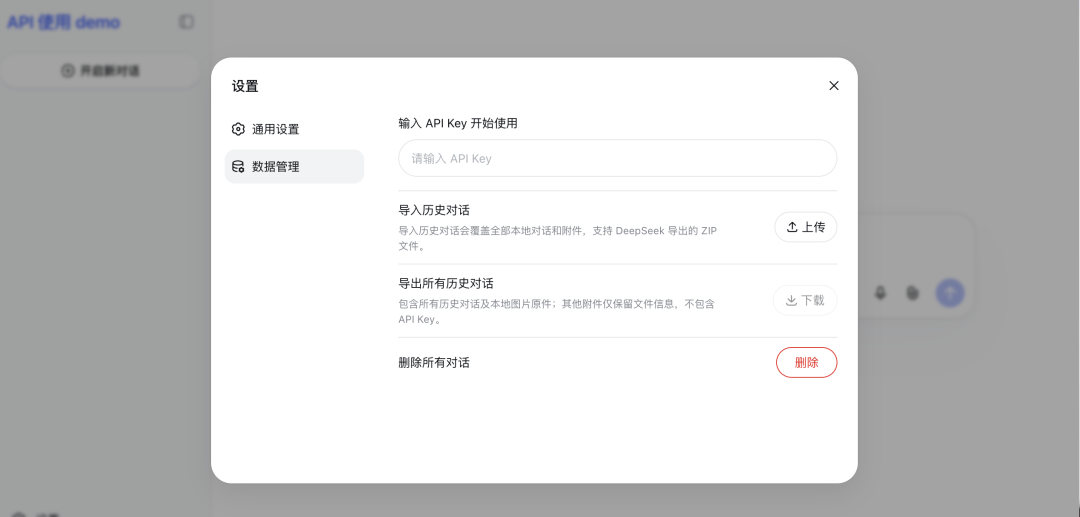
Chat Demo provides a ready-made chat interface. After configuring the DeepSeek API Key, you can call models and search, file reading, voice and other functions. Developers can deploy it themselves or modify it on this basis.
There is another feature in the official documentation:
Supports importing the history of DeepSeek Chat and continuing the chat in the new client.
However, it should be noted that according to official instructions, the import operation will replace all the original local conversations and attachments of the client. Therefore, if you have accumulated other chat records in Chat Demo, it is best to make a backup first and then perform the import.
Another tool is DeepSeek Harness (DSH).
Also on November 13, DSH released a preview version of v0.2.2-rc.3, which added an experimental DeepSeek session import plug-in.
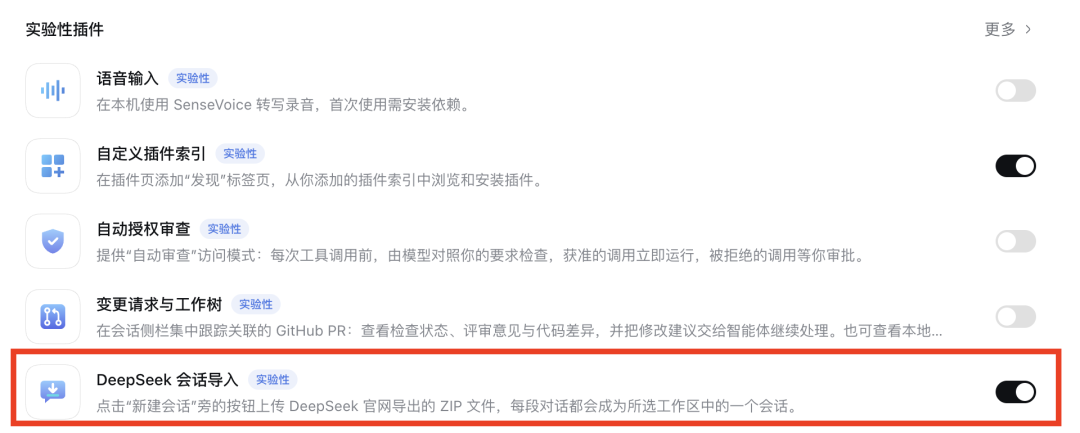
It can import the history records of DeepSeek App or web page into the workspace.
Compared with Chat Demo, DSH prefers an Agent working environment. Imported chats can be used together with files and tasks.
The plug-in also takes into account the branching structure of the original chat, as well as the conversion of search and thought content.
However, it is still an experimental feature and needs to be enabled by users.
Both tools support migration history, but the usage thresholds are different. Chat Demo needs to configure an API Key and bear the calling fee, while DSH needs to install and configure corresponding plug-ins and model services.
In addition to the official tools, there are several more convenient ways to move
In addition to the Chat Demo and DSH officially launched by DeepSeek, community developers have also made some tools specifically for processing historical chat records.
For example, the dsh-chat-migration released by developer Xiaozhuang is
a community plug-in that adds DeepSeek historical conversation migration capabilities to DSH
.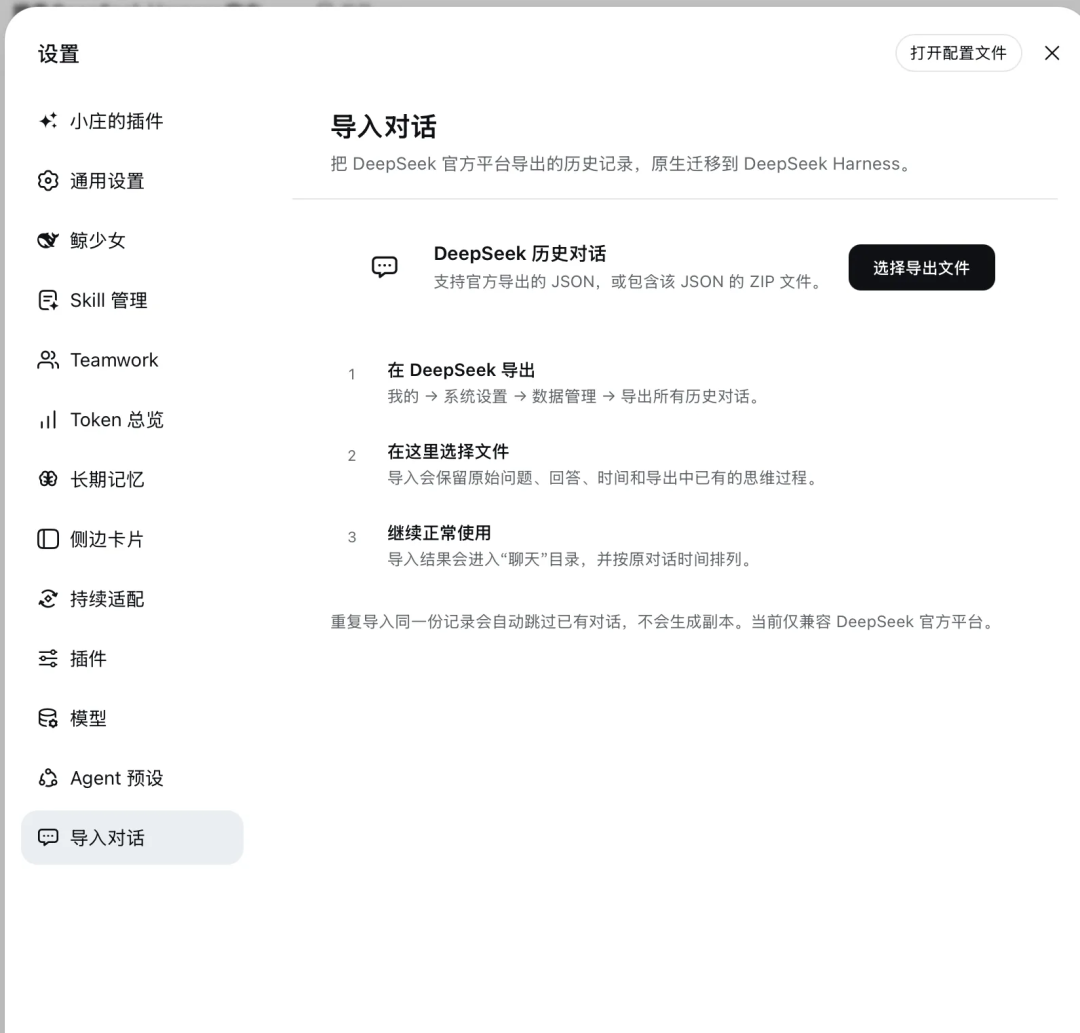
It actually contains two plugins: "Import Conversations" and "Chat Mode".
The former can read the JSON or ZIP officially exported by DeepSeek, preview the original chat records, and then select the conversations that need to be migrated. Titles, chronological order, Q&A content, and thought records saved in the exported file can all be converted into chat records in DSH.
Conversations that have already been imported will also be marked and can be skipped when re-importing.
"Chat mode" provides an entrance closer to the use of ordinary chat software, without the need to bind a workspace every time.
It should be noted that this set of community plug-ins and the DSH official experimental import plug-in mentioned above are different projects, and the installation methods are also different.
If you don’t usually use DSH, you can also check out the browser plug-in
DeepShare
.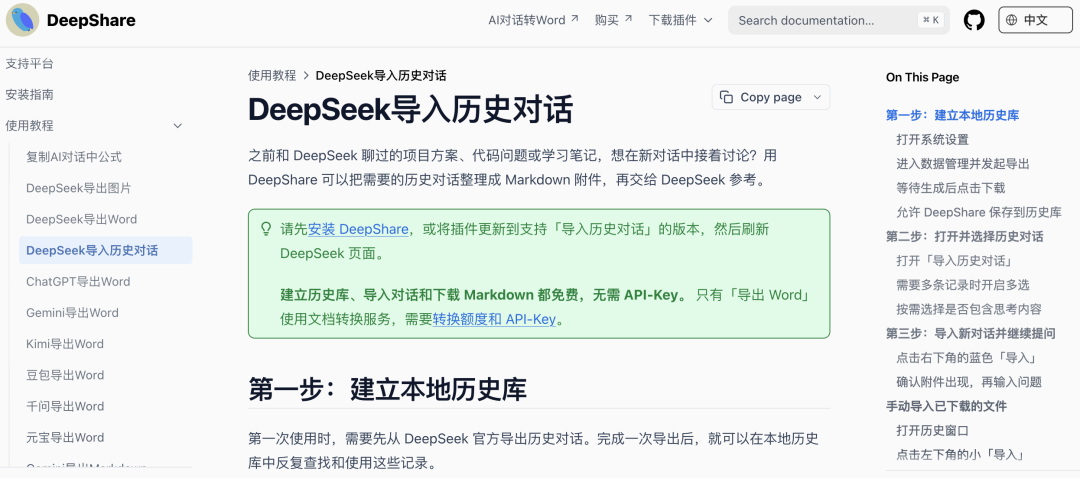
Its operation is closer to the chat page that ordinary users are familiar with.
Users first download history records from DeepSeek, and DeepShare can create a local history library in the browser. Afterwards, you can search past chats, select the few pieces of content you need, and organize them into Markdown files.
For example, if you have repeatedly revised an article with DeepSeek and want to continue writing it if you switch to another AI, you can first sort out the discussions related to that article and then upload the Markdown file to a new chat window.
DeepShare also supports directly placing selected history records as attachments into new conversations in DeepSeek.
However, this method only allows the model to re-read the old content and does not restore the original chat thread.
According to the developer documentation, historical record parsing, search, and Markdown generation are all completed locally in the browser, and no additional API Key configuration is required.
If
there is no need to continue chatting and just want to save the past records
, there is also an open source project calleddeepseek-keeper.
It is mainly used to browse DeepSeek chat records offline. You can check historical content in the terminal or browser, and is suitable for local backup of old chats.
These tools can all start from the history files exported by DeepSeek, but the processing methods are different.
If you want to keep the session format and continue to use DSH, you can consider the session import plug-in; if you want to organize old content for other AIs to use, DeepShare provides a more lightweight method; if you just want to archive, there is no need to deploy a dedicated chat client.
No matter which tool you choose, it is best to download the original history records from DeepSeek's "Data Management" page and keep a backup.
Exported files may contain private chats, work documents, and other sensitive information. Before using third-party tools, it is recommended to confirm whether the files need to be uploaded to an external server. It is also best to save PDFs, images and other attachments used in the original chat separately.
Finally, it is recommended that everyone "prepare for a rainy day". While DeepSeek can continue to be used, let it do a summary review: what has been discussed before, what requirements have been determined, and what things have not yet been completed.
After all, when the quota is really limited, no matter how much you say, it will ignore you.
Comments