
Abstract:
Microsoft has just released a redesigned Windows 11 Photos app, which brings users a faster gallery browsing experience, richer editing tools, and more artificial intelligence features. However, although the new version of the photo application has been improved in terms of performance and functionality, it still uses the traditional grid-based photo browsing method.
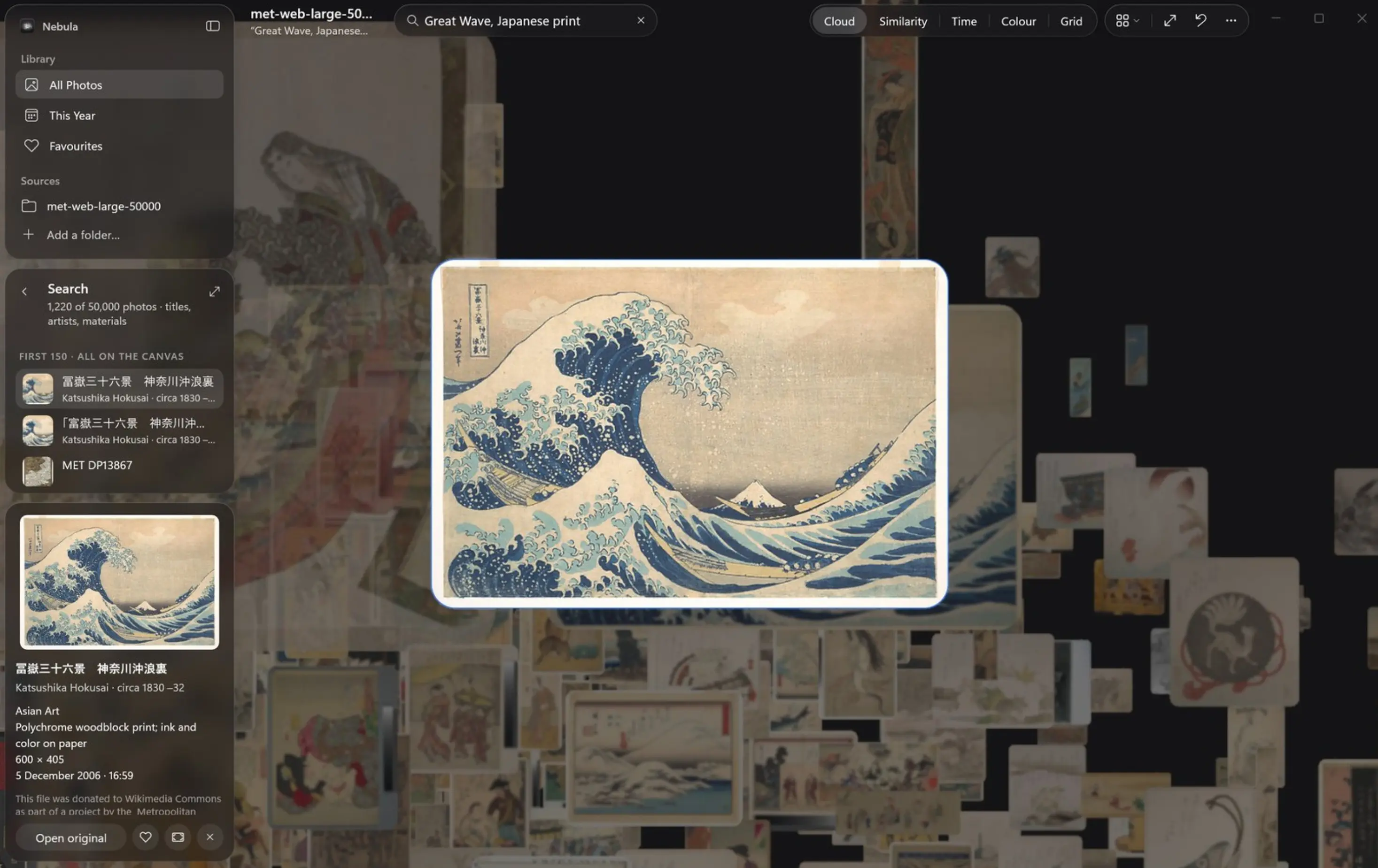
Meanwhile, a new open source app called Nebula is trying to revolutionize the photo management experience. The project was initiated by Microsoft Design Director Lucas Couto and was originally a personal experimental project to explore the potential of the WinUI framework and Windows native AI capabilities, and to demonstrate what innovative experiences modern Windows development technology can achieve.
Unlike the scrolling list of thumbnails in traditional photo apps, Nebula transforms your entire photo library into an interactive three-dimensional space. Users feel as if they are in a digital universe composed of photos, and can freely fly, zoom, rotate the perspective, and explore their photo collection from different angles.
The developers said that Nebula is built using WinUI 3, Windows App SDK and a customized C++ Direct3D 11 rendering engine, and performs well in terms of performance. The application can display 50,000 photos simultaneously, and its underlying renderer has been tested to even support the real-time display of up to 100,000 images.
When the user zooms out, the photos will be distributed in the three-dimensional space in the form of colored light points; as they get closer, these light points will gradually transform into clearly visible thumbnails. When users select a photo, they can also view the full-resolution original image directly.
To help users manage photos from different angles, Nebula provides five layout modes. The first is "cloud image mode", in which photos float in space in the form of three-dimensional clouds; the second is "similarity mode", which uses artificial intelligence to automatically gather photos with close visual content together; the third is "time mode", which is arranged according to shooting time; the fourth is "color mode", which organizes content according to the main color of the picture; and the fifth is a grid view common in traditional photo galleries.
When switching between different modes, the system will reorganize the position of the photos through smooth animation, allowing users to observe the same batch of photos from different dimensions without creating an abrupt feeling.
In addition to visual performance, Nebula also takes full advantage of the Windows native artificial intelligence platform. This application uses Windows ML, ONNX Runtime and DirectML acceleration technology to call the GoogleSigLIP 2 image model to analyze photo content and implement semantic-based intelligent search.
For example, if the user enters "horse in the snow" to search, even if there is no relevant text description in the photo file name, the system can still identify and find pictures that meet the conditions. The similarity view also relies on AI analysis capabilities to automatically discover photos with similar visual characteristics and classify them into different theme groups. After users select a group, they can fly directly to the corresponding photo area to browse.
It is worth noting that the entire AI analysis process is completed on the local device, and the photos do not need to be uploaded to the cloud, which is more conducive to protecting user privacy. Projects like these demonstrate the capabilities of modern Windows development tools and frameworks. Nebula's interface is built on WinUI 3 and Windows App SDK, while the real-time 3D environment is driven by custom Direct3D rendering technology. Even the translucent panels and interface elements in the application are rendered in real time on the dynamic 3D scene, thus presenting visual effects that are in line with the Windows 11 design style.
Currently, Nebula is still an experimental project and is not a direct replacement for Microsoft's Photos app. The project source code has been publicly released under the Apache 2.0 license, but ordinary users currently need to compile it themselves before using it.
In terms of hardware, Nebula supports Windows 11 devices equipped with x64 or Arm64 processors and requires a DirectX 12-compatible graphics card. If you want to enable the AI function, users need to download an additional model package, and the related files occupy approximately 6GB of storage space.
Although still in the experimental stage, Nebula demonstrates what is possible when native artificial intelligence is combined with modern Windows graphics technology. By transforming a traditional two-dimensional photo library into an explorable and navigable three-dimensional space, this app not only brings new ideas to photo management, but also shows the future development direction of how personal digital content is interacted with.
Learn more:
https://github.com/lcoutodemos/Nebula
Comments