
Abstract:
In February of this year, Perplexity launched Perplexity Computer. This is a set of artificial intelligence agent tools similar to Claude Cowork, which can use the network and files and applications on the user's computer to complete various tasks autonomously. Since then, the platform has gradually developed multiple products, including Personal Computer for Mac. Today, Perplexity has announced a new feature called Hybrid Compute.
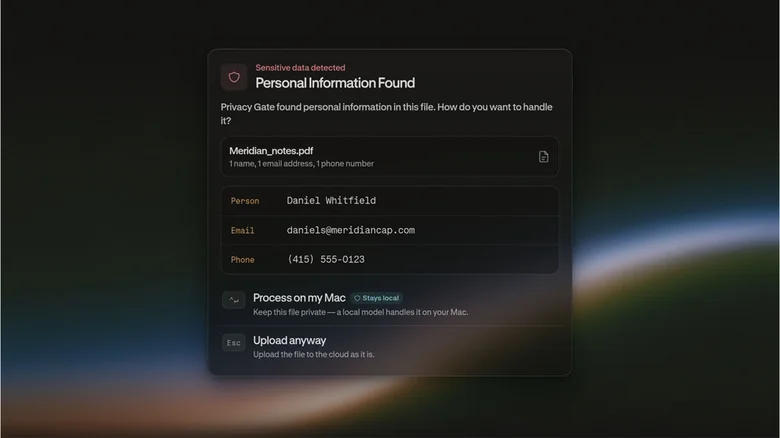
Hybrid Compute allows users to split a task between the cloud cutting-edge model and the local large language model for joint processing. The cloud model can be a high-performance model such as Opus 5 or GPT-5.6 Sol, while the local model runs on the user's own computer. The core idea is to let the local model handle sensitive information, ensuring that the relevant data always remains securely on the device.
Perplexity said that Hybrid Compute is suitable for a variety of scenarios. For example, a lawyer could use it to write a legal brief comparing an ongoing case to existing precedent. In this process, customer data can be saved locally and avoid being uploaded to the cloud. For users looking to control costs, Hybrid Compute can also move some work from the typically more expensive leading-edge models to local models to reduce inference expenses.
“This feature is integrated directly into the Mac app. Every time you try to upload a file or send a message, the system automatically checks whether it contains sensitive content and confirms whether you are willing to share this data to the cloud.” said Jon Staff, Perplexity Mac product lead. As part of the launch, Perplexity also trained a new privacy classifier that can automatically recommend files and information that users should keep locally on their computers.
Before Hybrid Compute starts allocating tasks to different models, users can first view the files that the system is preparing to isolate and keep locally to confirm that it has not missed important content. The user can also decide at this stage which models will complete the task.
Currently, local model options include Gemma E4B, and two versions of the Qwen 3.6 model, both with 35 billion parameters. One version was post-trained by Perplexity. The company says more local models will be available in the future. No matter which model the user chooses, the installation process does not require opening a Mac terminal, the Perplexity app will take care of completing the installation.
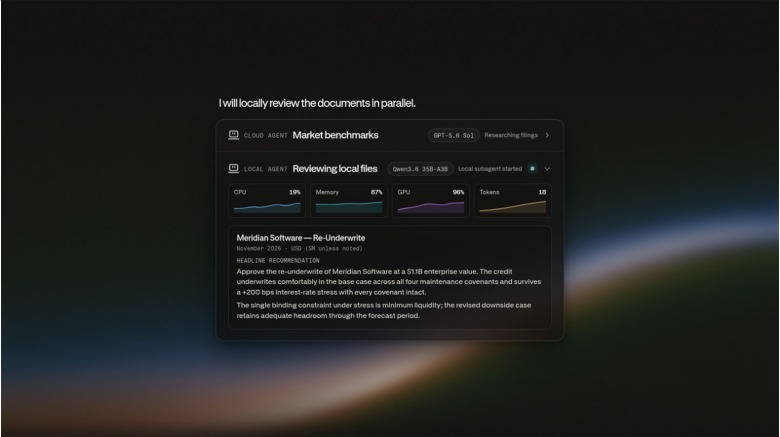
While the system is running, users can see visual information about local CPU, GPU and memory usage. The sidebar next to it will display the number of tokens consumed by the task. There are no fees for users using tokens generated by local models on their own computers. After the system generates the results, the user can continue to enter subsequent instructions as usual, or add the task to the queue through the iPhone.
When asked if Perplexity had benchmarked the results generated by Hybrid Compute against a system that relies entirely on the cloud, Staff said: "In short, if you just look at the quality of the raw product, the output of fully using the cutting-edge model is almost always better. It costs more, but it also has more capabilities."
However, Staff added that not all users need the most advanced and powerful AI models to get the job done. In such cases, data privacy and cost may be more important than model capabilities.
“I think this should be an adjustable scale. For the specific work that the user wants to accomplish, we want the user to decide where they are on this scale. Obviously, we will try to recommend the most appropriate solution based on the context we have, but ultimately it is still up to the user to decide which solution best meets their needs.” Staff said.
Currently, Hybrid Compute is only available for Mac computers equipped with Apple Silicon chips and running macOS 15. Perplexity recommends devices with at least 32GB of unified memory. The feature is available to Pro and Max subscribers, as well as Perplexity’s enterprise customers.
Comments