It is reported that Microsoft is creating a new version of the "Run" dialog interface for Windows 11 to replace the classic design that has been used for more than 20 years, while making certain enhancements in functionality. The news comes from an independent source who dug into the hidden features of the preview version. The public screenshots show that the new version of the "Run" dialog box is closer to the overall design language of Windows 11 in terms of layout and interaction.

According to the information currently exposed, the new "Run" dialog box will provide a larger command input area and display a list of recently used commands above the input box, making it easier for users to quickly call frequently used commands. When the system recognizes an executable program, the dialog box will automatically display the corresponding application icon and name, making the correspondence between instructions and actual applications more intuitive. However, the traditional "Browse" button will no longer appear, and users cannot directly open the file manager through this interface to manually locate the executable file.
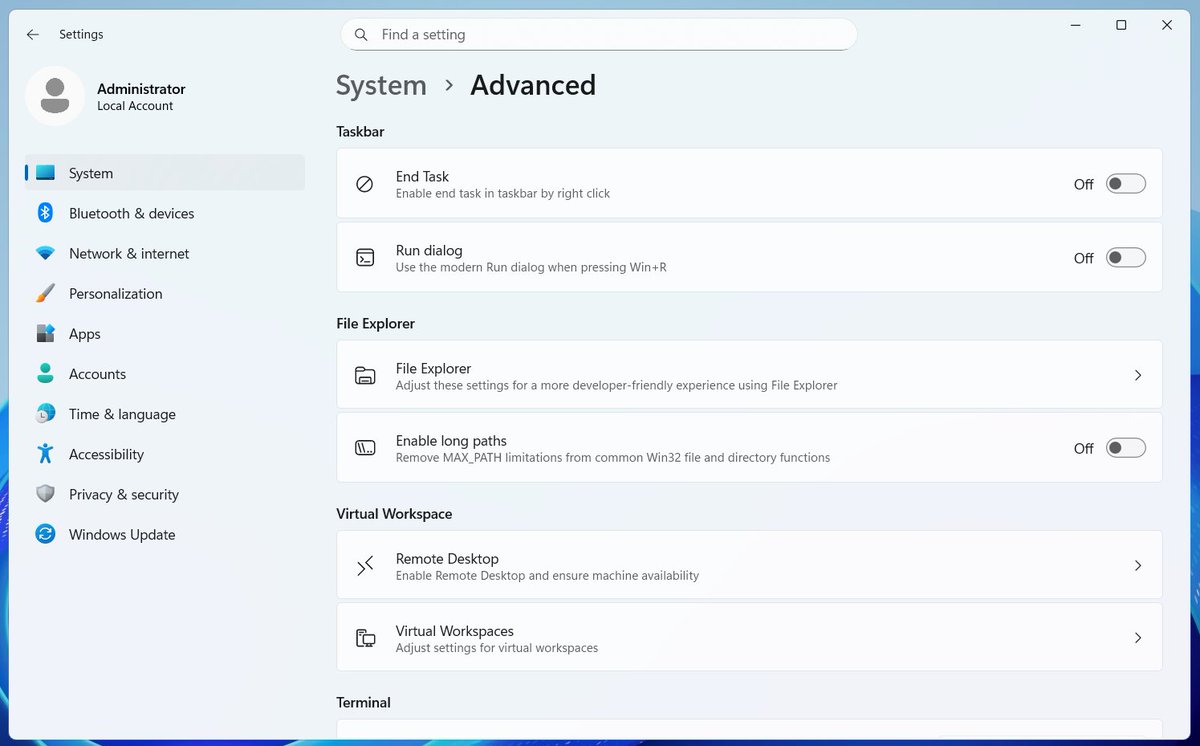
It is worth noting that Microsoft has not completely abandoned the old "Run" interface for the time being, but plans to retain both the old and new styles in the system for users to choose. According to reports, Windows 11 will add a "Run dialog" switch in "Settings > System > Advanced", and the old interface will still be enabled by default. Only after the user actively turns on this option, pressing Win+R will call the new modern "Run" dialog box.
At present, the code related to the new version of the "Run" dialog box is still hidden in the latest preview version of Windows 11, and Microsoft has not made any official announcement about this feature. Before the official launch, some third-party tools have tried to apply an interface solution that is more in line with Fluent/WinUI style for the "Run" window to meet the needs of heavy users who want a unified visual experience. This self-developed revision by Microsoft is also seen as another step to further clean up and modernize the old system interface.