Microsoft has just launched two long-requested features in the latest Windows 11 preview: the taskbar can be freely moved and supports switching to a smaller size. These changes are regarded as a "return" to the traditional desktop experience, but Microsoft said that this is just the beginning, and optimization around the taskbar and "Start" menu continues to advance.
According to the latest notes posted by Microsoft on the official Windows blog, the company has confirmed that a new batch of Start menu customization options will be available in a new preview version in the coming weeks. This batch of functions will be pushed to test users first, and then gradually promoted to users of the official version based on feedback.
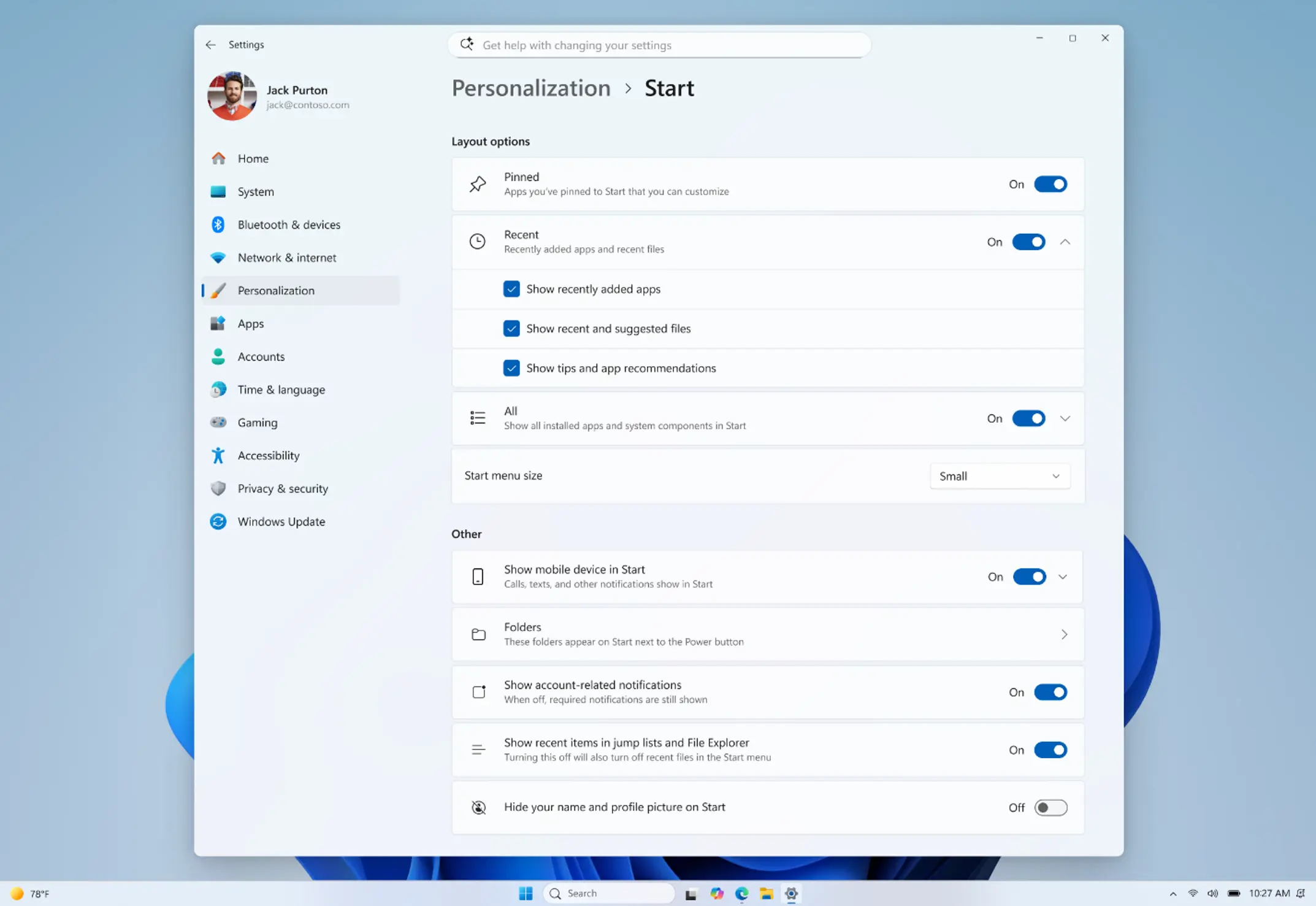
In the upcoming update, the Start menu will become more modular, and users can press block switches to decide which parts of the interface need to be displayed. For example, Microsoft said that users can individually close areas such as "Pinned Apps", "Recommended Content" and "All App Lists" to customize a more streamlined or complete "Start" menu layout based on personal habits.
Microsoft also plans to fix the side effects of the current "recommended content" switch. Currently, if you completely turn off recommended items in settings, not only will the recommendation area in the "Start" menu disappear, but the "Jump List" and "Recent Files" functions in the File Explorer will also become invalid. Microsoft said that these logics will be decoupled in subsequent updates, and users can individually close the recommended content area in the Start menu while retaining the jump list and recent file functions.
Start menu resizing is also one of the key upcoming improvements. Currently in Windows 11, the size of the Start menu is mainly determined automatically by the screen size and display scaling (DPI), leaving users with little room for manual adjustment. Microsoft plans to add a "size" option in settings, allowing users to actively switch between "small" and "large" layouts to adapt to different usage scenarios and screen environments.
On the privacy level, Microsoft will provide users with the option to hide account information. In the future, users can choose to hide the username and account avatar displayed in the lower left corner of the "Start" menu. This will help reduce the risk of personal information being exposed in public for users who often need to share their screens, conduct online presentations or live broadcasts.
The accompanying picture released by Microsoft shows the general appearance of the new "Start" menu settings page, which includes a series of options such as block-level switches, recommended content control, layout size, and account information display. In addition, Microsoft also plans to improve the quality of the file recommendation algorithm, so that the file list that appears in the Start menu will be closer to users' actual usage habits, and improve its usefulness as a work entrance and recent activity center.
In order to make the positioning of the ribbon clearer, Microsoft is also planning to rename the current "Recommended (recommended)" label to "Recent (recent)". Microsoft believes that this naming is more in line with the actual situation that this area mainly displays "recently opened files", and will help users quickly understand the purpose of this area.
Microsoft said that a set of new features, including block-level switches, fine-grained control of recommended content, resizable menus, and hiding account information, will be available in the Windows 11 preview version in the coming weeks for Windows Insider program members to take the lead in experiencing and providing feedback. For users looking for a more flexible desktop and Start menu experience, these updates are expected to significantly improve the overall performance of Windows 11 in terms of personalization and ease of use.