Microsoft recently introduced a major change in Windows 11 that allows two or more applications to call the camera at the same time, ending the long-standing restriction of "only one application can occupy the camera at the same time." This change is included in the optional update Windows 11 KB5089573 released in May 2026 and is scheduled to be rolled out to all users with Patch Tuesday in June 2026.
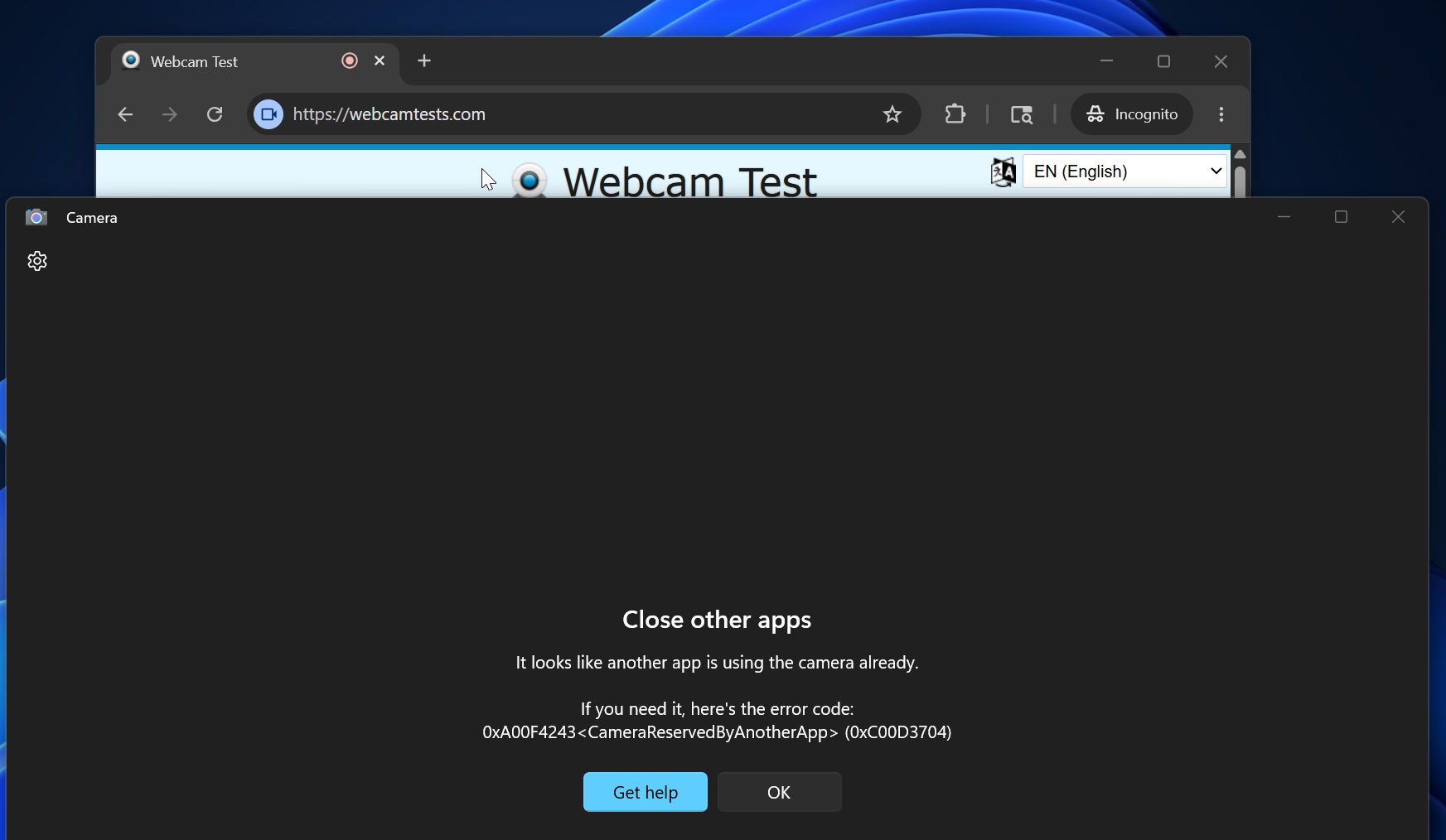
In the current official version of Windows 11, the system does not allow multiple applications to access the camera at the same time by default. For example, when a user opens Microsoft Teams and Zoom successively, only the application launched first can obtain camera permissions, and the application launched later will not be able to call the camera video stream. This also means that if a user tries to record themselves through software such as OBS while using Teams for a video conference, OBS will not be able to obtain the camera image.
Microsoft's official error message also clearly requires users to "close other applications that are using the camera." Otherwise, the system will give an error code such as 0xC00D3704, indicating that the camera has been occupied by other programs. In the example given by the author, when the browser accesses the online camera testing tool and calls the device camera, and then opens the system's own "Camera" application, the latter cannot access the camera hardware and relevant error messages pop up.
With the release of KB5089573 (build 26200.8524 and above), this restriction that has been in place for many years has finally been removed, and a new mode that supports camera sharing across multiple apps is now available to users. After enabling this function, as long as the hardware performance and driver conditions are met, multiple applications can access the camera in parallel at the same time, and there is no need to frequently close the previous application to free up camera resources.
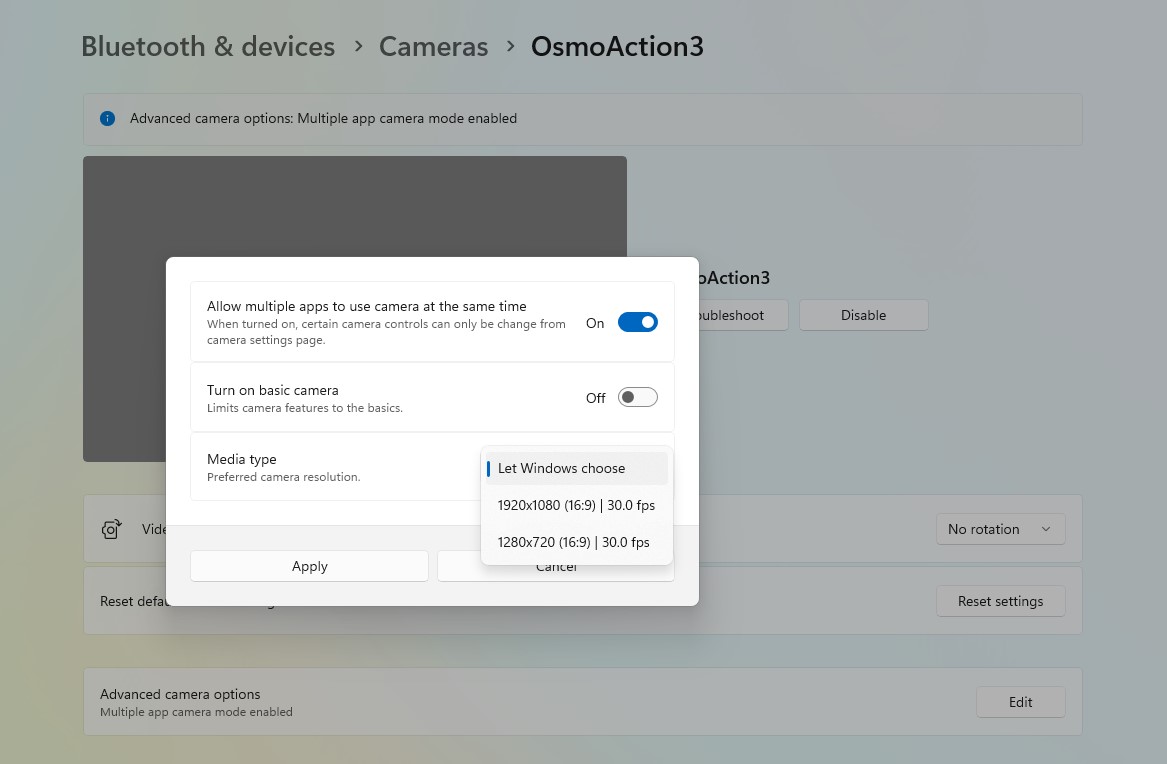
If users find that the multi-app mode does not take effect automatically after updating to KB5089573, they need to manually turn on this new feature in the settings. The path provided by Microsoft is: Settings > Bluetooth & Devices > Camera, select the camera device you are using, scroll down, click "Edit" in "Advanced Settings", and then turn on the switch for "Allow multiple apps to use your camera".
In addition to the multi-app camera mode, this update also brings another important change related to the camera experience - a new feature called "Basic Camera". When Microsoft previously confirmed that it would launch a major update for Windows 11, it said that it would focus on improving the system's performance in many aspects such as File Explorer and Copilot, and would also improve the reliability of cameras and audio devices.
Microsoft admitted that some users will encounter the problem of cameras "disappearing" or randomly failing during meetings or daily use, and audio equipment (including microphones and speakers) also often fail to work properly. Microsoft believes that many camera-related issues are rooted in device manufacturer drivers rather than Windows updates themselves. The author of the article also gave an example that the camera of the HP Specter device he used had disappeared from the system overnight. At first, he suspected that it was caused by a Windows update, but after reinstalling the camera driver provided by HP, it was confirmed that the problem was on the OEM side.
To help users quickly determine fault attribution, the "Basic Camera" function introduced in this KB5089573 update allows the system to fall back to Microsoft's own basic driver and default settings to drive the camera when a problem occurs. When users turn on "Basic Camera" and find that the camera works normally in this mode, they can roughly determine that the problem is caused by the OEM driver or its accompanying software, rather than a serious error in the Windows system itself or a completely damaged hardware.
The report pointed out that the multi-application camera mode and the "basic camera" function will be gradually pushed to users together with several other improvements, including a more understandable user folder naming method during the installation process, and a performance-oriented "low latency profile" option. Among them, the new user folder naming scheme is designed to solve the problem of illegible 5-letter user directory names being generated by default during Windows 11 installations in the past, while the "low-latency profile" can optimize CPU response speed on some devices and improve system fluency.
Overall, Microsoft is systematically improving the Windows 11 experience in high-frequency usage scenarios such as video conferencing and content creation through this update. The opening of the multi-application camera mode is expected to benefit professional and ordinary users who need to record, live broadcast and video conferencing at the same time, while the "basic camera" function provides a more intuitive path for troubleshooting, helping to distinguish whether the problem is caused by system updates or hardware manufacturer drivers.