
Abstract:
The open source player Media Player Classic – Home Cinema (MPC-HC) has released version 2.8.3, which adds a set of modern themes based on the Windows 11 design language for dialog boxes and menus, and adds an optional native Windows 11 menu that supports a rounded corner appearance. This is an update at the interface level, not a rewrite of the entire player; users can still choose the previous theme, or turn off the modern theme and return to the familiar classic look.
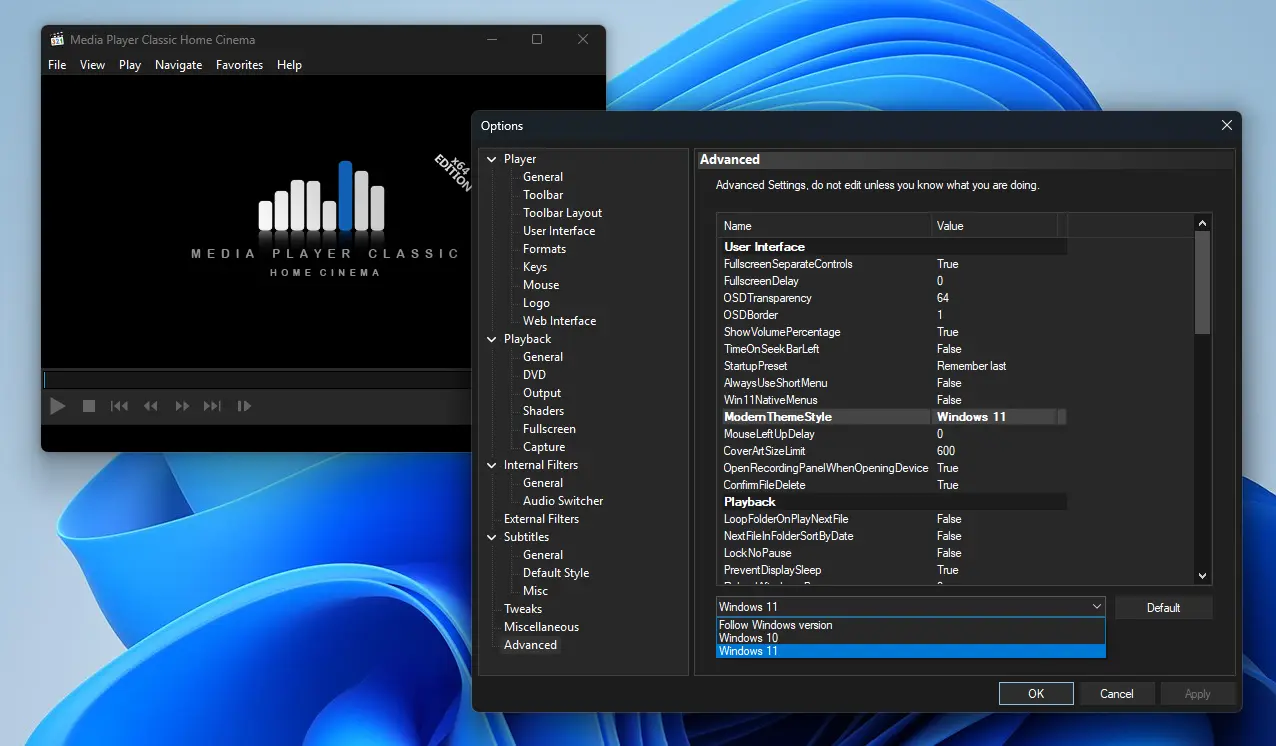
The new theme can be selected in "Options-Advanced-ModernThemeStyle" and is not restricted by the current Windows version; the native Windows 11 menu needs to be enabled separately in the advanced options. If you don’t like the new look, you can cancel “Use modern themes” in “Options—Player—User Interface” and restore the traditional interface. MPC-HC has long been popular with Windows users for its lightweight, simplicity and wide video format compatibility. Its original development team stopped maintaining it in 2017, and has since been continuously updated by the clsid2 community branch on GitHub.
Version 2.8.3 also updates the MPC Video Renderer to 0.10.8.2600 and the MediaInfo component to 26.10; EVR-CP and Sync rendering modes add support for HLG tone mapping, CUE playlist file parsing has also been improved, and it also includes several stability optimizations and minor fixes. MPC-HC itself is a free open source audio and video player. The code is licensed under GPL v3. It is available in Windows 7, 8, 8.1, 10 and 11 versions, including 32-bit and 64-bit builds.
MPC-HC has not given up its original advanced functions due to the appearance update, including HDR playback, playback speed adjustment, subtitle search, playback progress memory, shortcut key customization, and online video streaming through yt-dlp. Among them, HDR playback requires the use of MPC Video Renderer or madVR, and the online video function also requires additional configuration of related tools. This update brings the classic player closer to the modern Windows desktop, while leaving room for users to choose their own interface.
Download address:
https://github.com/clsid2/mpc-hc/releases
Comments