
Abstract:
For Windows users who want to run artificial intelligence models on their own computers, there has always been a certain threshold for installing and configuring local AI tools. Users not only need to find suitable model files, but also consider issues such as model format, hardware compatibility, inference engine installation, and startup parameters. Today, the open source application Llama for Windows, launched by developers related to the Hugging Face and llama.cpp teams, attempts to simplify this process into a few simple operations, allowing users to download and run local large language models on Windows computers without using the command line.
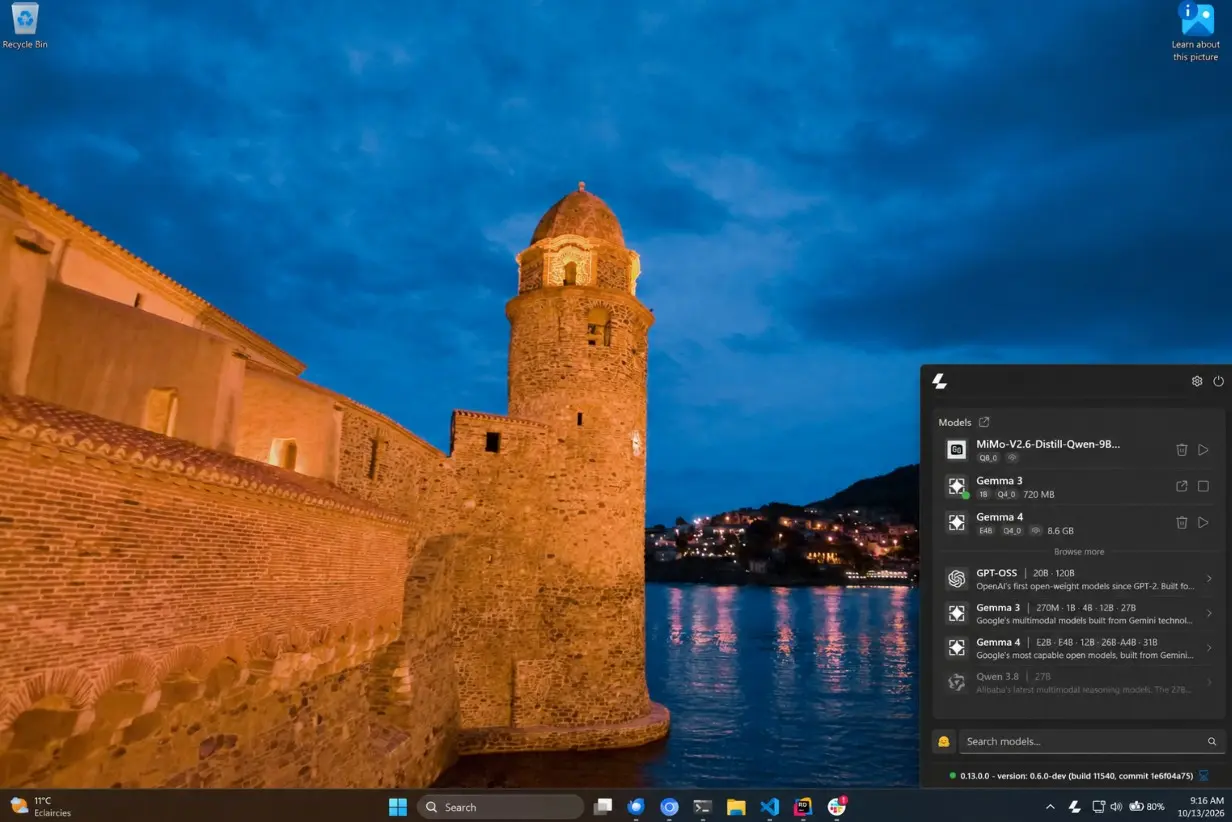
Llama for Windows will be launched in October 2026 and is the Windows counterpart of the macOS version of the Llama application. It is a free, open source Windows 11 application built on Microsoft's WinUI 3 technology and mainly runs in the system notification area. After users install it, they can open the control panel through the application icon in the notification area of the taskbar, without having to keep an independent window like traditional software.
The most important feature of this application is its ability to directly connect to the Hugging Face model warehouse. Hugging Face is currently an important hosting platform for open source artificial intelligence models, bringing together a large number of models and their derivative versions from different development teams. In the past, users usually had to find a suitable model file by themselves, determine whether the file format was correct, then download the corresponding version and start it through the inference engine. For the average user who is not familiar with artificial intelligence technology, this process can be quite tedious.
Llama for Windows provides a list of recommended models within the application. Users can check the model's parameter size, disk space, and whether it supports visual functions such as image understanding, and then select a model suitable for their computer to download. After selecting the model, just click on the corresponding option and the app will automatically start downloading and display the download progress.
This tool mainly uses quantization models in GGUF format. GGUF is driven by the llama.cpp ecosystem and has become one of the widely used model file formats for running open source large language models locally. Quantification technology can reduce the storage space and running memory required by the model by reducing the numerical accuracy of the model parameters, giving models that originally require higher hardware configurations the opportunity to run on ordinary personal computers. However, quantization usually also brings a certain degree of accuracy loss, and the specific impact depends on the model, quantization method and usage scenario.
In terms of model management, Llama for Windows will list the models that have been downloaded to the computer. Users can directly load or unload the models and talk to the models through the built-in web interface. The application also displays the current running status of the model, allowing users to know whether the model has been started without having to manually check the background process.
The underlying inference engine can also be handled automatically by the application. Llama for Windows uses llama.cpp as the core running component. If there is already a usable llama.cpp service in the system, the application can connect to the existing service; if it is not installed, it can be installed through the official installer. The entire process does not require administrator rights, and users do not have to compile the source code themselves or manually configure complex startup parameters.
This design lowers the entry barrier for local AI, but it does not mean that all models can run smoothly on any computer. The actual performance of the model still depends on the processor, memory, graphics card, video memory capacity, and the size of the model itself. Models with smaller parameter sizes are generally easier to run on a regular computer, while larger models may require a lot of memory or even a workstation with a high-performance graphics card to achieve good response times.
Llama for Windows also provides a chat interface similar to a system-level quick launcher. Users can press the Alt+Space shortcut key in other applications to bring up the floating chat window and directly interact with the currently loaded model. The window adopts a lightweight design, and the conversation will not be closed immediately after being hidden, and it can continue to be used when called again. This means users don’t have to repeatedly switch to standalone AI applications when writing documents, browsing the web, or writing code.
In addition to the chat function for ordinary users, the software also takes into account the needs of developers. The application can start a local server based on llama.cpp on the local machine and provide model services through an API compatible with the OpenAI interface. The default service address is
http://localhost:9931. Developers can have their scripts, applications, or AI agents call local models without having to send all requests to remote cloud services.
Because the interface is compatible with the OpenAI API, some tools originally developed for the OpenAI interface can have the opportunity to access locally running models by simply adjusting the service address and related configurations. However, interface compatibility does not mean that all functions are completely consistent. Whether it can be used still depends on the API capabilities required by the client and whether the loaded model supports the corresponding functions.
This also makes Llama for Windows not only a local chat tool, but also an AI running platform on personal computers. The same model file can be shared by multiple applications, and developers do not need to download a separate model for each program, thus reducing repeated occupation of disk space. This architecture has certain practical value for users who want to build programming assistants, document analysis tools or other AI applications locally.
In terms of privacy, the main advantage of running models locally is that the inference process does not have to rely on remote AI services. According to the project description, user-entered prompt words and model inference are done natively, and the app does not collect telemetry, analyze events, or generate specialized installation identifiers. However, users still need to connect to the Internet to download model files and obtain software updates. The project description also mentions that these networking requests will carry a standard User-Agent identification that contains information such as software version, Windows version, and processor architecture. Therefore, the so-called local operation does not mean that the entire installation and maintenance process does not require a network at all, but it means that model inference and prompt word processing can stay locally.
Hardware compatibility is also a focus of this app. Llama for Windows supports Windows 11's x64 and ARM64 platforms and provides native support for Windows on Arm devices. This is especially important for Windows notebooks equipped with Arm processors, because some local AI tools were mainly developed for traditional x86 computers in the past, and may need to rely on simulation running on Arm devices, or lack corresponding precompiled components.
The project also mentioned support for the NVIDIA RTX Spark platform. The platform is geared toward local AI computing applications and can provide another hardware option for users who want to run larger models in a desktop environment. However, software supporting a certain platform does not mean that all models can achieve ideal performance. The specific operating results still depend on the model size, memory capacity and inference configuration.
Llama for Windows can be obtained through the Llama official website, or you can download the corresponding installation package from the project's GitHub release page. Once installed, users can open the app, select a model, wait for the download to complete, and then start using it through a floating chat window or web interface. It should be noted that the app is currently for Windows 11 and does not list Windows 10 as a supported platform.
In general, Llama for Windows does not reinvent the running technology of local large language models, but integrates the steps originally scattered in model warehouses, inference engines and command line tools into a lightweight interface. Its greatest value lies in lowering the threshold for use while retaining scalability capabilities such as local APIs and developer workflows.
As the open source model continues to develop, running AI locally is gradually transforming from a toss-up project that requires certain technical experience to an application scenario that ordinary computer users can try. Whether Llama for Windows can become a mainstream tool depends on its stability, model support range and actual running experience, but it at least makes it easier for Windows users: they can start exploring running AI models on their own computers without having to learn complex command line operations first.
Download address:
https://llama.app/download/windows
https://github.com/ggml-org/Llama-Windows
Comments