
Abstract:
Mozilla released Firefox 161 on Tuesday, bringing more granular VPN management capabilities to the browser. Users can now set VPNs to automatically turn on or off for specific websites using the Manage VPN Rules option in Firefox’s VPN panel, eliminating the need to manually toggle VPN status each time they visit the page in question.
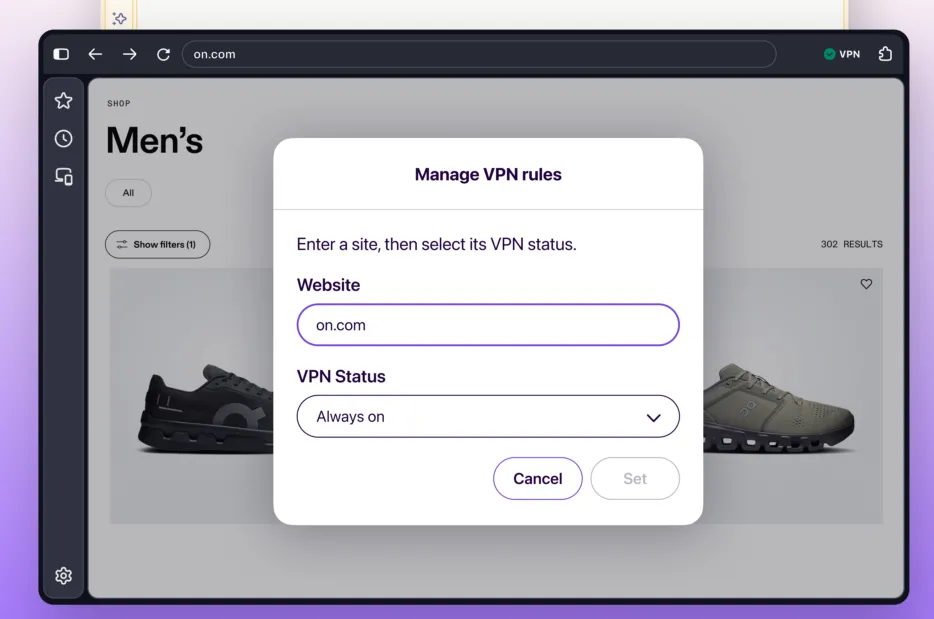
This feature is designed to reduce duplication. For example, users can set a website to "Always turn on VPN" to automatically obtain privacy protection when accessing; they can also set other websites to "Always turn off VPN" to avoid affecting the access experience or function usage due to VPN connections.
In addition to VPN rules, Mozilla is also starting to roll out a new "Fire" button in the standard Firefox window. This button is located in the toolbar and allows users to quickly clear browsing data. Users can choose what to delete, including browsing history, download history, cookie data, website data, temporary files, saved form information, and website permissions and preferences.
If the user sets the "Fire" button to delete all of the above data, clicking it will not only clear this information, but also log the user out of all websites they are logged into and open a new Firefox window. This design provides privacy-conscious users with a more direct way to clean up, and is also convenient for use when sharing devices or needing to quickly reset the browsing environment.
This update also includes other improvements. Firefox 161 adds the option to create a keyboard shortcut for "Copy current tab URL" to make it faster to share or save a link to the page you're browsing. At the same time, the "Read Aloud" function in reading mode has also been launched on the Android version of Firefox, allowing mobile users to listen to web content through voice.
Mozilla also said that Firefox can now be installed directly on cars equipped with Google services through the Google Play Store. This means that Firefox's usage scenarios are being further extended to in-vehicle systems, not just PCs and mobile devices.
Overall, the Firefox 161 update focuses on improving users’ control over privacy and browsing data. Setting VPN rules by website, clearing data with one click, and new shortcut keys and read-aloud functions all reflect Mozilla’s direction of simplifying the operation process while continuing to strengthen browser privacy protection and convenience.
Download address:
https://ftp.mozilla.org/pub/firefox/releases/161.0/
Comments