In the latest preview version of Windows 11, Microsoft has added a Copilot button and an "Open File Location" button to the File Explorer home page. When the user hovers the mouse over the file, the "Ask Copilot" option will appear in the shortcut menu, allowing you to jump directly from the file to the AI conversation without opening the file first.
However, the current actual experience of this function is not ideal. After actual testing, it was found that clicking the Copilot button only opened the Copilot application separately, and did not identify which file the user clicked to enter, and the file was not sent at all. Of course, this is still a preview version, and imperfect features are expected.
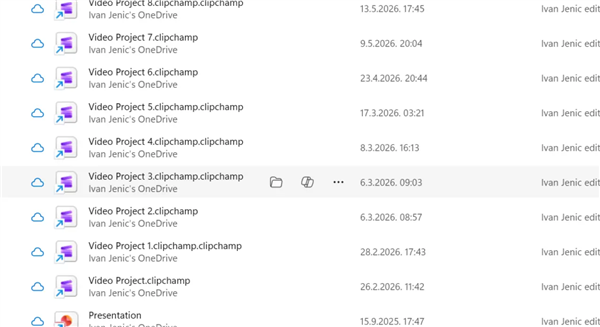
But even if this bug is fixed in the future, the practicality of this function is still questionable. The file explorer contains various types of files. Copilot can handle documents and pictures well, but when faced with complex files, it is difficult to complete a complete analysis through a hover shortcut operation.
At present, the button has a low presence and will not frequently interfere with users, but there is no obvious actual need. If Microsoft can provide an option to completely turn off this function, it will be more friendly to users who do not need it.
It is worth noting that Microsoft has recently stated that it is working hard to reduce AI push to users who do not need AI. Against this background, the new Copilot button in the File Explorer seems somewhat contradictory: on the one hand, it claims to reduce AI exposure, and on the other hand, it is looking for new entrances to embed AI.