
Abstract:
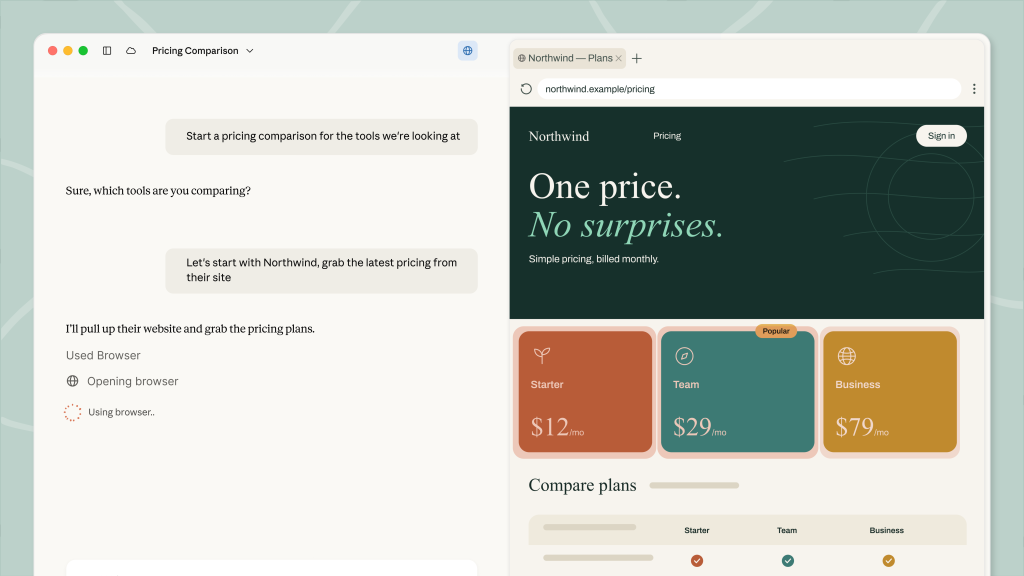
Anthropic recently announced that it has officially added a built-in browser to Claude's Cowork desktop application. This feature is built on Chromium and can run on macOS, Windows and Linux platforms, so that users no longer need to rely on Chrome extensions and can directly let Claude access web pages and perform related tasks in the work environment.

This feature is currently being gradually opened to paid Pro, Max and Team subscribers. With the addition of a built-in browser, the Claude desktop application is closer to similar AI tools in terms of product form: OpenAI also previously gave up its plan to launch Atlas as a standalone browser and instead integrated related capabilities into the ChatGPT desktop application.
Prior to this, in order for Claude to operate web pages, users needed to install the "Claude in Chrome" extension. While the extension is generally available, it still appears to be a patchwork solution in actual workflows. In contrast, embedding the browser directly into the AI desktop application allows users to more naturally complete operations such as web browsing, screenshots, and discussing page content with the model, thus simplifying many task processes.
值得一提的是,Claude的Chrome扩展恰好于一年前的8月26日上线。 Just two weeks ago, Anthropic released a major update to the extension, making it functionally closer to a Cowork session. However, in the context of rapid iteration of AI products, two weeks is enough for significant changes in product form.
Anthropic said that in the past, letting Claude use the network in Cowork meant giving him access to the user's browser through the "Claude in Chrome" extension; however, many network tasks do not actually require the use of the user's daily work browser, only a browser that can access the web. Therefore, Claude now has its own built-in browser.
However, Chrome extensions do not lose their relevance. Extensions still work better for pages that the user already has open in the browser and logged into the relevant account. For example, users can ask Claude to assist with updating a CRM system, working with inbox contents, or editing the document they are currently viewing. Anthropic pointed out that "Claude in Chrome" applies to the pages the user has opened and the account environment they have logged in to.
If the user has installed the Chrome extension, it will still be Claude's default way to access the web unless the user manually changes the preferred browser in Claude Desktop settings.
Anthropic also emphasized that the new built-in browser is "Claude's browser" and not the user's own daily browser. This means that it will not carry the user's existing login status and account information by default. To compensate for this limitation, the company allows users to import browser login information on specific platforms: on macOS, it can be imported from Chrome, Edge, and Firefox; on Windows and Linux, only Firefox is supported.
For security reasons, banks, email providers, and website accounts that use single sign-on are explicitly excluded from importing. Claude had no direct way to obtain access credentials to these highly sensitive accounts unless the user insisted on granting permissions.
There are differences in the scope of support on different operating systems, which may be related to the browser's protection mechanism for local cookies and keys. According to reports, Chrome and Edge on Windows will restrict third-party applications from reading local cookies to reduce the risk of information-stealing software; Firefox will still save relevant data in a normal SQLite database. On macOS, Chrome's keys are stored in Keychain, and other applications can request access after obtaining user permission.
At the same time, Anthropic also reminds that allowing AI agents to perform operations in open networks will always face security risks such as prompt word injection. The company has deployed protections in Chrome extensions and built-in browsers, but admitted the risk is "not zero."
Since this built-in browser usually does not log into a large number of sensitive websites, even if a problem occurs, the potential impact scope will theoretically be relatively limited. For users who want to let AI take care of search, web page information sorting and lightweight online operations, Claude Cowork’s built-in browser will further expand the practical application boundaries of desktop AI agents.
Comments