
Abstract:
As artificial intelligence processors become more popular, more and more PCs are beginning to be equipped with neural network processing units (NPUs) specifically used for AI computing. However, this type of hardware is currently mainly used for local AI model inference and image processing, and daily Windows desktops still mainly rely on integrated graphics cards or independent graphics cards to complete graphics rendering.
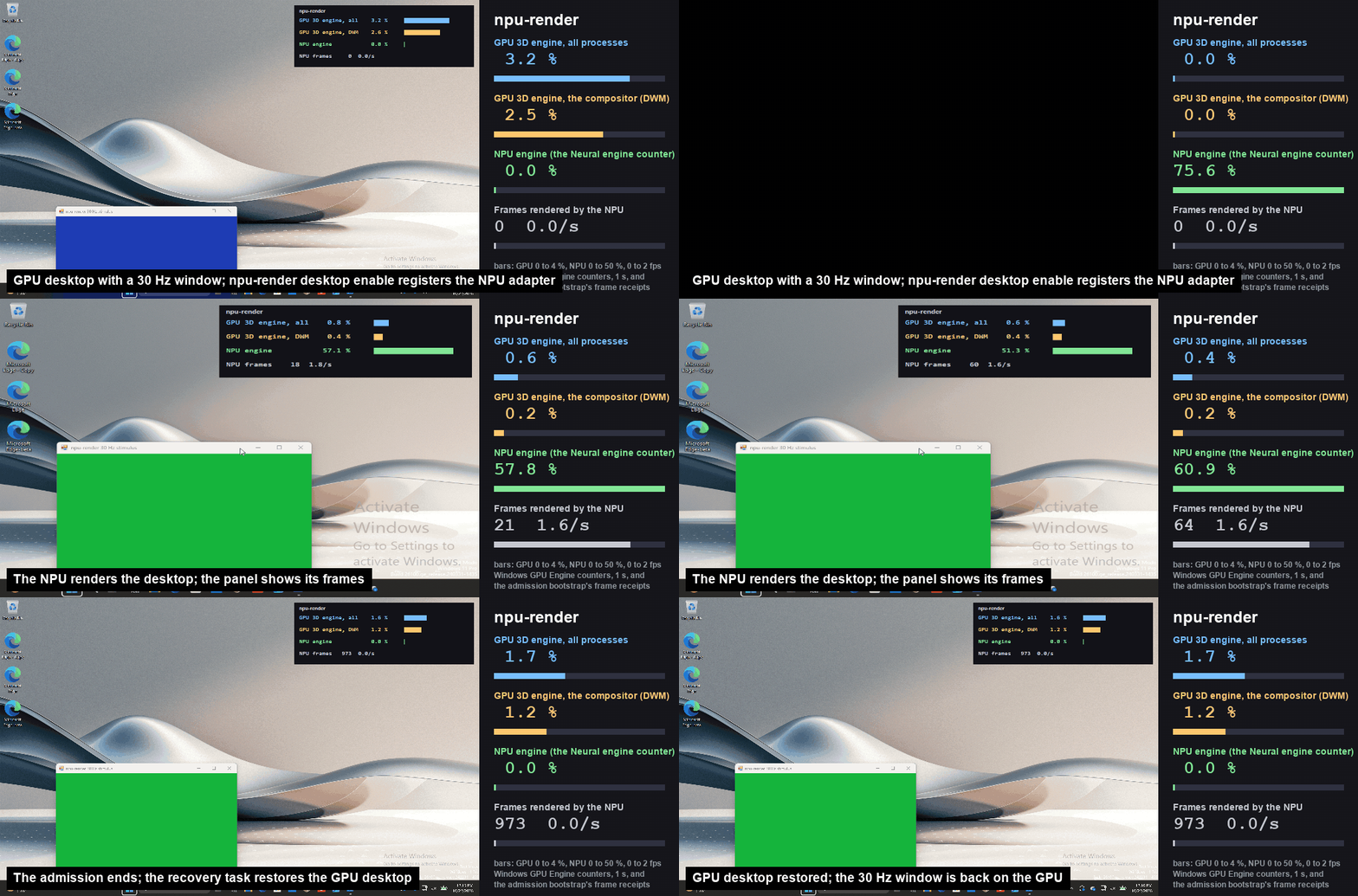
Recently, a development team called labscommunity launched the open source project npu-driver, successfully implementing a rather special experiment: allowing Windows 11 to complete desktop graphics synthesis entirely through the NPU, instead of relying on the traditional GPU. Although the current running speed is extremely slow, this result proves that the NPU, which was originally mainly used for artificial intelligence calculations, can also undertake some traditional graphics processing tasks.
The project is licensed under the Apache 2.0 open source license, and the source code has been publicly released on GitHub. The goal of the development team is to explore a question: Can the desktop rendering work originally completed by the GPU be completely transferred to the NPU without modifying the Windows application and desktop compositor?
In order to achieve this goal, developers designed a special display driver that intercepts the graphics operations originally sent to the graphics card by the Windows Desktop Window Manager (DWM), and then converts these operations into computing tasks that the NPU can handle.
Windows applications still run in the traditional way. Notepad, File Explorer, Start Menu, Microsoft Edge, and other windows do not require special adaptation to the NPU. What has really changed is the underlying graphics processing path: desktop compositing tasks originally performed by the GPU have been reassigned to the NPU.
In terms of specific implementation, npu-driver uses a custom Direct3D 10 user mode driver to record graphics operations as batches of frame data, which are then handed over to the Intel NPU for processing through OpenVINO and a dedicated SHAVE computing core. The system also implements its own rasterization processing module, which is responsible for traditional graphics operations such as vertex processing, texture sampling, and layer blending.
Currently, this solution has been tested on laptops equipped with Intel Panther Lake processors. Panther Lake uses the fifth-generation NPU architecture, and the NPU computing power of related processors reaches 45 to 50 TOPS.
However, the experimental results also exposed a very obvious problem: performance.
The current desktop refresh speed of npu-driver is only 2 to 3 frames per second, and some tests are even as low as 0.6 frames. By comparison, a stock Windows desktop typically runs at 60 frames per second or more. Even if games aren't involved, just moving windows, opening File Explorer, or operating the taskbar can become extremely slow.
In other words, this solution currently proves that the NPU can undertake complete desktop graphics synthesis tasks, but it is far from the performance level required for daily use.
The developers are aiming to increase the refresh rate to 30 frames per second, but they are still far from that goal.
In order to avoid serious failures during the experiment, the development team also designed an automatic rollback mechanism. When an error occurs in the NPU driver, or the user actively requests to switch, the system can reuse the integrated graphics card or independent graphics card to complete graphics rendering. However, there are still some limitations to this recovery mechanism. In some tests, the positions of all application windows could not be fully restored.
The project developer emphasized that npu-driver is currently only a research prototype, not a mature product for consumers. It requires specific Intel Panther Lake hardware, compatible NPU drivers, and additional development tools. Ordinary users cannot simply install it and get a Windows 11 system running without GPU.
The significance of this experiment is not actually to prove that the NPU can replace the graphics card, but to explore how to redistribute the work of different computing units within modern processors.
Today's CPUs, GPUs, and NPUs each have different design goals. GPU is good at large-scale parallel graphics computing, while NPU is specially optimized for matrix operations and neural network reasoning. Letting the NPU take on desktop rendering tasks means that developers must re-convert traditional graphics processing processes into tasks suitable for neural network computing units, which in itself is a quite complex project.
However, if processing efficiency can be significantly improved in the future, the NPU may be able to take on some of the lightweight desktop tasks originally performed by the GPU, thereby freeing up the GPU resources for gaming, video processing or local AI inference.
At present, npu-driver is still a long way from being truly practical, but it has completed an interesting technical verification: the Windows 11 desktop is not only capable of synthetic rendering through traditional GPUs. The NPU in modern processors can also take over this work, but the performance price paid at this stage is too huge.
Learn more:
https://github.com/labscommunity/npu-render
Comments