
Abstract:
According to the official National Day holiday arrangement, October 1 (Thursday) to October 7 (Wednesday) will be a holiday for a total of 7 days. You will need to work on September 20 (Sunday) and October 10 (Saturday) due to the holiday. Today, iPhone users finally have a practical experience in adjusting the alarm clock.
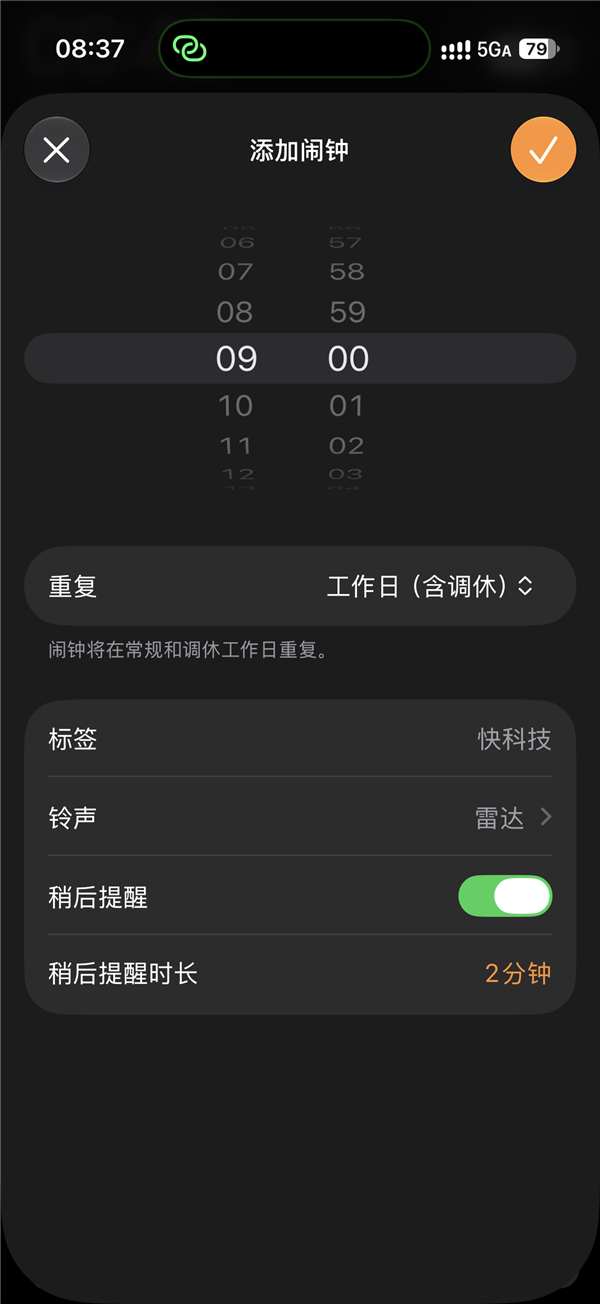
Many netizens posted on social platforms saying,
The alarm clock on their iPhone will finally go off, and they no longer have to worry about oversleeping due to taking time off to work on weekends.


This is due to the new snooze alarm function in iOS 27.

The official version of iOS 27 was launched last week.
The Clock App has a new "Working Day (Including Offset)" option, which can automatically identify statutory holidays and offended working days in mainland China.
As long as the user selects "working days (including rest days)" when setting the alarm repeat cycle, there is basically no need to worry about it later.
When working on weekends, the alarm clock will sound as usual; when it happens to be a legal holiday or normal rest day, the alarm clock will automatically "go on holiday".
However, some iPhone users complained today that the alarm clock still does not go off.

The reason is actually very simple: either the phone has not been upgraded to iOS 27, or even though the system has been upgraded, the alarm clock still uses the original week repeat setting and has not switched to "working days (including adjusted breaks)".

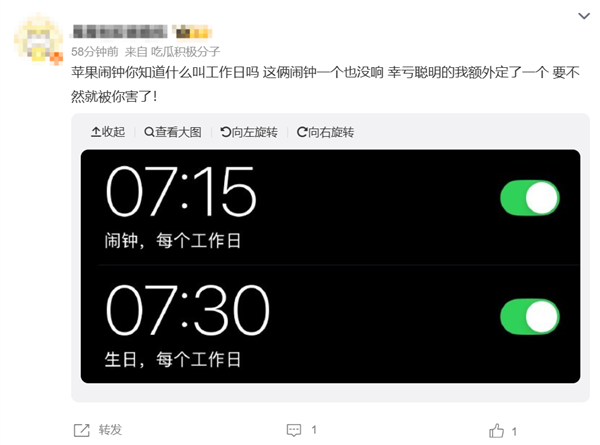
Before iOS 27, the iPhone alarm clock could only select specific dates from Monday to Sunday. When it came to holidays, the user had to manually turn the alarm clock on and off.
If you forget to adjust, it is easy to have the embarrassing situation of "people are still sleeping, but the class has already started" on the day of work.
With the addition of rest recognition, the iPhone alarm clock finally no longer requires users to worry about it manually during holidays.
Comments