
Abstract:
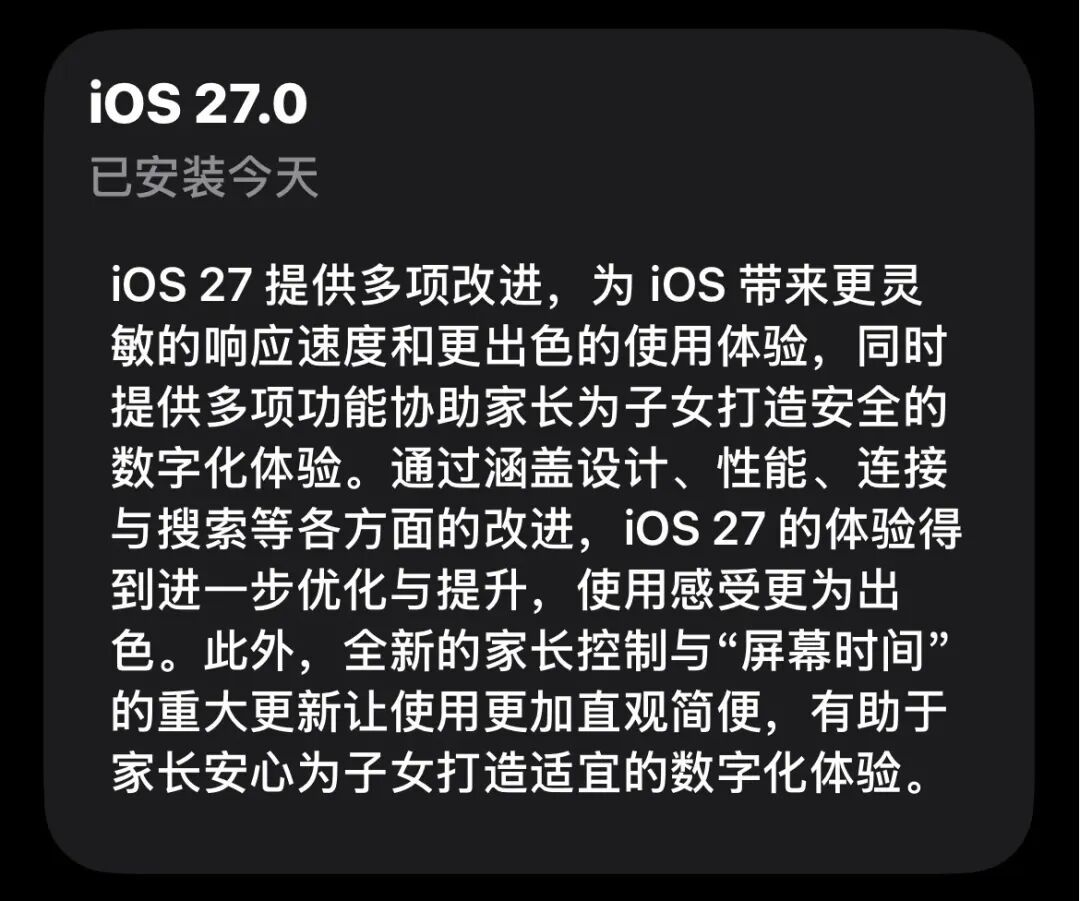
In the early morning of September 15th, Beijing time, Apple pushed the official version of iOS 27, three months after it first appeared at WWDC. According to the official statement, iOS 27 brings a number of upgrades, including UI design, system fluency, function optimization, etc.
(Picture source: Apple)
When iOS 26 was launched that year, Apple also praised it with various publicity, but everyone knew the result. iOS 26 was criticized for having many bugs and poor smoothness.
Since the current national version of iOS 27 still does not have Apple Intelligence installed, after excluding the AI function, there are actually very few major upgrades worth mentioning in iOS 27. Our biggest expectation for it is that it is simple, smooth and easy to use.So, how is iOS 27 used? Should I upgrade? The following is a detailed review of Lei Technology.
New changes worthy of praise in iOS 27,
We summarized 10
As mentioned at the beginning, one of the highlights of iOS 27 is the new Apple Intelligence, but the National Bank version has not yet been launched. The new changes that ordinary users can perceive are mainly reflected in many scattered functional details. To this end, Lei Technology (ID: leitech) has summarized 10 noteworthy changes on iOS 27. Let’s take a look at them together.
1. The long awaited holiday alarm clock.
Domestic iPhone users have always complained about the alarm clock not supporting holiday alarm clocks. When it comes to holidays, they often end up being woken up by sleeping in during holidays or being late when the alarm clock does not go off on holidays.
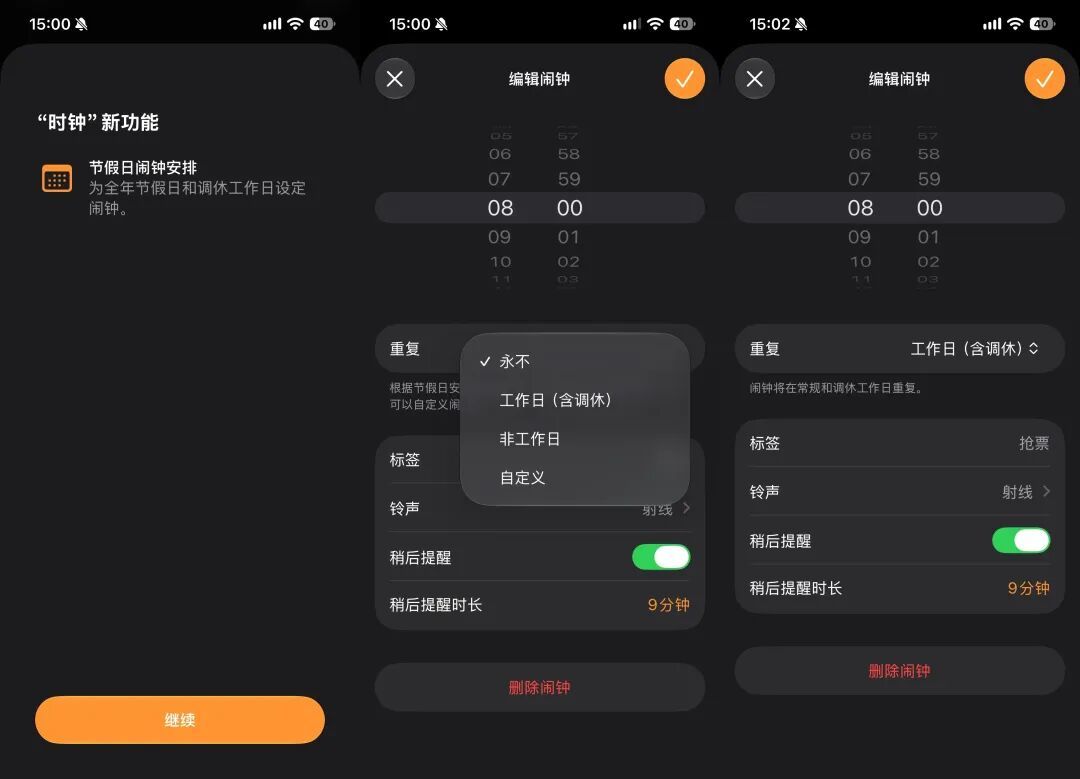
On iOS 27, the small function of the holiday alarm clock has finally been integrated into the system clock App. The repeat options have become working days (including adjusted holidays), non-working days and customization. Finally, the choice is given to us.
(Photo source: Lei Technology)
2. Videos can be saved in frames, and camera customization options have been added.
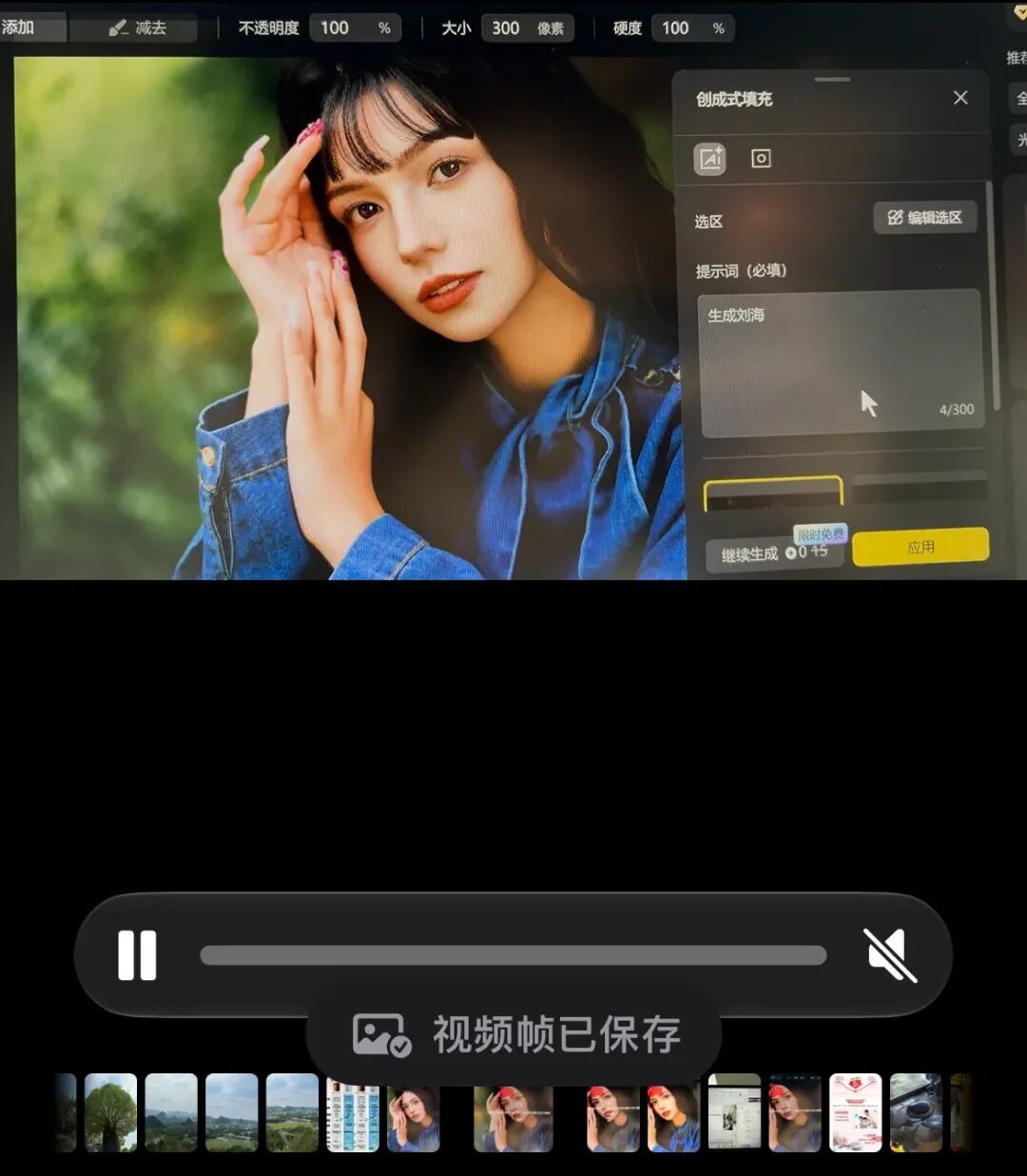
If you want to extract a frame from a video and save it as a picture, the simplest and most crude way to do it on your mobile phone is to take a screenshot directly. However, there are many problems with this. On the one hand, taking screenshots may reduce the image quality, and on the other hand, interfering elements such as button presses may appear when the video is paused.
A small change in iOS 27 appears in the Photos App. A single frame of the captured video can be selected to be saved as a picture, which solves the above problem.
(Photo source: Lei Technology)
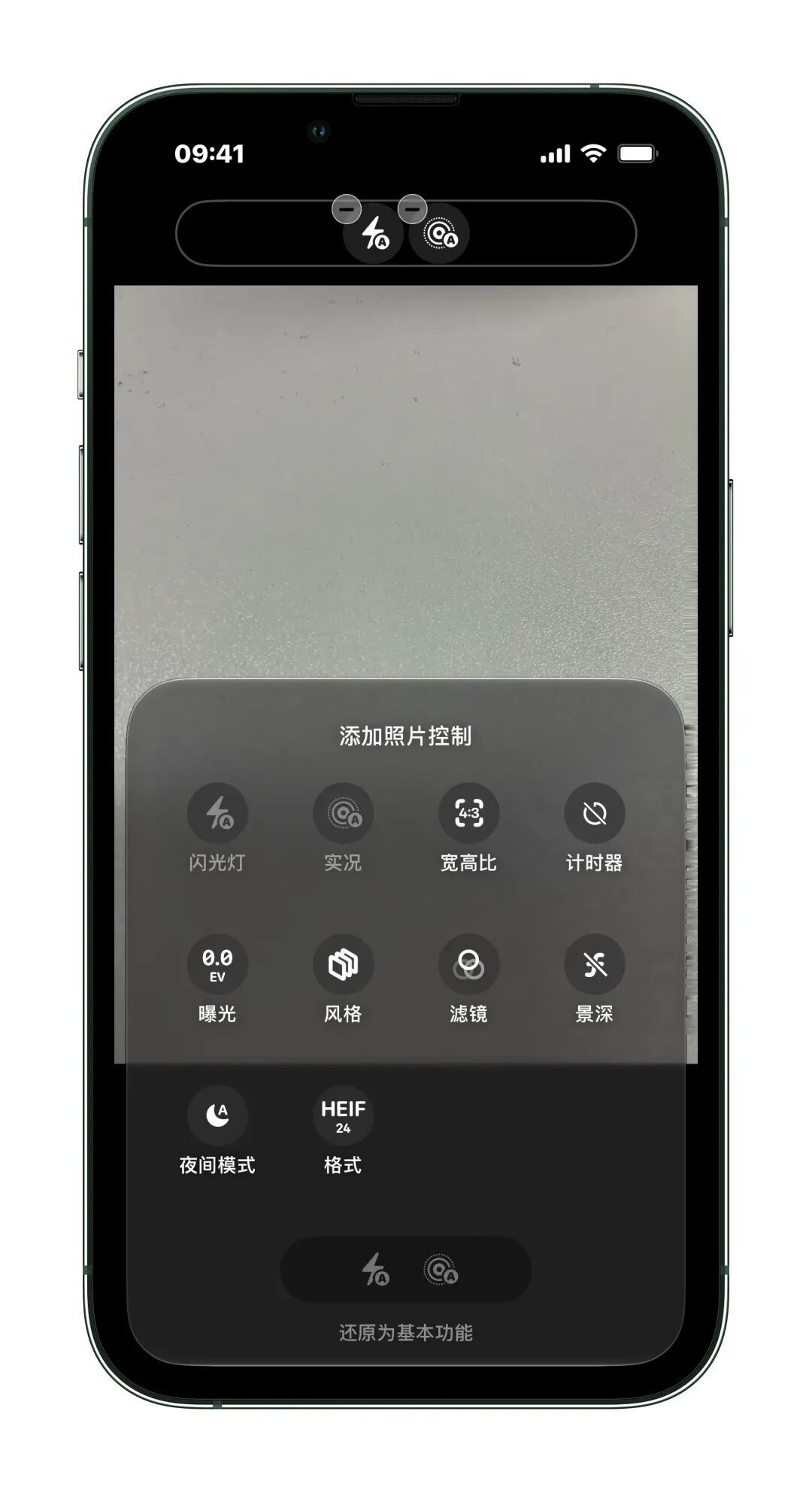
The main change in the system camera is that the shortcut keys can be customized. Users can put filters, exposure, timers and other functions on the top for easy use when taking pictures.
(Photo source: Lei Technology)
3. The volume can be set independently, but it is still not as free as Android.
There has always been a small problem on the iPhone that has troubled many people - the volume of different apps cannot be controlled independently. In other words, if you adjust the volume of an app on iOS, the volume of other apps and even the entire system will change accordingly.
iOS 27 has optimized this problem to a certain extent, allowing users to set the volume of alarm clocks and prompts by themselves, which can be distinguished from the volume of phone ringtones.
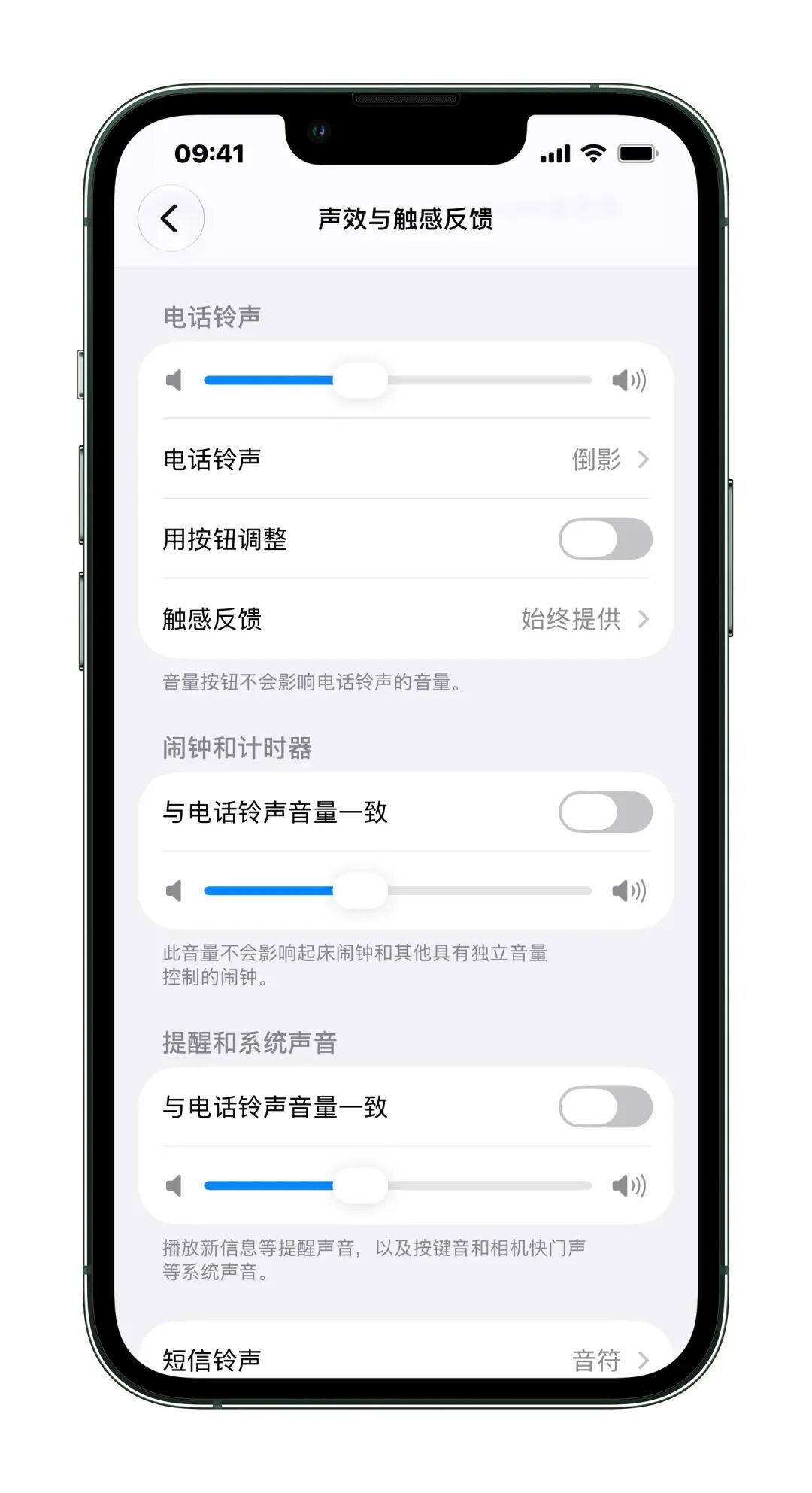
(Photo source: Lei Technology)
However, it still does not support the independent volume control function of third-party apps, which is far from Android. Of course, different people have different ideas as to whether independent volume settings should be fully liberalized. Apple's approach can indeed avoid volume confusion.
4. Don’t like liquid glass? Transparency can be adjusted.
A major change in the UI style of iOS 26 is the addition of Liquid Glass design, but users have mixed reviews about it. Those who like it like its modern visual effects, while those who hate it hate that it always interferes with the display of other elements. In addition, many people do not agree with the aesthetics of liquid glass, thinking that it looks like "baked acrylic plate."
On iOS 27, Apple simply allows users to adjust the transparency of liquid glass. Users can set the effect they want in the transparent and opaque range, which is the best solution under the current situation where it is difficult to adjust.
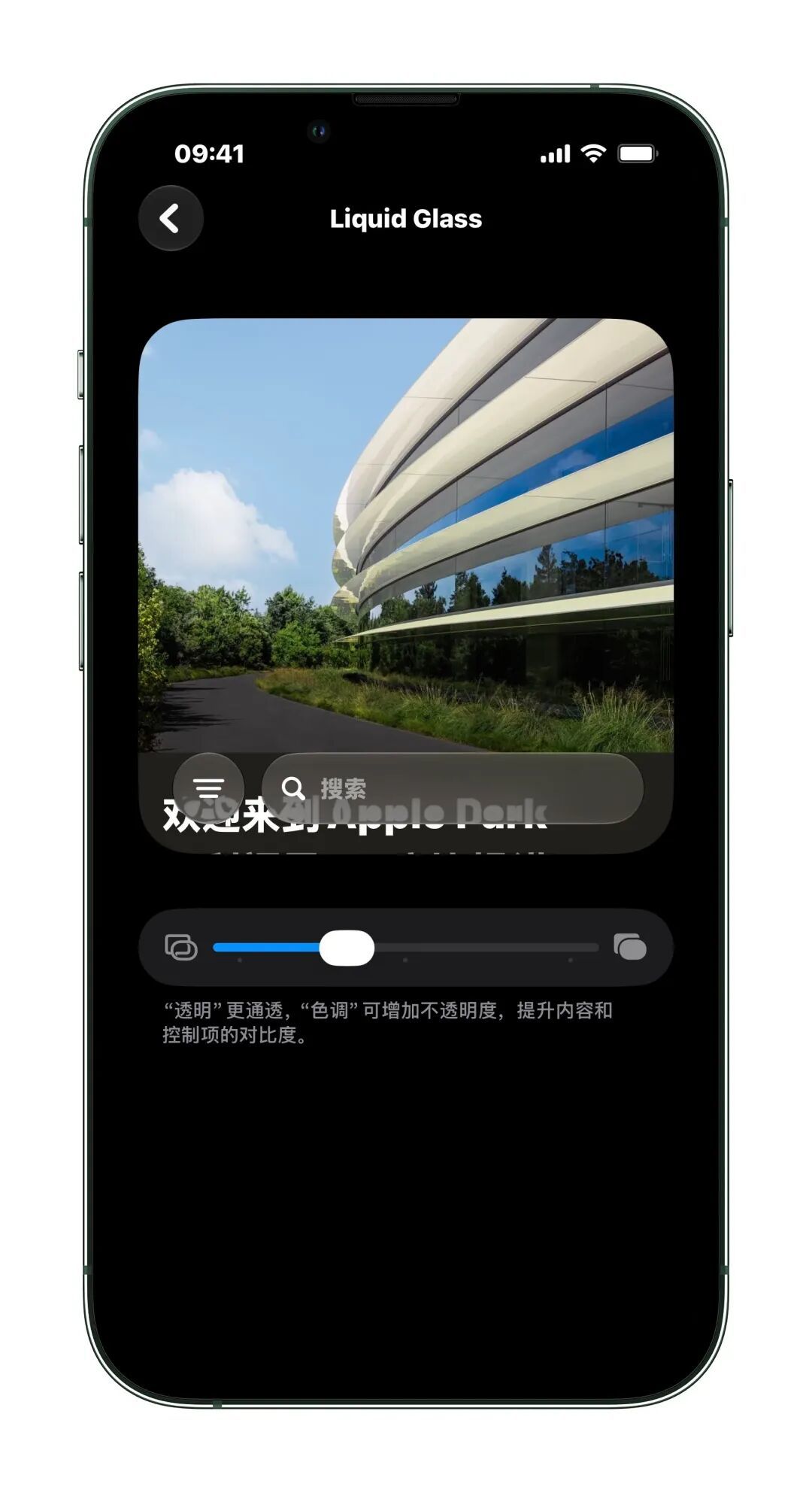
(Photo source: Lei Technology)
5. The weather function is more detailed and the time-sharing information is more.
The functions and UI of the system weather app on iOS 27 have also changed. Specifically, the information display is more detailed and the functions are more complete. After entering the weather interface, you can see that there are three sub-buttons above: weather, precipitation and wind.
For example, after we click to enter the precipitation interface, we can see the probability of precipitation by time period on the day. At the same time, the precipitation situation in the next few days will also be displayed in the form of a histogram.
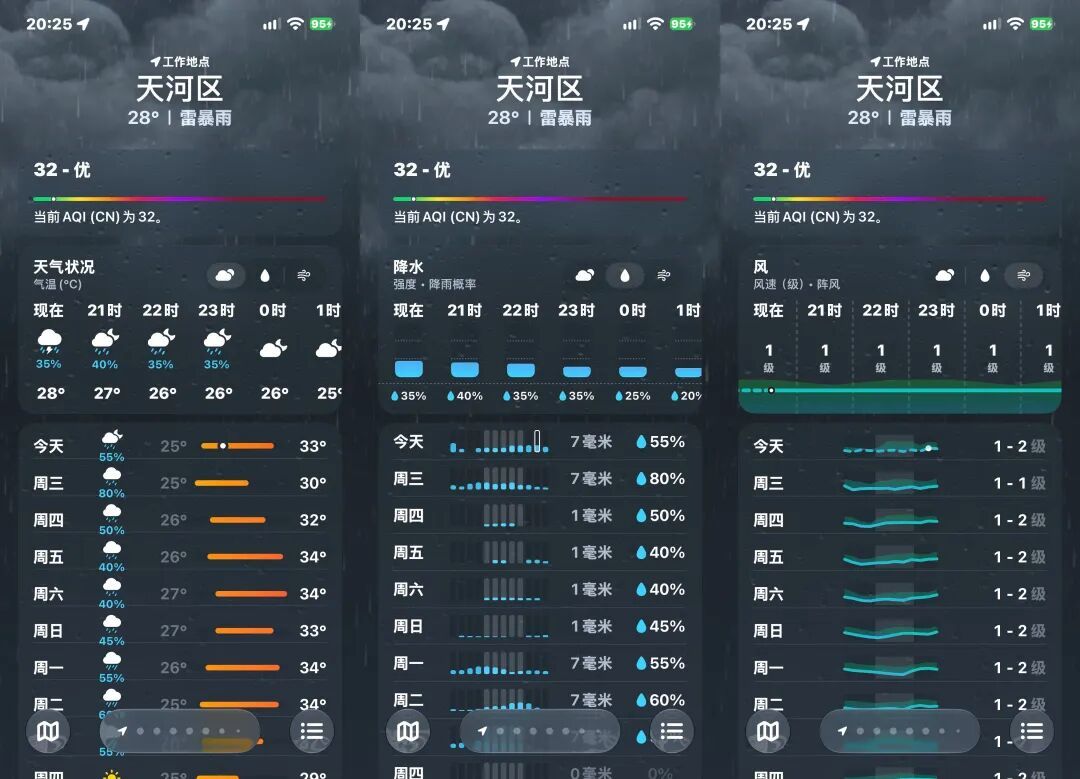
(Photo source: Lei Technology)
In general, compared to the old version, the new version of the Weather App is quite practical in its updated details. At present, several domestic mainstream weather apps generally face the problems of large size, bloated functions, and too much advertising and marketing information. The weather app officially produced by Apple is overall simpler and more comfortable to use.
6. The input method supports split-character input, making it easier to handle rare characters.
This is another small function that Android and third-party apps have been popularized for a long time, and Apple is now making up for it. The Pinyin input method that comes with iOS 27 supports split word input. For example, if we want to enter the word "Ben" but don't know how to pronounce it, we can just enter "niuniuniu".
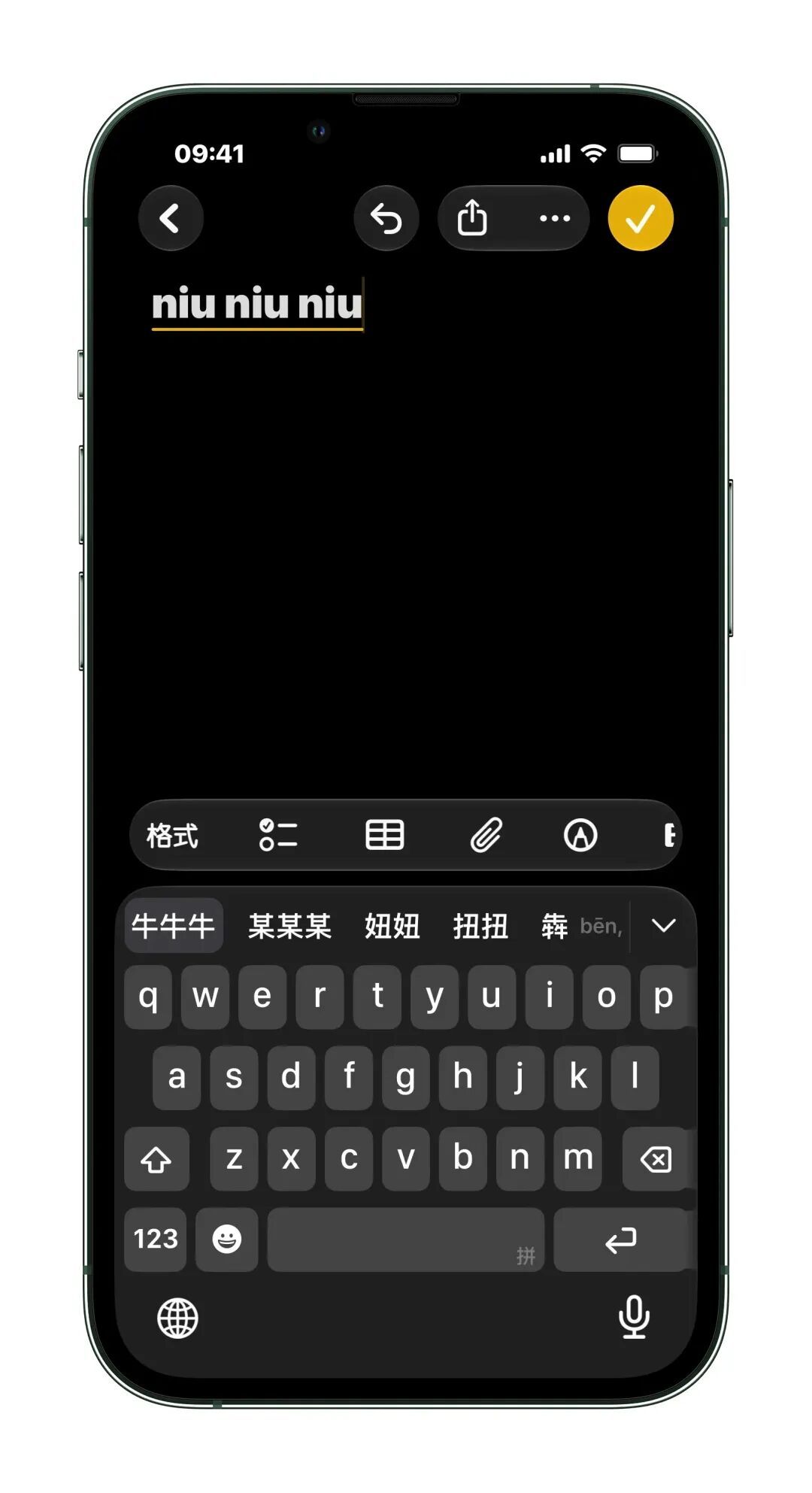
(Photo source: Lei Technology)
But this function is not perfect yet. Our tests found that split character input is currently only supported by the full keyboard input method. Apple's own Jiugongge Pinyin input method cannot yet use this function. Moreover, some rare characters cannot be typed using this method, such as "喆". You cannot get the word "喆" by directly typing Jiji.
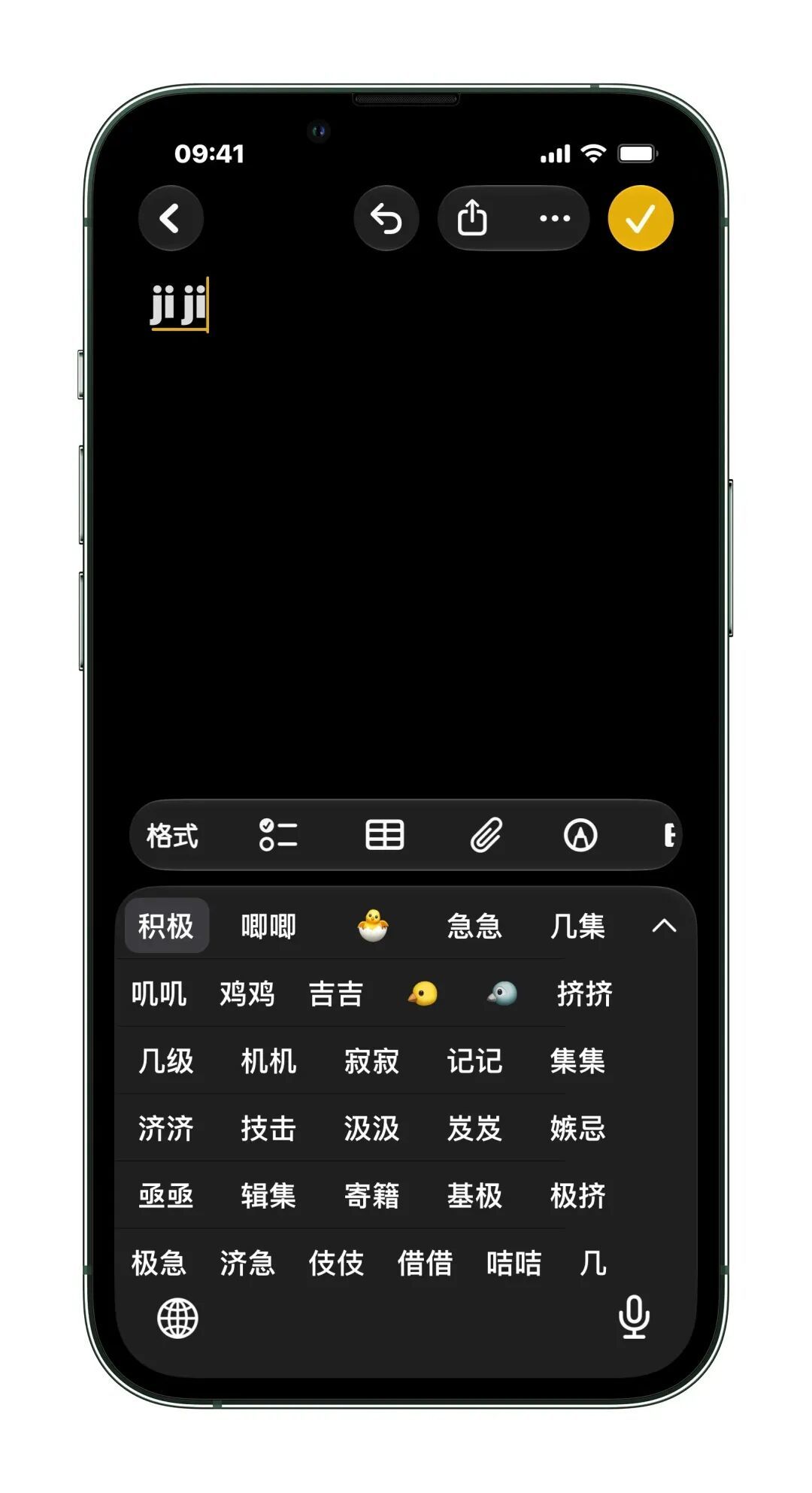
(Photo source: Lei Technology)
We also found that if it is not a rare word but a common word, including words such as "林" and "明", this method cannot be used. But the key problem is that Apple determines whether a word is a common word or a rare word, and this judgment may not always be accurate.
7. The wallet supports adding QR codes, can it store tickets?
On iOS 27, you can add custom vouchers to the iPhone Apple Pay wallet, specifically for scenarios such as tickets and membership cards. In fact, Apple Pay could add QR codes before, but it had to be redirected through a third-party app. Now, iOS 27 supports manual addition, and any third-party QR code can be put in.
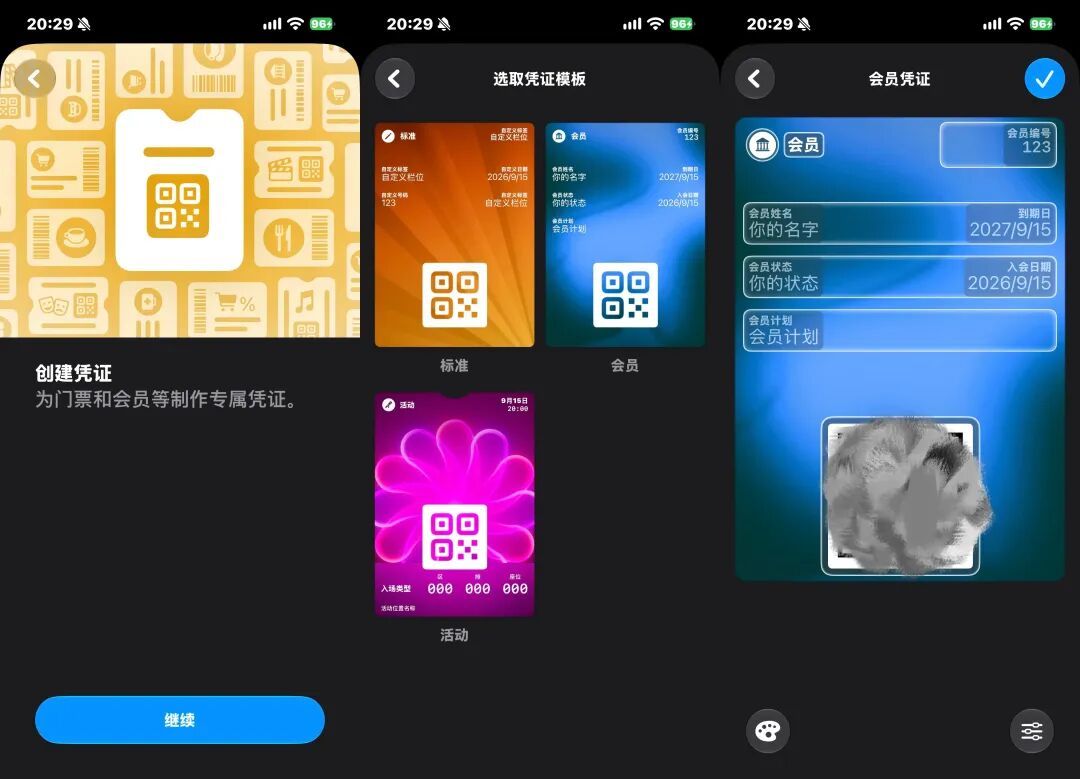
(Photo source: Lei Technology)
Of course, this function is more for the convenience of storing QR code screenshots, and it can only embed static QR codes. In real-life scenarios, the QR codes for many electronic tickets, train tickets and other vouchers are usually dynamically refreshed, so this Apple function is not particularly practical.
8. The headphone function has been upgraded, and the noise reduction mode can be fine-tuned.
There is another inconspicuous change in iOS 27, which is that the noise reduction function of AirPods has been upgraded. Under normal circumstances, AirPods actually have only a few noise reduction modes, either active noise reduction, transparency mode, and adaptive. The three options are all fixed.
But now, if the user selects the adaptive mode, they can further fine-tune it, whether it is biased toward transparency mode or biased toward noise reduction mode. To put it bluntly, this function allows users to customize it according to their own tastes and find the balance they want between the noise reduction effect and hearing the ambient sound clearly.
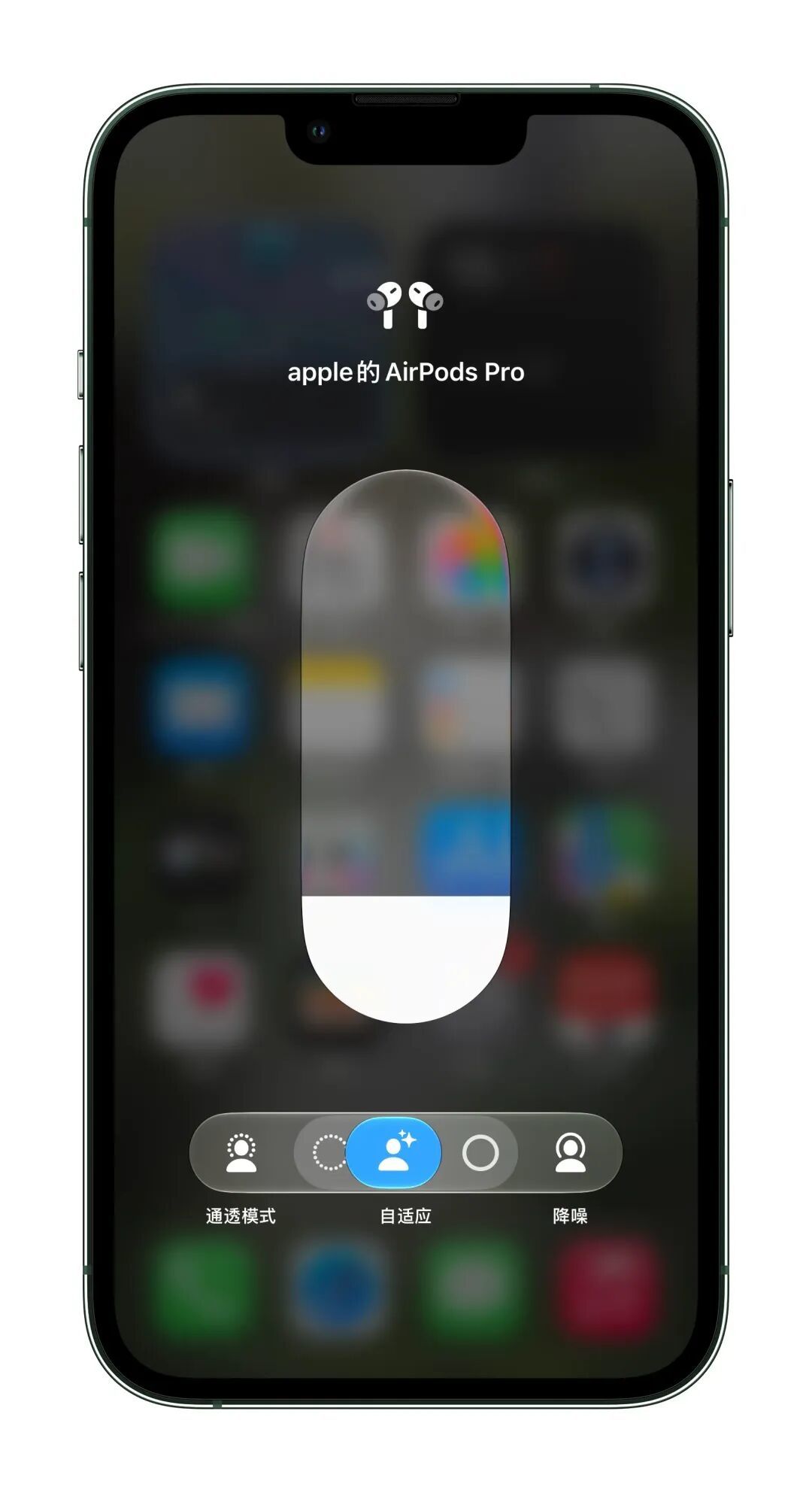
(Photo source: Lei Technology)
In addition, AirPods can adjust the EQ by itself. The bass, midrange and treble can be adjusted by yourself. This is a useful new feature for people who like to listen to music.
9. You can choose the location sharing time by yourself.
In addition to tracking the Apple devices under your own name, the Find App on iPhone can also share your location with others. The previous location sharing only had two options: always sharing or not sharing.
Now this function has been upgraded. Users can choose to share for 1 hour, 1 day or simply customize a time period.
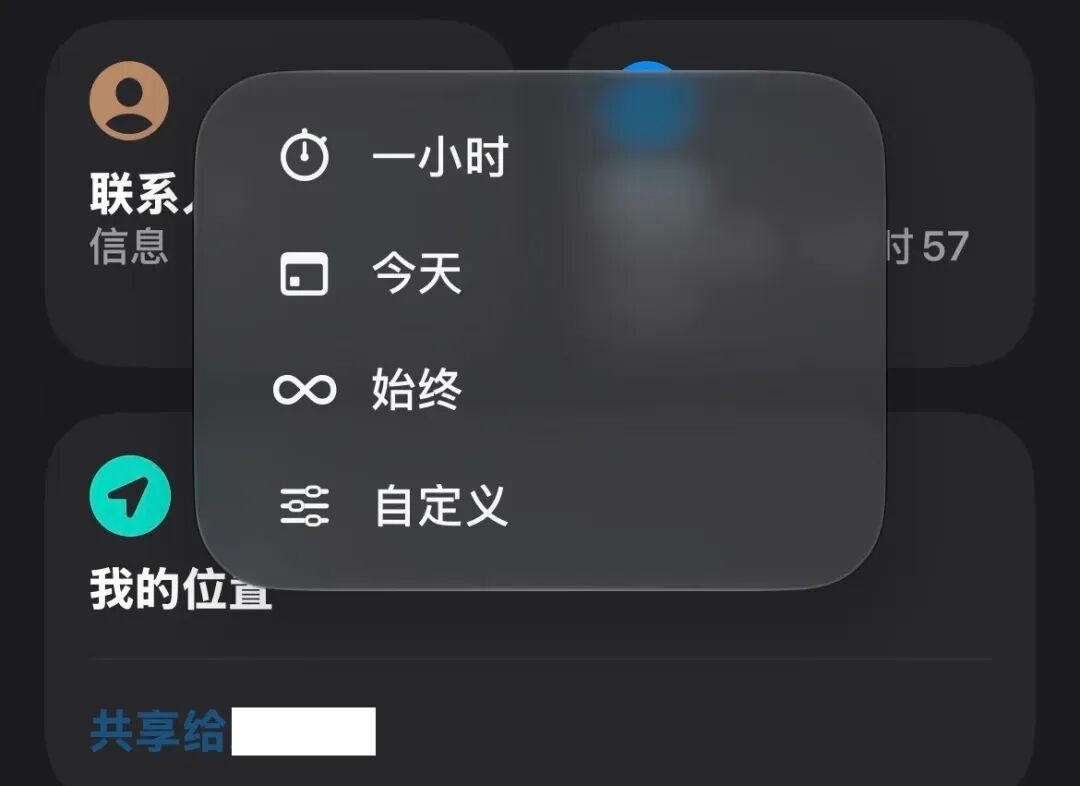
(Photo source: Lei Technology)
This function is quite practical and is very suitable for some temporary scenarios. For example, you can temporarily share your location when you meet with friends and cannot find each other. The function is basically the same as WeChat's location sharing, but it is more customizable. It should be noted that to enable location sharing, you need to add the other person to your phone's contacts.
10. The smoothness has been upgraded and frame drops have been reduced.
This is what we consider to be the most critical upgrade. According to officials, the app startup speed of iOS 27 has been increased by up to 30%, and the photo loading speed has been increased by up to 70%.
In terms of the whole-day usage experience, compared to iOS 26, the smoothness of iOS 27 has been significantly improved. Application opening and animation transitions are quite smooth, and the occasional frame drops on iOS 26 are relatively rare.
Looking back, we still feel it is a bit ironic. After all, system fluency should be a basic requirement for mobile phones and systems. However, because iOS 26 performed so poorly in this regard, iOS 27 was praised for its improved fluency.
There are not many bugs, but they have not completely disappeared
As mentioned at the beginning, one of the main reasons why iOS 26 has been criticized is that there are many bugs. One thing to say, iOS 27 performs much better in this regard, but there are still some minor problems.
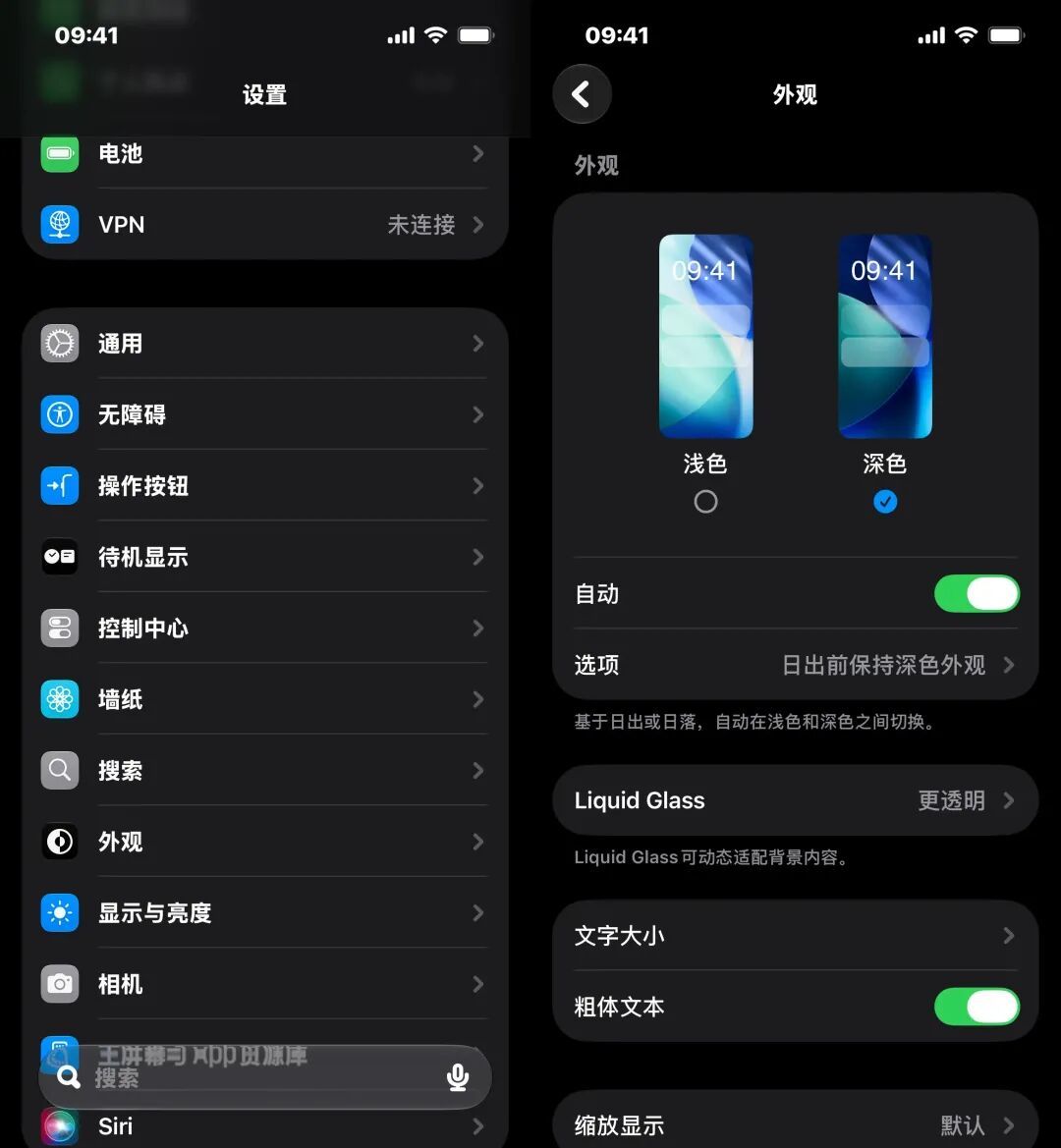
Specifically, the iOS 27 camera interface feels relatively sluggish when manually clicking on the focus frame; when deleting photos in the album, the feeling of slow shooting will be more obvious; some netizens reported that small white dots in accessibility mode will still drop frames, and after setting bold mode, they found that the font of the secondary menu in the settings is still not bold.
(Photo source: Lei Technology)
However, overall, iOS 27 has done a good job in improving fluency and reducing bugs. For users who are still using iOS 26, I personally recommend upgrading. Of course, if you are still using iOS 18, it is recommended that you consider upgrading again.
On the one hand, iOS 26 and iOS 27 are both liquid glass styles, which some users do not like; on the other hand, the official version of iOS 27 still has some minor details that need to be fixed later. If you mind, you can wait.
The devices compatible with iOS 27 are basically the same as iOS 26. The oldest model supported is the iPhone 11 released in 2019. However, considering that the hardware cost of iOS 27 is relatively large, it is not recommended to upgrade older models.
According to China-Singapore Jingwei, the answer given by Apple customer service is that it is not recommended to upgrade to iOS 27 for iPhone 13 models. Lei Technology (ID: leitech) believes that this suggestion is quite pertinent. Whether it is chip performance or memory capacity of the iPhone 11 and iPhone 12 series, it is still quite difficult to run iOS 27 with liquid glass special effects.
It is also worth noting that upgrading to iOS 27 does not mean automatically getting the latest Apple AI features. First of all, as mentioned before, Bank of China’s AI has not yet been implemented, and Bank of China’s devices cannot experience Apple Intelligence. Secondly, the oldest device that supports Apple Intelligence is iPhone 15 Pro, and earlier devices are not supported.
Moreover, there are even fewer models that support the iOS 27 end-side AI model, and the memory must reach 12GB. Currently, only the three old models of iPhone 17 Pro, iPhone 17 Pro Max, and iPhone Air and the newly released three new models of iPhone 18 Pro, iPhone 18 Pro Max, and iPhone Duo support it.
AI is absent,
How does iOS 27 compete with domestic OSs?
It is no exaggeration to say that September is the most intense month for new phone competition. At present, Apple and Huawei have brought blockbuster new flagship phones. MediaTek’s flagship chip launch conference has just concluded. Qualcomm will follow closely. Xiaomi, OPPO, vivo, Honor and other leading brands will soon follow suit, and a wave of new flagship phones will be ushered in at the end of the month. This year, the release time of the new generation flagship phones of the Android camp has been moved forward, and they will compete head-to-head with Apple.
Apple’s biggest variable this year is the iPhone Duo, but as the first foldable screen, it is not well received by the outside world. After all, at the hardware level, Apple’s folding screen has basically no new ideas. Compared with the mature products of the Android camp, it has insufficient configuration, and the price is much higher than other folding screen competitors.
As for the system, in our opinion, the advantage of iOS 27 is that it is relatively smooth and has relatively few bugs, but this is compared with iOS 26. In terms of AI, iOS 27 has completed the make-up work, but the AI of Bank of China devices is definitely still lagging behind.
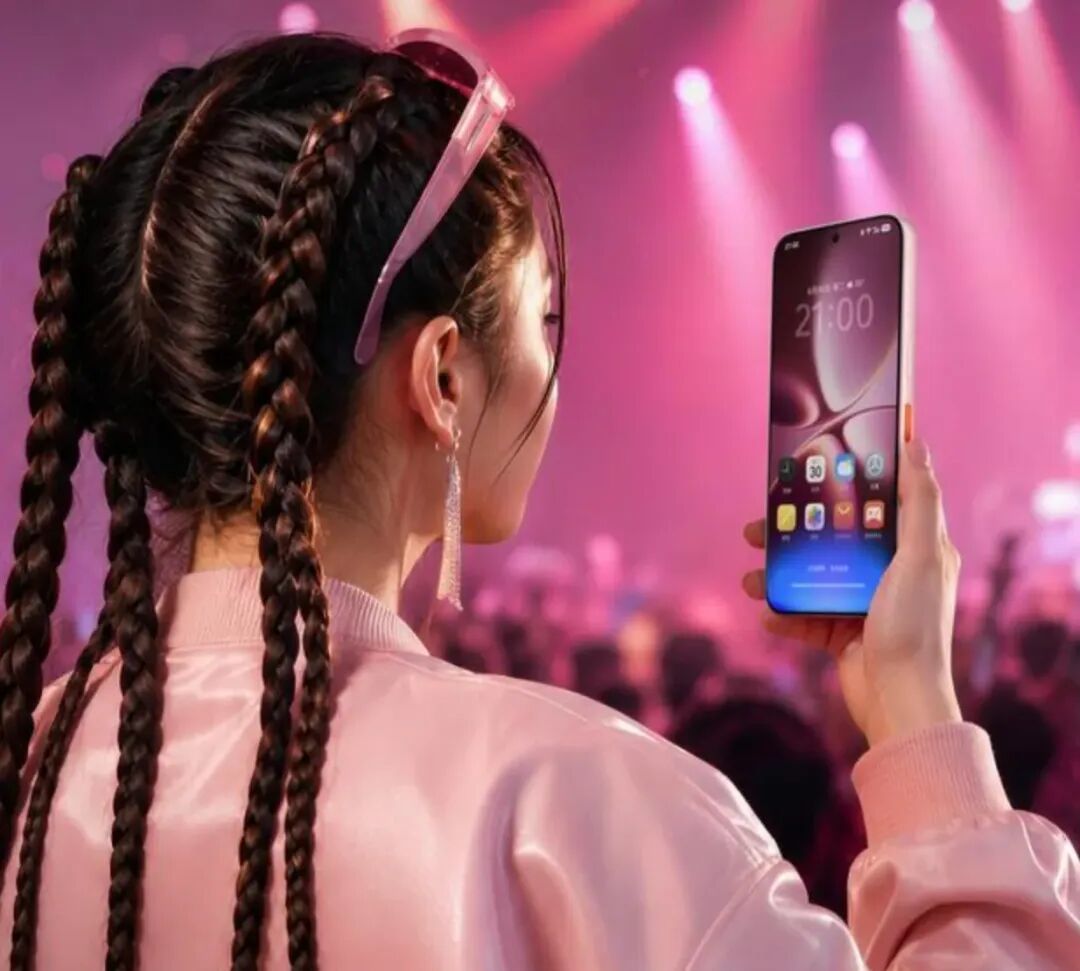
As for Apple’s opponents, the customization systems of domestic brands are generally accelerating AI and Agent-based systems. Needless to say, models with Agent as the core such as Nubia NaviX Ultra, Huami OV and other brands’ flagship phones have all been upgraded with large versions of OS, Huawei HarmonyOS 7, Xiaomi HyperOS, OPPO ColorOS 16, vivo OriginOS 6, Honor MagicOS 11. Each experience is unique, the fluency is improved, and the AI capabilities are compared to iOS 27 has reached the level of dimensionality reduction. They are all trying their best to cram in various agent functions, and AI completes complex tasks across applications on mobile phones. In this regard, iOS 27 still cannot tell as many stories as its rivals.
(Photo source: Nubia)
Of course, Apple still has other advantages. The liquid glass aesthetic brought about by iOS 26 and iOS 27 has gradually become mainstream, and Apple's brand appeal is still there. Frankly speaking, the Android customized system still "borrows" a lot from iOS, and the psoriasis of advertising and marketing information is much more serious than iOS.
On the other hand, iOS 27 is also learning from Android. Most of the new features mentioned above can be seen on Android phones. Moreover, a large part of the iOS 27 upgrade idea this time is to open up customization options. The alarm clock can choose the time by itself, the liquid glass can adjust the transparency by itself, and even the noise reduction mode can be fine-tuned. Apple's approach can be said to be delegating power, or it can be said to be "lazy".
In short, iOS and Android are still integrating with each other. Apple is laying down its posture and absorbing the practical details of Android; while Android manufacturers are following Apple in terms of UI aesthetics and underlying ecology. But facing the full outbreak of AI Agent in 2026, the absence of iOS 27’s AI functions in the Bank of China does make it somewhat passive in the competition with domestic flagships.
Comments