
Abstract:
Grok Bot, can go to work for you. On September 1st, Grok Bot quietly announced a piece of news that shocked the technology circle: Grok Bot can now directly access your Microsoft account to realize reading, writing and executing actions. Through the new plug-in, your AI assistant can directly connect to Outlook, Calendar and OneDrive. A few hours later, Musk forwarded it with only one sentence: Grok Bot has been upgraded.
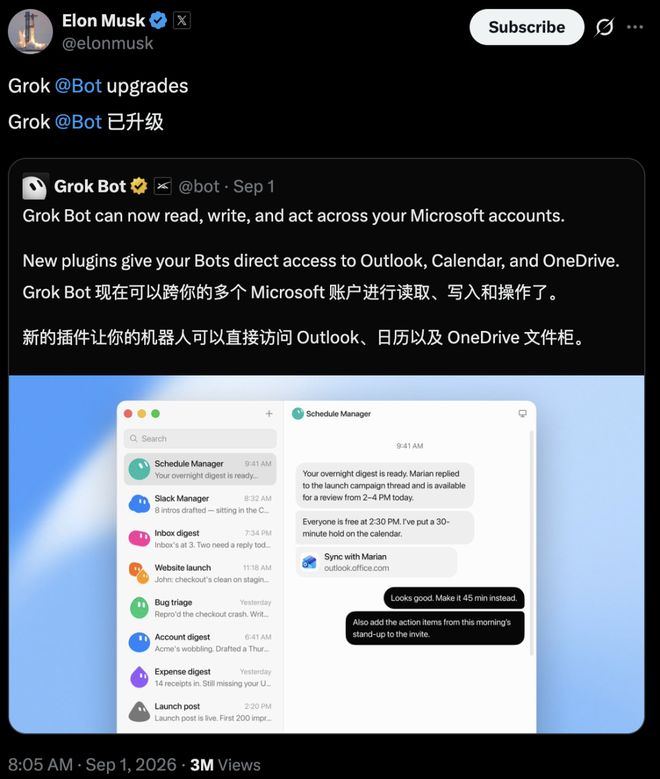
There is no press conference and no demonstration video. But behind this post are real changes:
A Grok Bot, an AI employee who is not off duty, has officially obtained the keys to your email, calendar and network disk. It can send emails, change meetings, and transfer files to OneDrive for you.
The comment area quickly became lively.
“Copilot panicked” and “Microsoft opened the door to Musk”, these types of statements quickly flooded the screen.
But when you look at xAI’s official documentation, you’ll find one thing: Outlook and OneDrive connectors have already appeared in Grok’s documentation as early as May this year.
In other words, Grok could do this more than three months ago.
So what’s new in this update?
The answer is hidden in the word "Bot": the permissions never change, what changes is the person holding the key.
Three plug-ins
What can be done
First dismantle "read, write, and act" to the action level to see where the new plug-in can move.
Outlook mail plug-in has the most complete capabilities.
Searching for emails, reading text and attachments are basic operations; it can also do drafting, sending, replying to everyone with one click, and forwarding; it can even do the sorting work of moving emails to other folders for you.
Files generated by Grok can also be directly inserted into drafts as attachments.
Among the permissions applied for behind the scenes, the two most critical ones are Mail.ReadWrite and Mail.Send, plus offline_access, which means that you don’t need to log in repeatedly after authorization once.
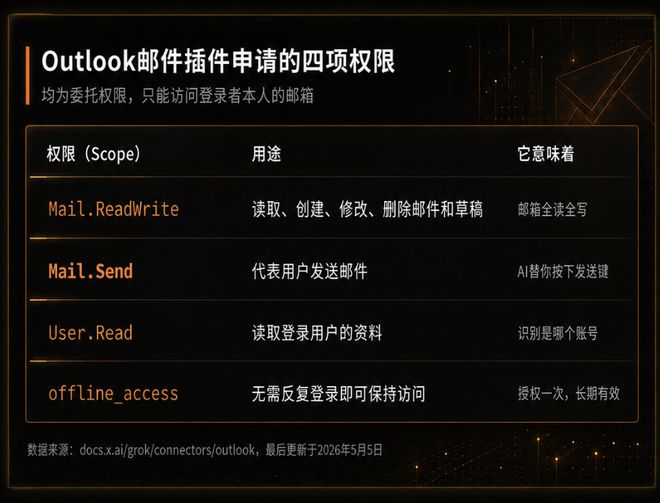
The calendar is a separate connector and is licensed separately.
It can check events by date, check the free time of multiple people, create and modify meetings with participants and repeating rules, and click accept, reject or pending for you.
OneDrive needs a discount.
The official thing is to do three things: browse folders, read documents, and upload Grok-generated content. If you want to search the full text of files in OneDrive, you need to connect an additional SharePoint connector.
And it is only open to Grok Business and Enterprise, personal accounts are not included in the official connection process.
So, to be more precise: emails can be received, sent, and sorted, calendars can be created, modified, and replied to, and network disks can be viewed and transmitted.
Mail and calendar are given a key; network disk is only half a key.
Permissions will be available in May
The one holding the key this time is Grok Bot
Since the connector was ready in May, why did Musk make an official announcement now?
In May, these connectors served traditional chat scenarios.
You ask grok.com "What did the supplier say in the email last week?" and it will adjust Outlook and read the result to you.
The conversation is over and no one has touched the permissions.
On August 11, Grok Bot entered early testing, and its form was completely different.
It does not live in the chat box, but in a permanent cloud computer, with its own browser, file system and terminal. It can log in to websites, save sessions, run tasks in parallel, and even continues to run after you close your laptop.
This update is equivalent to making the connectors from May into plug-ins on this cloud computer.
So the usage of the same set of permissions has changed.
It used to be "check my email for me", but now it reads all the emails overnight, determines which ones need to be answered, writes the draft and puts it in the draft box, waiting for your decision in the morning.
The executor changed from a chat box waiting for your questions to an employee who is not off work.
Microsoft and Google
Different opening logic
In this change, Microsoft’s role is the most subtle.
Grok Bot is connected to the core Microsoft 365 scenario of Copilot.
Just six days ago, Grok 4.6 was announced to be available on Microsoft Foundry, hosted and sold by Azure.
Some people connected these two things and joked that Microsoft was giving Musk a green light.
But these two lines are technically completely independent.
Foundry is a place where companies buy models, and it has nothing to do with you.
The Outlook plug-in follows Microsoft's standard authorization process that is open to all third parties. Just like when you authorize any app to log in, you hand over the key by clicking "Agree" yourself, not by Microsoft on your behalf.
Microsoft did not help Grok to siege its own products. This is just the price of an open platform: if your door is open to people, there will always be people entering your core territory.
In contrast, Google is much more cautious.
The Google account help page clearly states that login will be blocked in the following situations:
The browser is "controlled through automated software rather than a human being" or is "embedded within other applications." The browser running on the Grok Bot cloud computer happens to be on this line.
Some users encountered a blocking prompt when logging into Google using Grok Bot.
But this does not mean that Google has banned Grok.
xAI official documentation still lists OAuth connectors for Gmail, Google Drive and Google Calendar.
What Google blocked was "Bot logs in like a human in the cloud browser", and what it released was "the user is officially authorized through OAuth".
Two giants, two roads:
Microsoft uses standard authorization to let you open the door, while Google always keeps an eye on whether a real person is knocking on the door.
The battle for intelligence
Your Microsoft account has been called
Grok Bot is not the only one crowding towards these three entrances.
Microsoft's own Copilot already lives in Outlook. At the Build conference, it launched Autopilot "Scout" that can stay in Outlook and keep track of emails.
Anthropic's Microsoft 365 connector is available in the full package and can read SharePoint, OneDrive, Outlook and Teams.
However, actions such as sending emails, changing calendars, and writing files must be approved by the tenant administrator alone, and only the work account is recognized, and the personal mailbox of @outlook.com cannot be connected.
The open source OpenClaw takes the community route.
There are a bunch of Microsoft Graph skills on ClawHub, the official Outlook skills have been downloaded more than 6,600 times, and the Microsoft 365 skills covering OneDrive have also been downloaded thousands of times. The price is that the user has to go to Azure to register the application and manage the token himself.
All three companies are stuffing their own smart bodies into your Microsoft account.
The difference this time with Grok Bot is that it ties a "resident cloud computer" and a "first-party plug-in" together.
Musk added another piece that day: "Grok Bot runs 24/7 on his own cloud computer, so it doesn't matter whether you turn off your laptop or not."
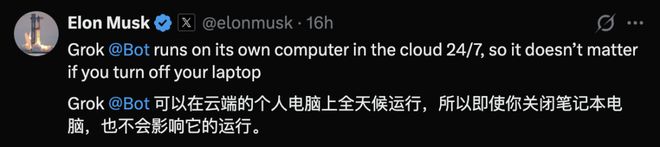
You don’t need to configure Azure yourself, you don’t need to turn on the computer, authorize it once, and the Bot will run on the cloud by itself.
Although the boundaries of delegation authority are defined within the personal account, the account is full of real work transactions. If you mistakenly send an email or delete an important meeting, the losses will be real.
Fortunately, xAI has left an approval point in the product.
In the official demo, a Bot called Inbox Manager ran out in the middle of the night and left you a message in the morning: "The inbox is cleared and 5 drafts are left for you to read."
Another Bot called Sales Outbound illustrates the problem better.
You give it a task: screen potential customers from Google Sheet, conduct online research, complete information from Hex, Sumble, and Salesforce, draft emails and LinkedIn contact sequences in my tone.
It ran all night and returned a list: 52 customer accounts, 3 similar customer groups, 4 people who had recently been contacted took the initiative to skip, 36 drafts were queued, and 0 were sent.
You take a look at it and reply, "The first 10 emails look good. Send them. I'll run them once a week from now on."
The decision-making power is always in your hands.
For ordinary people, entering the era of intelligent agents, four issues are more important than model running scores:
Did it ask me before sending it out? I can’t find out what it did. I want to recover the key and remove it with one click. Is it possible to save it if it was sent or deleted by mistake?
Email, calendar, and network disk are the three lowest entry points for knowledge work.
Whoever gets the authorization first will get the default position in the workflow first.
The "entry procedure" for AI employees is hidden in the authorization button you click casually.
Before clicking, see clearly what you are handing over. Lively is lively, sobriety cannot be lost.
Reference materials:
https://x.com/elonmusk/status/2094577304647164374
https://docs.x.ai/grok/connectors/outlook
https://x.com/bot/status/2094543253811183943
Comments