
Abstract:
Microsoft has recently continued to promote the memory efficiency optimization of Windows 11. However, some people believe that it is difficult to completely solve the problem by relying solely on improvements at the operating system level. Excessive use of system resources by third-party applications is becoming an important factor affecting the Windows experience.
A recent case that has attracted attention shows that a user had to install Razer Synapse and Chroma software in order to achieve unified RGB lighting effects on his Razer peripherals. However, during actual operation, this software combination occupies about 2GB of system memory, which puts significant pressure on device performance. Especially in the context of some manufacturers currently re-launching devices with 8GB memory configurations, the resource occupation problem is further highlighted.
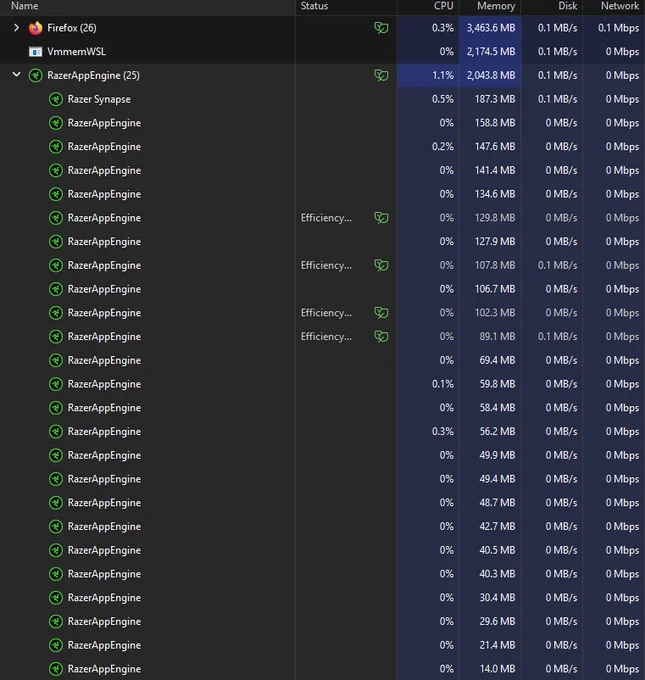
The screenshot shared by this user on the social platform shows that 25 service instances named "RazerAppEngine" are running simultaneously in the background of the system, occupying a total of approximately 2044MB of memory. In order to free up system resources and use alternatives, he had to make complex manual adjustments.
Users originally hoped to use the open source RGB control software OpenRGB to manage lighting effects to avoid using Razer's official software. However, after installation, OpenRGB cannot start normally, or it may shut down immediately after starting. To solve this problem, he entered the Windows service management interface and disabled all related services marked "RazerAppEngine" one by one.
After completing the above operations, OpenRGB is finally running. The user then installed the lighting effect plug-in and applied rainbow lighting effects to the four devices, and the lighting control function basically met expectations. However, he said that OpenRGB still has the problem of unstable startup and often exits immediately after running, so this solution is not fully mature.
The user then tried another RGB control tool, SignalRGB, but because the software required logging in with a Google account, it ultimately failed to meet its needs.
Although third-party lighting management software still has compatibility and stability issues, this user believes that successfully releasing a large amount of memory resources is more important than the lighting effect itself. Especially in systems with limited memory capacity, saving resources is often more practical than peripheral personalization functions.
This case once again sparked discussions about resource management in the Windows ecosystem. Some people believe that if Microsoft wants to truly improve the memory efficiency of Windows 11, it not only needs to optimize the system's own resource scheduling mechanism, but also needs to promote third-party developers to improve software quality and reduce the number of background services and unnecessary memory consumption.
Most ordinary users do not know how to enter the Windows service management interface and lack the experience to manually disable background services. Therefore, when third-party software occupies a large amount of system resources for a long time, users often can only passively accept the results of performance degradation. For users who are still using 8GB memory devices, the impact of such background programs is particularly obvious, which may lead to reduced system response speed, weakened multi-tasking capabilities, and a worsened overall user experience.
Comments