
Abstract:
Apple recently announced that with the official launch of iOS 27, iPadOS 27 and macOS 27, a new set of child safety and parental control features have been launched. These features are designed to help parents create a safer, more age-appropriate digital environment for their children, giving them more flexibility to manage what their children can see, who they can contact and when they use apps.
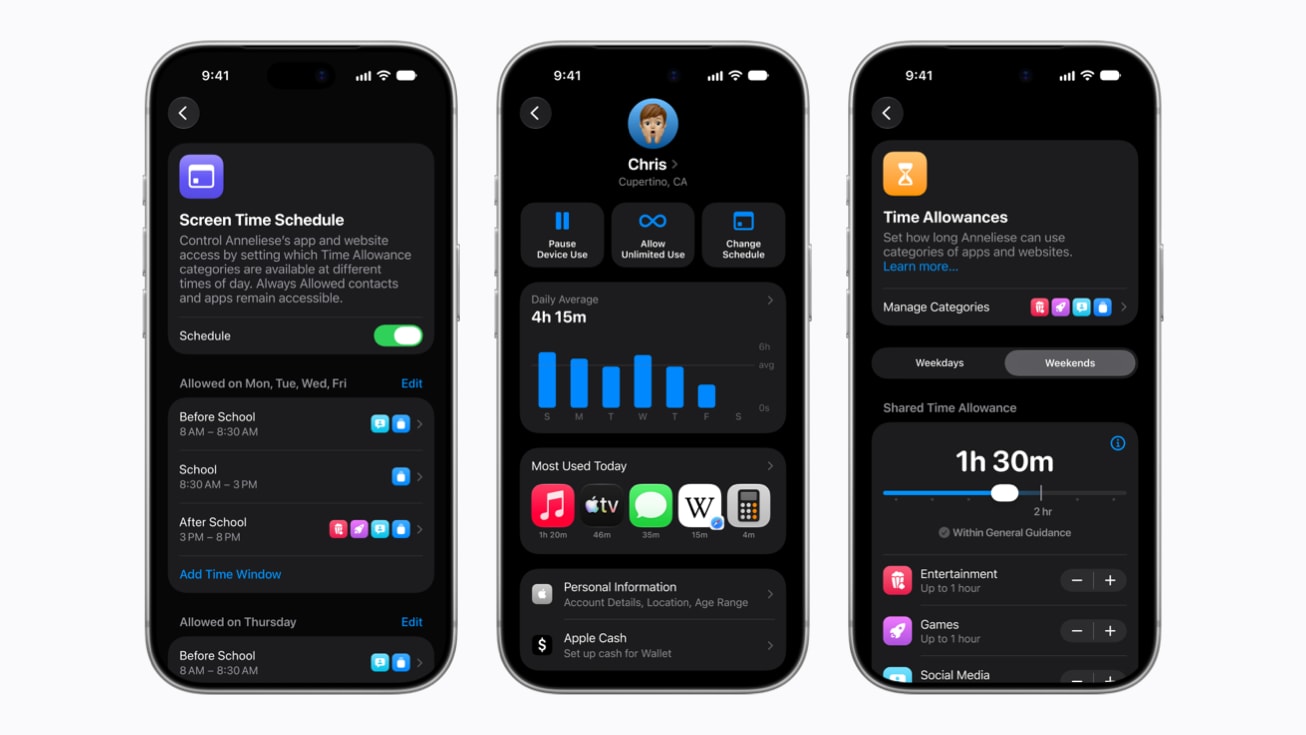
Apple said the new set of tools was first previewed in June this year and builds on its existing parental control features. This update focuses on improving the child account setup process, website access control, communication management, and screen time management, while further strengthening protection measures against inappropriate content.
For families just creating accounts for their children, Apple is now offering a simpler setup experience and a recommended set of basic apps so parents can decide from the start which apps their children can use. Parents can choose to offer only a handful of necessary apps, or use a mix of apps recommended by Apple, and then gradually increase access as their children grow.
Apple has also added a new "Request Browse" feature. When a child tries to access a website they haven't visited before through Safari, parents can ask the child to get permission first. After the child makes the request, the parent can directly approve or deny it. This feature is similar to the previous "Ask to Buy" mechanism in the App Store, which allowed parents to approve apps before their children downloaded them or made in-app purchases. Request Browsing extends this management approach to web access and is available across iPhone, iPad, and Mac.
When it comes to communications, parents can manage who their children contact via Messages, FaceTime, and phone calls. Parents can reduce the risk of their children connecting with strangers by requiring prior approval when they wish to communicate with a new contact.
Apple’s existing “communication security” feature also further expands the scope of protection. The feature was previously used to detect nudity in messages and FaceTime calls, blurring and warning when relevant content was found. With this system update, it will also be able to intervene against bloody or violent content in shared images and videos, providing additional protection for minors.
Apple emphasizes that communication security-related image and video analysis is completed locally on the device, and these contents will not be sent to Apple or third parties. Apple says end-to-end encryption is maintained, the fact that nudity or violent content is detected does not leave the device, and parents or others will not receive notifications as a result of detections.
In terms of application usage time management, Apple has launched a "time limit" function this time. Parents can set usage time limits for their children according to different categories such as entertainment, games and social media. When setting limits, the system will also provide recommendations based on expert research based on the age of the child, providing parents with an initial reference value that can then be adjusted based on the actual situation.
Meanwhile, parents can use the Scheduling feature to dictate which apps their children can access at different times of the day and days of the week. For example, parents can limit the use of entertainment apps during school hours to allow children to focus more on learning, or temporarily restrict device access for meals, outdoor activities, and family time.
Apple has also redesigned the Screen Time interface. The new interface allows parents to quickly view the average time their children use the device each day and the most commonly used apps, and directly adjust access to apps and websites. If the child is completing a certain task and needs to use it for an additional period of time, parents can quickly extend the access rights; conversely, during family meals or other scenes that require children to temporarily leave the device, they can also directly suspend the use of the device.
Apple said these features were designed with input from experts in the fields of children's health, online safety and child development. Apple is currently working with the American Academy of Pediatrics to adapt its Family Media Plan into a reference guide that can help parents manage their Apple devices. Apple also stated that it will continue to cooperate with relevant researchers to further study the impact of technology products on children’s digital life and physical and mental development.
In addition to system features, Apple has also launched a website specifically for parents, focusing on child safety tools, related resources and frequently asked questions to help parents understand how to start using these features.
Apple also reminds parents that some existing child safety tools will continue to be available. For example, "Screen Time Password Notification" can remind parents when the screen time password set by parents is entered on their children's devices; some countries and regions also provide user reporting tools that allow users to report harmful content directly to Apple, and Apple plans to gradually expand the coverage of this feature.
For children who do not have their own iPhone, Apple also provides the "Apple Watch for Kids" function, allowing parents to stay in touch with their children through Apple Watch and use the "Find" function to view their children's location. Children can use phone calls and messages to connect with family and friends, and can also use Apple Maps, Apple Music, and some other functions, while developing more independent usage habits through functions such as activity goals. In school time mode, the device can block notifications and disable some apps to help children focus.
Apple’s update also includes developers in the child safety system. While parents can decide which apps their children can use and when, app developers are also responsible for ensuring children have age-appropriate experiences within apps.
To this end, Apple provides developers with a series of tools. For example, SensitiveContentAnalysis can help apps identify material that may contain violence or nudity; PermissionKit can help developers obtain parental permission when it comes to new in-app contacts. Additionally, developers can use the Declared Age Range API to obtain a child's age range without obtaining their specific date of birth and adjust their app experience accordingly.
Apple says the new child safety features are now officially available with the Screen Time update in iOS 27, iPadOS 27, and macOS 27. However, if a family manages multiple devices through Family Sharing, the related devices in the family group need to be updated to iOS 27, iPadOS 27, macOS 27, watchOS 27, and visionOS 27 to fully use the new Screen Time feature. Some features may vary by region, language, and specific device model.
Comments