
Abstract:
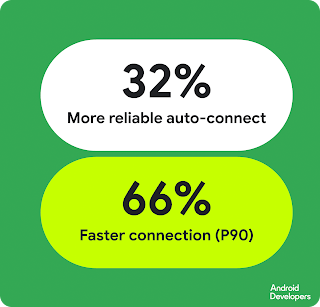
Google recently officially launched ADB Wi-Fi 2.0, which comprehensively reconstructs the wireless debugging function of the Android system. The new version was launched with Android 17, focusing on solving previous problems such as easy disconnection of wireless ADB, troublesome re-pairing, and difficulty in device discovery in Android Studio. Google said that after the upgrade, the automatic connection success rate of ADB Wi-Fi increased by 32%, and in 90% of connection cases, the connection speed increased by 66%.

Android Debug Bridge, also known as ADB, is an important tool for Android developers to connect computers and Android devices. Traditionally, developers usually need to connect mobile phones, tablets and other devices to computers through USB data cables, but starting from Android 11, ADB has supported wireless debugging via Wi-Fi. Developers can install test applications, view logs, run debugging commands, and perform other development work without plugging in a USB cable.
However, the early ADB Wi-Fi had many troublesome problems in actual use. Any time the computer switches networks, the phone connects to a different wireless network, the computer goes to sleep, or even the device is temporarily turned off, the wireless ADB connection may be interrupted. Developers often need to rediscover the device or even re-pair it, which makes many people ultimately choose to use a USB cable.
Google did not simply optimize a certain component this time, but redesigned the entire software stack of ADB Wi-Fi, including the adb server on the computer, the adbd daemon on the Android device, and Android Studio. Google has also reimplemented the mDNS network service used for device discovery, replacing the legacy mDNS components and third-party implementations it previously relied on.
Previous wireless ADB used third-party software components from Apple Bonjour and Chrome Open Screen on the computer side. Although these components can quickly provide network discovery functions such as mDNS, they were not originally designed specifically for ADB wireless debugging, and are prone to compatibility issues when facing computer hibernation, network switching, and different network environments. Google is now switching to a new mDNS solution designed specifically for ADB Wi-Fi to reduce these historical problems from the bottom up.
Adbd on the device side has also been upgraded. The new version of the system can more intelligently determine whether the currently connected wireless network is a network trusted by the user. ADB Wi-Fi automatically turns off when the device finds itself in an untrusted network environment; when it reconnects to a trusted network allowed by the user, the system can automatically re-enable wireless debugging, achieving a better balance between convenience and security.
Android Studio's device discovery method has also been adjusted. In the past, developers needed to enter the corresponding wireless pairing interface to find the device, and the entire entrance was not intuitive. ADB Wi-Fi 2.0 integrates wireless debugging devices directly into Android Studio’s Device Manager. Users only need to enable wireless debugging on their mobile phone, and the device will automatically appear in the device manager of Android Studio, and then the connection can be completed through a QR code or pairing code.
Google said that ADB Wi-Fi 2.0 is not only suitable for Android phones and tablets, but also supports Wear OS devices and Android TV and other products. Using the new system requires Android 17, and the computer needs to install Android SDK Platform-Tools 37.0.0 or higher, and use Android Studio Quail 3 or higher. The computer and Android device must also be connected to the same Wi-Fi network.
After completing the first pairing, the pairing status can be maintained between the device and the workstation, and there is no need to re-authenticate each time using wireless ADB. As long as the phone and computer are on the same network that allows wireless debugging, the system will automatically discover and connect to the device. This means that developers can pick up their phones and test applications at any time during their daily work without having to repeatedly plug and unplug the data cable.
It is worth noting that ADB Wi-Fi 2.0 does not mean that USB debugging has lost its meaning. For system recovery, low-level debugging, unreliable network environment or unavailability of trusted Wi-Fi, USB is still a more stable choice. In addition, wireless ADB itself has certain security risks, so one of the design focuses of Android is to limit its use on untrusted networks.
Google's previous ADB wireless debugging mechanism has provided encrypted connections and security authentication through TLS, which is more secure than the early method of directly connecting devices through TCP. ADB Wi-Fi 2.0 further increases the judgment of trusted networks so that wireless debugging will not remain open when users connect to untrusted networks such as public Wi-Fi.
For ordinary Android users, ADB Wi-Fi 2.0 may not bring obvious changes in daily experience, because ADB itself is mainly targeted at developers and advanced users. But for people who often develop, debug and test Android applications, this upgrade solves precisely the most unsatisfactory stability problem of wireless ADB for a long time.
With the increasing popularity of Android 17, Platform-Tools 37 and new versions of Android Studio, ADB Wi-Fi 2.0 is expected to make wireless debugging gradually become the default way of Android development work. For developers who had to pick up the USB data cable again because wireless connections often dropped in the past, this reconstruction starting from the underlying software stack may be an upgrade that truly matures ADB wireless debugging.
Comments