
Abstract:
Google recently announced that Android will launch a more convenient password manager switching function. When users migrate from one password manager to another in the future, they no longer need to export passwords to a CSV file and then manually import them into a new application. The new system can directly coordinate different password managers on the device, allowing passwords and even pass keys to be migrated between apps.

According to the new process announced by Google, users first open the new password manager they are ready to use, where they choose to import or copy passwords from the old password manager. The Android system then automatically recognizes other password managers installed on the device and takes care of coordinating the data transfer between the two apps. Users can view the content to be transferred during the migration process, and then complete the entire process in a few clicks after confirming it is correct.
One of the biggest changes in this upgrade is that the migration scope is no longer limited to traditional passwords. Android's new mechanism also supports passkey transfer, so users do not need to re-create passkeys for each website and application after changing their password manager. This change is especially important for users who already heavily use passwordless login methods.
In the past, data migration between password managers often required the help of CSV files. Users need to first export a file containing account and password information from the old password manager, and then import the file into the new password manager. Although this method is simple, CSV is essentially an ordinary data file and may expose sensitive login information in clear text during the migration process. Once the file is saved incorrectly, uploaded to the cloud, or accessed by other software, there may be a risk of password leakage.
The new approach adopted by Google this time attempts to fundamentally avoid this problem. Password data is transferred directly between the two password managers, eliminating the need for users to manually generate and process CSV files containing large amounts of sensitive information, thus reducing the chance of exposing account credentials during the migration process.
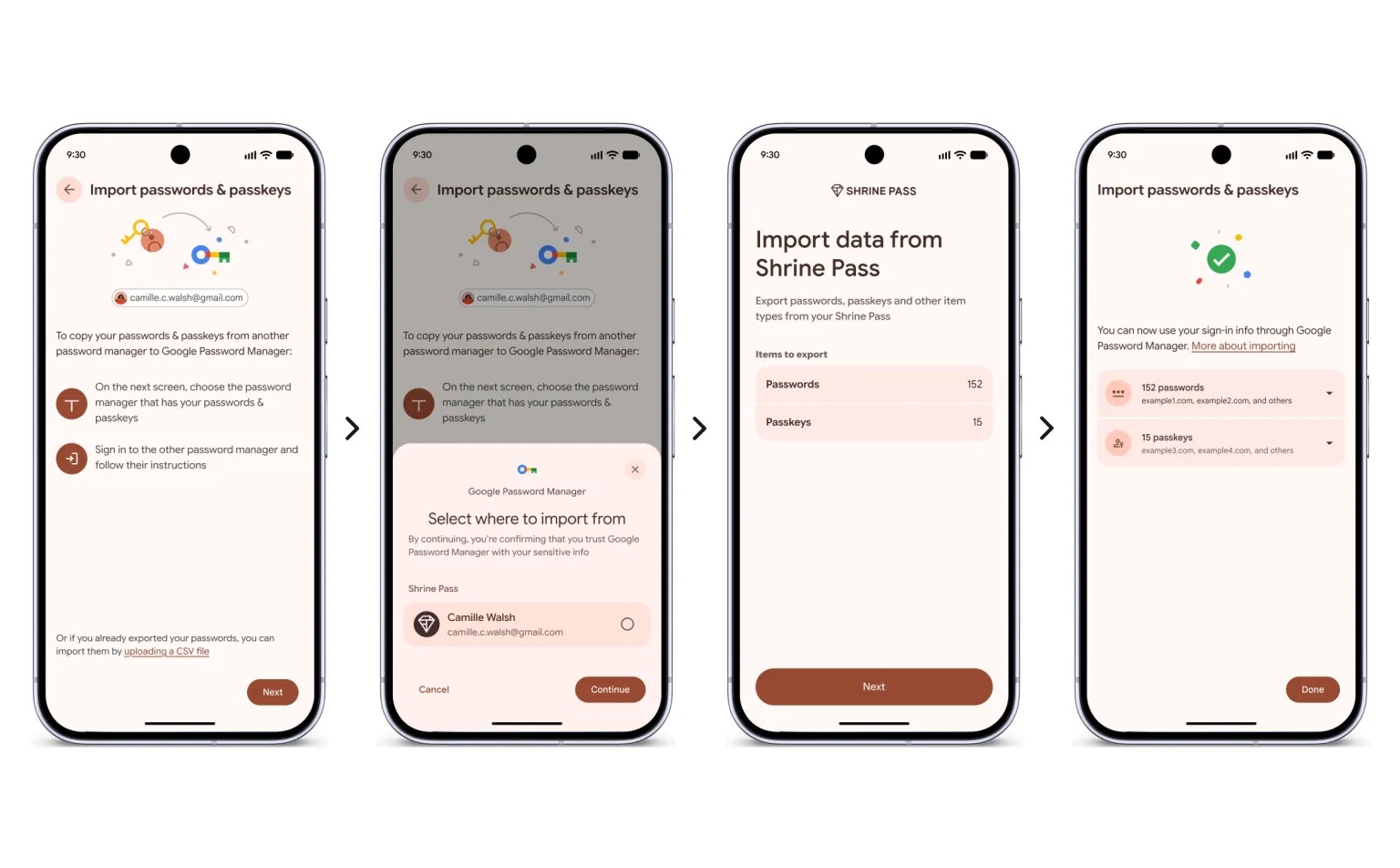
This feature is based on the Credential Exchange standard that Google participates in promoting. The standard aims to create a more unified mechanism for password managers to exchange passwords and pass keys in a secure, standardized way. Previously, different password managers often used their own proprietary data formats, making it difficult for users to freely move their login information between services.
Currently, the new feature is open to some partners and also supports Google’s own password manager. Bitwarden, 1Password and Dashlane have become the first third-party password managers to support this mechanism, and more password management applications will join in the future.
Google stated that this password manager switching feature is not exclusive to Android 17, but can cover devices running Android 8 and above. This means that even if the user is using an older Android phone, as long as the system and the relevant password manager support this mechanism, there is still a chance to use the new migration feature.
As passkeys increasingly replace traditional passwords, the importance of password managers is growing. Pass keys are often used in conjunction with a device's biometrics, PIN, or screen lock mechanism, and are saved and synced by a password manager. Compared with traditional passwords, passkeys can reduce the risk of phishing attacks, but one of their biggest practical problems is that they are inconvenient to migrate across platforms and password managers.
Google allows passwords and pass keys to be migrated together this time, which actually reduces the cost for users to replace password managers. In the past, once users accumulated a large number of passwords and pass keys in a password manager, changing services might mean tedious data export, reset, or even re-registering pass keys. However, the new Android mechanism attempts to make this process closer to data migration between ordinary applications.
This change may also reduce the user lockout effect between password managers. For password manager manufacturers, whether users can easily leave their services will largely affect the market competition. If the migration process is simple enough, users choosing a password manager won't have to worry too much about the cost of switching services in the future, giving them more freedom to choose products based on security, features, price, and cross-platform capabilities.
Google is currently gradually expanding support for this feature. As more password managers adopt the Credential Exchange standard, when Android users change password managers in the future, they are expected to initiate migration directly in the new application without having to deal with the complex file import process. For users who save passwords and passkeys at the same time, this also means that cross-service migration of login credentials is finally starting to become closer to a true "one-click completion."
Comments