
Abstract:
The Microsoft Incident Response Team recently introduced Windows 11’s prefetch files (Prefetch Files) in a document titled Prefetch Files and Program Execution. The team stated that deleting system-generated prefetch files will not make the system faster, and deletion may also slow down the startup of related applications.
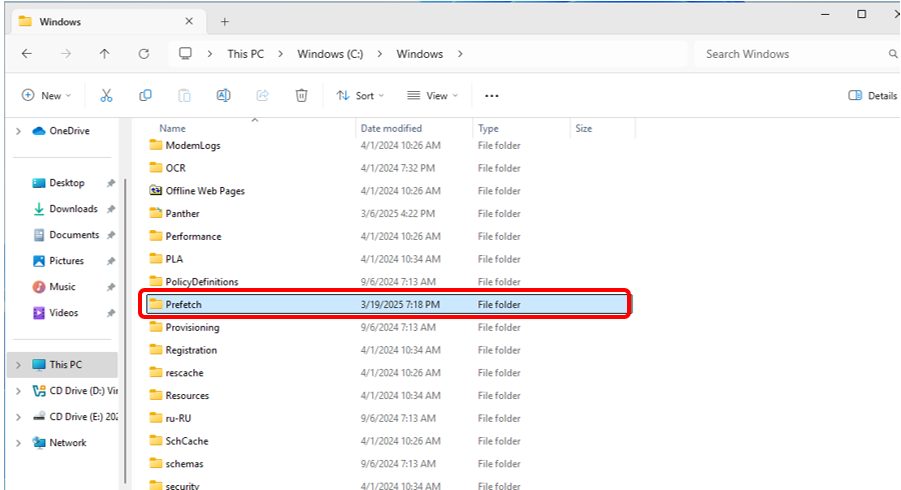
The prefetch file is located in the C:WindowsPrefetch directory, where the file with the suffix PF records the files and directories accessed when the application starts, helping the system to read the required content faster the next time it starts. Microsoft's incident response team stated in the document that the prefetch mechanism usually collects relevant access information within 10 seconds after the application is launched.
The prefetch file is not a copy of the application, nor will it be loaded into memory as a whole. The system will read the matching prefetch record when starting the corresponding application. The records of applications that have not been started for a long time will not continue to occupy running memory.
Cleaning the prefetch file will remove the startup records that have been generated, so the next time the application is run, the system needs to re-collect the accessed files and directories and rebuild the prefetch file again to create a cache for subsequent startups. For users, the prefetch files generated by the system usually do not take up too much system space, and users do not need to actively delete the prefetch files generated by the system.
The Microsoft Incident Response Team is a team in the security field, so why was this report on prefetched files released by the Microsoft Security Team? The answer is that prefetching files involves the privacy of system records. Simply put, prefetching files also need to be extracted during incident investigation and evidence collection.
For most users, there is no need to actively clean up prefetch files because it will affect the application startup speed. However, for users who pursue privacy and security, deletion is indeed possible because the prefetch files also save information such as the number of times the application has been run, the most recent run time, and the access path. Users who are concerned about reducing traces of their local activity can consider cleaning as a privacy option.
Cleaning method: Open C:WindowsPrefetch, select all files and delete them.
Comments