
Abstract:
NVIDIA recently updated the NVIDIA App to add the long-awaited CPU monitoring function to the built-in in-game statistics overlay. With the release of version 11.0.9, users using GeForce graphics cards can now check the processor temperature, power consumption and current operating frequency directly during the game, without the need to open third-party hardware monitoring software such as HWiNFO and MSI Afterburner at the same time.
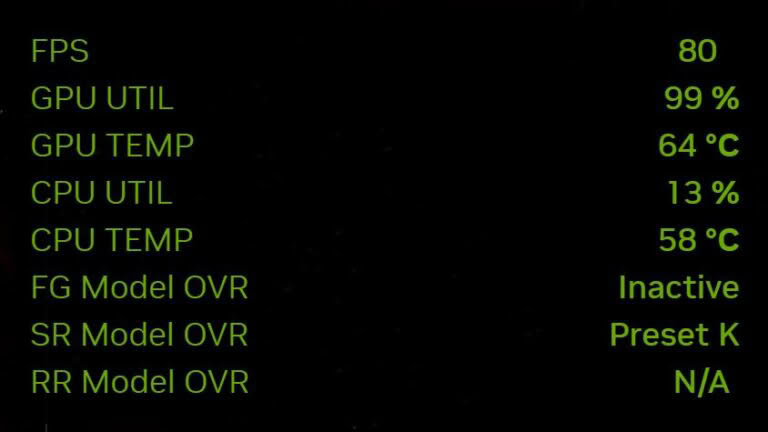
The most obvious change in this update is the addition of CPU Temperature, which is processor temperature monitoring. Previously, NVIDIA's in-game statistics floating layer mainly focused on the GPU. Users could view information such as frame rate, GPU utilization, GPU temperature, and clock frequency, but the data that could be directly displayed on the CPU was very limited. For users who need to observe whether the CPU is overheated and subject to temperature restrictions during games, this has always been an obvious functional gap in NVIDIA's statistics floating layer.
In addition to CPU temperature, the new version also adds two indicators, CPU Power and CPU Clock Speed, which are used to display processor power consumption and current clock frequency respectively. After the three data are combined, players can more intuitively judge the working status of the processor during game running. For example, when the game load increases, the changes in CPU power consumption, frequency and temperature can be observed at the same time to determine whether the processor is improving performance normally or has been limited by temperature or power consumption.
This information can be viewed directly through the NVIDIA App's existing in-game statistics overlay. Users can turn on or off statistical display through the Alt+R shortcut key, or enter the statistical settings of the NVIDIA App through Alt+Z to configure the indicators that need to be displayed. In this way, players can observe the processor status in real time without exiting the game or switching to the desktop to open other monitoring software.
This feature is especially useful for laptop users. During gaming, the CPU and GPU often share limited heat dissipation space and the overall power consumption budget. Only looking at the GPU temperature cannot fully reflect the actual load of the system. After adding CPU temperature, power consumption and frequency, users can observe the running status of the two core processors at the same time, making it easier to determine whether the performance bottleneck comes from the CPU, GPU or the heat dissipation of the entire machine.
However, NVIDIA's statistics overlay has not yet completely replaced professional monitoring tools such as MSI Afterburner, RivaTuner Statistics Server and HWiNFO. Although this update has completed several important indicators such as CPU temperature, power consumption and frequency, information such as RAM memory usage and VRAM video memory usage has still not been added to the statistical floating layer. In addition, users currently cannot view the independent load status of each core or thread of the CPU like professional monitoring software.
This means that for ordinary players who just want to quickly understand the running status of their computers in games, the NVIDIA App is now much more convenient; but for advanced users who want to overclock, reduce voltage, adjust power consumption, and troubleshoot CPU bottlenecks, third-party monitoring tools still have irreplaceable value. Especially when determining whether a game is affected by a single CPU thread being fully loaded, simply looking at overall CPU utilization is often not enough.
NVIDIA's addition of CPU monitoring function also means that its in-game statistics overlay is gradually developing from a simple GeForce graphics card performance display tool to a more complete system performance monitoring tool. Although there is still a certain gap between the comprehensive data provided by professional hardware monitoring software, for GeForce users who have installed the NVIDIA App, at least they no longer need to run another set of software in order to view the most basic CPU temperature and power consumption data.
Comments