
Abstract:
Microsoft recently released Windows 11 26H2 to the public and listed a number of AI features as upgrade highlights. However, users' acceptance of AI functions is not consistent, and some users want to turn it off; actual operations are limited by function type and Windows version, and some local AI functions do not have officially supported ways to turn them off. In contrast, features such as Windows' new search and new right-click menu provide more customization options.
Many of the latest on-device AI features are only available on Copilot+ PC. The computer must have a compatible processor and a neural network processor (NPU) with at least 40 TOPS, 16GB DDR5 or LPDDR5 memory, and at least 256GB SSD or UFS storage. Supported platforms listed by Microsoft include AMD Ryzen AI 300 and 400 series, Intel Core Ultra 200V and 300V series, and Qualcomm Snapdragon X series. Even if the computer's CPU or GPU is sufficient to run AI tasks, as long as it lacks an NPU that meets the requirements, or the memory and storage do not meet the standards, it will not be eligible for Copilot+ PC.
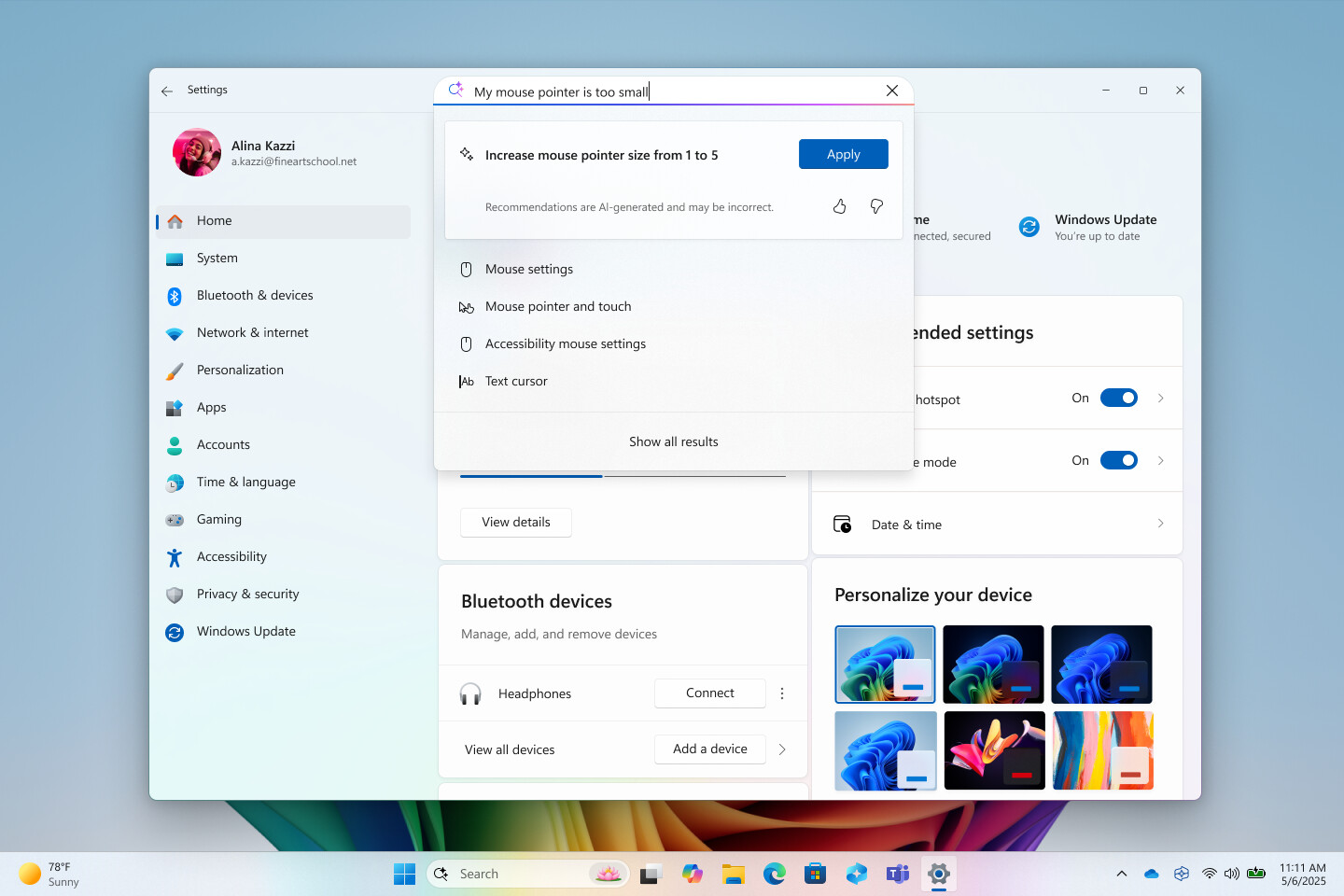
One of the controversies is setting up AI agents in apps. It replaces the traditional settings search with an AI overview run natively by Microsoft, and users can ask for a setting or directly ask the system to change the setting. Microsoft provides the DisableSettingsAgent policy, which can turn off proxy search and use static indexing and semantic search. However, this policy only supports the Enterprise Edition, Education Edition and IoT Enterprise Edition. Home Edition and Professional Edition are not officially supported. Even though the Professional version comes with Group Policy Editor, manually adding the corresponding registry values cannot bypass version restrictions. Neowin said that there is currently no reliable data on the proportion of users of each Windows version, but it is speculated that most ordinary users use the home version or the professional version, so most Copilot+ PC users may not be able to officially turn off the setting of the AI agent.
The permissions to close different AI functions are not the same. Professional version users can turn off Click to Do through the DisableClickToDo policy; stop Recall to save snapshots through DisableAIDataAnalysis, and delete previously saved snapshots; or use the AllowRecallEnablement policy to disable Recall, make it unusable, remove related files from the device, and delete existing snapshots after restarting. The Cocreator, Generative Fill, and Image Creator in Paint can also be turned off through the DisableCocreator, DisableGenerativeFill, and DisableImageCreator strategies respectively; these strategies support the Professional Edition, Enterprise Edition, Education Edition, and IoT Enterprise Edition.
Control related to the AI agent connector is more limited by version. Connectors allow AI agents to access Windows files, settings, or other system functions. For example, the File Explorer connector can read, create, move, rename, and modify local files; however, access still requires explicit authorization from the user. Pro users cannot shut down the connector cleanly via policy, nor can they restrict which MCP servers or hosts the agent can use. ConfigureAgentConnectors, which controls connector switching, AgentConnectorAccessPolicy, which restricts connector access, and AgentConsentDuration, which controls how long authorization is retained, currently only support the Enterprise Edition, Education Edition, and IoT Enterprise Edition. The same goes for advanced Recall controls, which include excluding specific applications or websites from appearing in snapshots.
Recall caused controversy because the original version continued to capture computer activity. Microsoft subsequently changed it to allow users to actively choose to turn it on, and added Windows Hello authentication and sensitive information filtering. In contrast, both Click to Do and Recall can be turned off in the Pro version. The Copilot application itself is not subject to complex group policy restrictions, and users can uninstall it directly from the computer.
Home version users are in a more limited situation because this version does not include a local Group Policy Editor and can only rely on the switches provided by Microsoft in the settings application or within each function. Although users can try to manually create hidden registry entries, Windows may not honor these settings on unsupported versions. Some related strategies are still in the Windows Insider testing phase, and Microsoft may still adjust the supported version range before official launch.
The point of the debate is not whether Windows should add AI features. AI features will only continue to increase and are indeed helpful to some users; the key is whether users can adjust the system experience according to their own preferences. Although keeping the more expensive Windows version attractive is one of Microsoft's considerations, providing users with more choices may achieve a better balance between feature promotion and autonomous control.
Comments