
Abstract:
Google is rolling out an enhanced autofill feature powered by artificial intelligence for the Chrome browser. Using Gemini and its Personal Intelligence capabilities, Chrome can now pull relevant information from a user's Gmail mailbox and proactively provide suggestions when filling out web forms. Instead of switching tabs, searching for confirmation emails, or rummaging through purchase receipts, users have the opportunity to complete information they would otherwise have to manually find and enter.
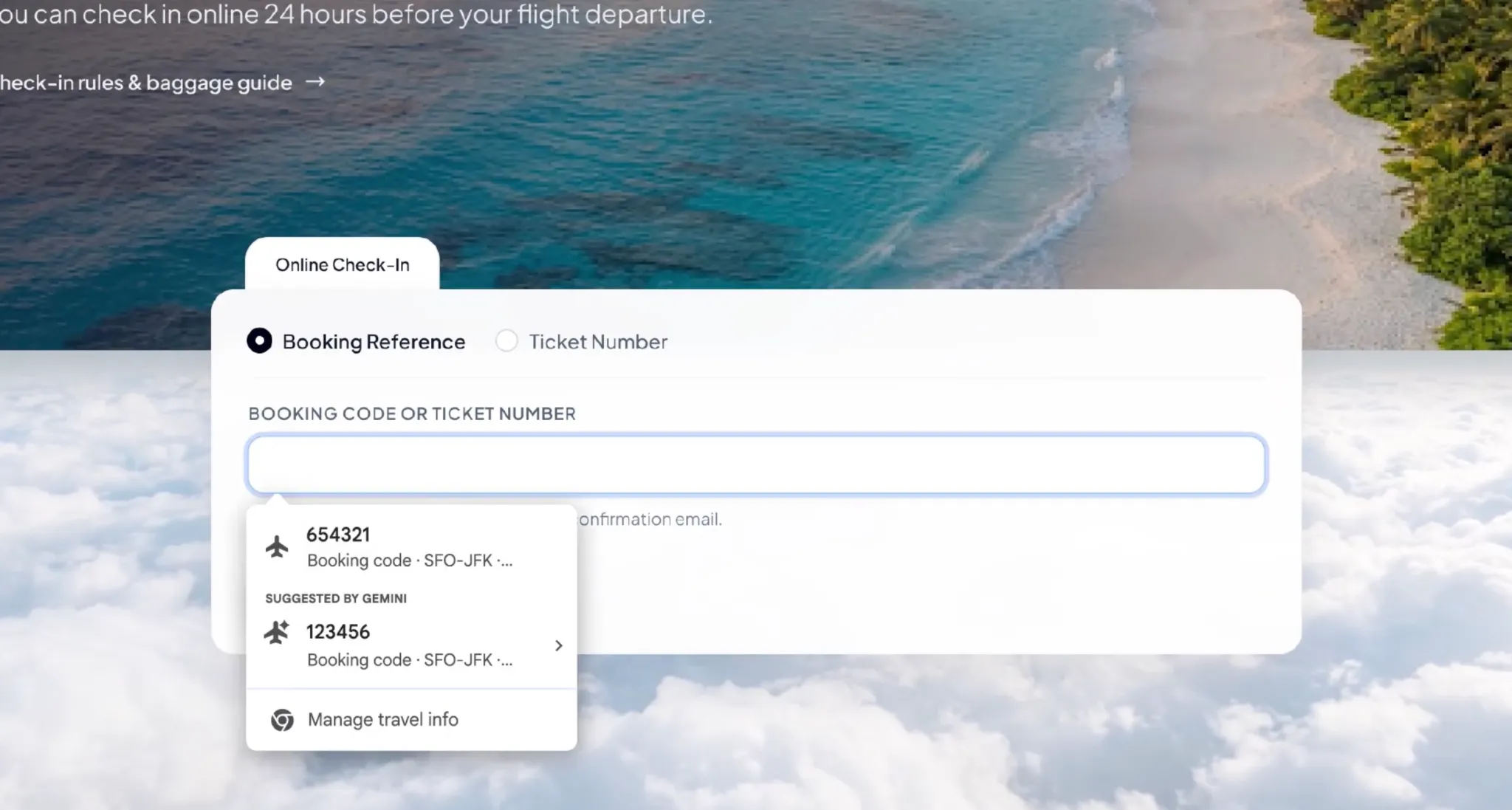
The new feature expands Chrome's original autofill capabilities. In the past, the browser was mainly responsible for filling in common content such as name, address, phone number and credit card information; after this upgrade, it can also look up order numbers, package tracking numbers, flight booking information and other information from Gmail, and give corresponding suggestions based on the specific needs of the current web form.
For example, when a user checks a package on a logistics website, Chrome can try to find the logistics tracking number from the shipping notification or order confirmation email in Gmail; when checking in for a flight, the browser can extract the booking number or related itinerary information from the airline's confirmation email. Users no longer need to open their mailbox, search for messages, and then copy the found numbers to another web page.
This feature relies on the integration of Gemini and Personal Intelligence. Personal Intelligence can use information from associated Google services to provide personalized help for specific tasks with user authorization. This update brings this capability further into the browser's form-filling process, allowing AI to not only answer questions but also provide instant information matching as users conduct daily network operations.
When Chrome recognizes that the current form may require certain information, suggestions provided by Gemini will appear in the autofill menu. Users can view suggestions and choose whether to use them, rather than relying solely on browser autofill. Relevant suggestions will also display the source of the information to help users confirm whether the content is consistent with the current task.
Google said that this feature has begun to roll out to users in the United States, and is applicable to the desktop version of Chrome, as well as users using the Gemini feature in Chrome on iOS and Android platforms. Users need to enable Personal Intelligence-related features to use the enhanced autofill experience that extracts information from Gmail. Not all Chrome users will get this feature immediately this time, and actual availability depends on account qualifications, related settings, and phased push progress.
In terms of privacy protection, Google emphasized that the sensitive information involved in autofill is encrypted, and users can still control whether the function is enabled and what information it can access. Users can also delete unwanted suggestions or simply turn off enhanced autofill.
However, the upgrade still sparked discussion about the scope of use of personal data. Gmail mailboxes often contain a large amount of private information, including shopping records, travel plans, bills, order confirmations and other sensitive communications. When the browser can automatically retrieve these contents based on the current web page, users gain greater convenience, but they also need to clearly understand what data will be read, when it will be called, and how to restrict relevant permissions.
Google said that users can manage the enhanced Autofill feature and its data access through Chrome settings. However, users still need to rely on actual use experience and setting instructions to further understand how this function selects emails in different scenarios, how to judge whether certain information is relevant to the current form, and what information will be displayed in suggestions.
Google also plans to expand the information sources of Enhanced Autocomplete in the future, so that it can safely extract relevant information contained in images from Google Photos. This means that in the future, browsers may no longer be limited to finding information in emails, but may also help users obtain the content needed to fill out forms from saved images. However, this expanded feature has not yet been fully rolled out with this update.
Chrome has continued to expand the coverage of its autofill feature in recent years. In 2025, Google has added smarter form understanding capabilities to the browser, allowing it to handle complex data such as passport numbers, driver's license information, vehicle identification numbers, etc.; in 2026, the company will extend some advanced autofill features to mobile devices and strengthen the integration between Chrome and Google Wallet.
This Gmail integration will further advance automatic filling from "remembering the information that the user has saved" to "finding the required information from related services based on the current task." This is also part of Google's attempt to integrate Gemini into daily software usage scenarios: artificial intelligence no longer only exists in independent chat windows, but has gradually become the underlying capabilities in browsers, emails, and other applications responsible for understanding context, extracting information, and performing auxiliary operations.
For users who frequently shop online, travel for business, or process a large number of orders, this update is expected to reduce repetitive operations, especially for scenarios where frequent switching between email and websites is required. However, whether it can accurately identify form fields on different websites, whether it will mistakenly select expired orders or similar booking information, and whether users can easily control the scope of data access will still determine the value of this feature in actual use.
In general, Google's update does not simply add several auto-fill data types, but allows Chrome to start using contextual information in the user's mailbox to actively assist in completing tasks. As artificial intelligence becomes more integrated with browsers, emails, and cloud services, automatic form filling is expected to evolve from a traditional information memory tool to an intelligent assistant that can understand task requirements and retrieve relevant information. At the same time, how to strike a balance between convenience, accuracy and personal data control will also become an issue that must be faced as such functions continue to become more popular.
Comments