
Abstract:
Microsoft recently announced that the Automatic Super Resolution (Auto SR) built into Windows 11 has been officially extended to Copilot+ PCs equipped with Intel processors. Previously, this technology was mainly targeted at Copilot+ devices equipped with Qualcomm Snapdragon X-series processors. Now, with the addition of Intel Core Ultra Series 3 processors, more thin and light laptops without independent graphics cards can also use AI super-resolution to improve game frame rates.
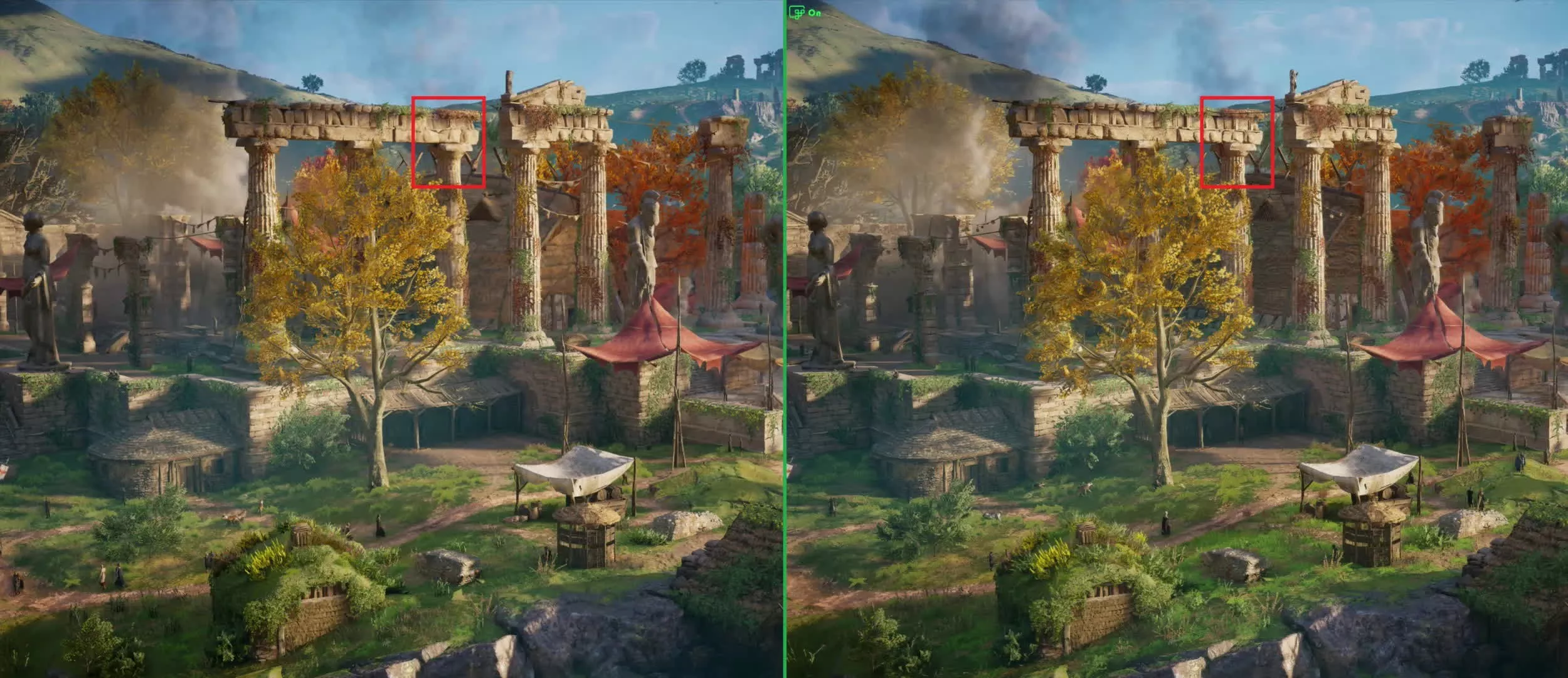
The working principle of Auto SR has certain similarities with NVIDIA DLSS, AMD FSR and Intel XeSS, but the biggest difference is that it is not a built-in game technology provided by a certain GPU manufacturer for a specific graphics card, but is directly integrated into the Windows system. The game itself is rendered at a lower resolution, and then the NPU in Copilot+ PC upscales the image to a higher target resolution through a pre-trained AI model, thereby reducing the number of pixels that the GPU actually needs to process while maintaining an image effect as close to the native high resolution as possible.
Microsoft said that Auto SR is mainly targeted at games that have difficulty achieving smooth frame rates at higher resolutions and image quality settings. By reducing the actual rendering resolution of the game and then using the NPU to complete AI amplification, the picture quality and running frame rate can be improved to a certain extent at the same time. For Copilot+ PCs with inherently limited performance, this means that players do not necessarily need to make a traditional trade-off between "lowering image quality" and "lowering frame rate."
Microsoft currently regards 60 FPS as the main goal of Auto SR. For games that can only barely run at lower frame rates, Auto SR can help the device get closer to 60 FPS while allowing players to retain higher game quality settings. Microsoft also said that it is studying how to further expand this technology to 90 FPS or even 120 FPS game scenarios in the future.
On the Intel Core Ultra Series 3 platform, Auto SR currently supports input resolutions up to 1080p. Microsoft points out that because AI models are trained for specific input and output resolutions, the input resolution will directly affect the final effect. For Intel platforms, the 800p to 1080p range is currently a more suitable area for Auto SR to work. If the game itself can already maintain a stable high frame rate at native high resolution, then the significance of enabling Auto SR will be relatively limited.
The actual case given by Microsoft shows that in the benchmark test of "Assassin's Creed: Shadow", when a device equipped with Intel Arc B390 GPU runs at 1600p resolution and very low game image quality, the average frame rate is about 31 FPS; after switching to 1050p input resolution and enabling Auto SR, increasing the image to 1600p, and increasing the game image quality to the highest level, the average frame rate is about 29 FPS. In other words, at almost the same frame rate, players can directly upgrade from very low image quality to ultra-high image quality while still maintaining a 1600p-level output resolution.
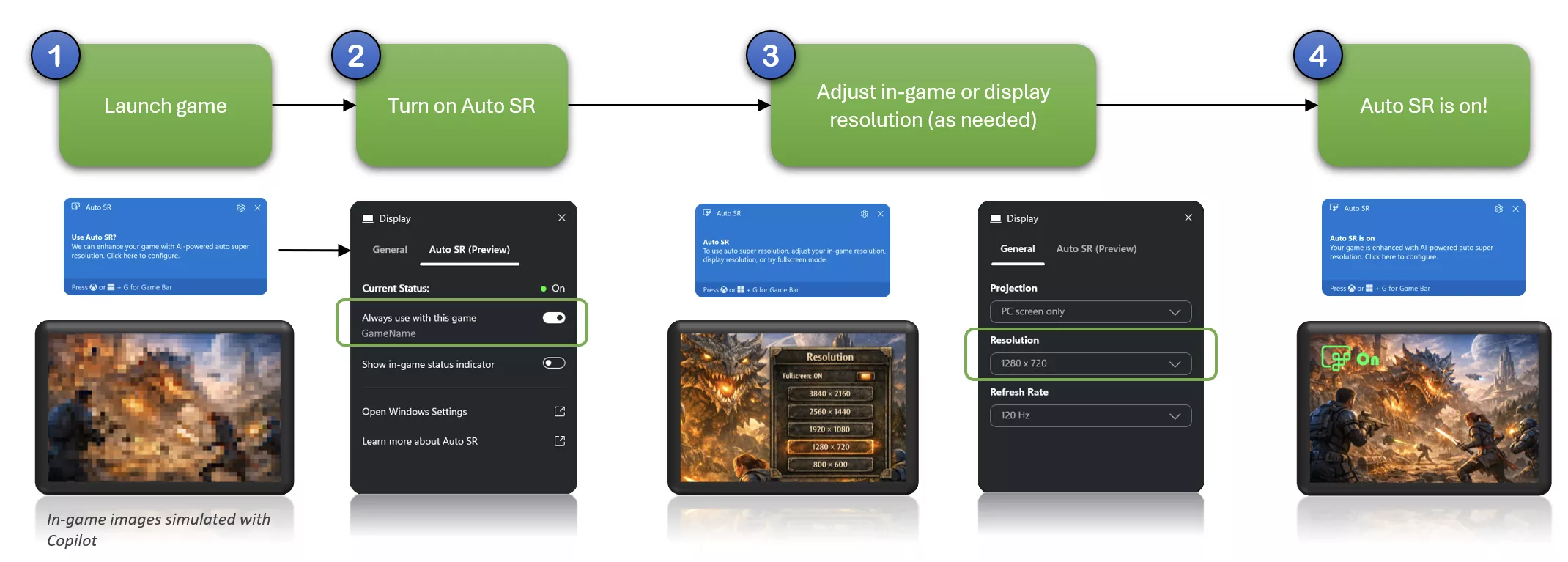
This way of working also shows that Auto SR is not necessarily only used to simply increase FPS. Players can also use it to reduce the actual rendering resolution when the game is approaching the performance limit of the device, using the saved GPU resources to improve shadows, textures, vegetation and other graphics settings. This approach is especially meaningful for integrated graphics or low-power notebooks, as the device can achieve higher visual quality with limited power consumption and heat dissipation.
Currently, Auto SR can support games using DirectX 10 and higher, and covers some games that natively run in x64, x64 simulation environments, and Arm64 environments. However, it is not directly available for all PC games. The target games listed by Microsoft include "Assassin's Creed: Shadow", "Assassin's Creed: Valhalla", "Assetto Corsa", "Avowed", "Control", "Doom: Dark Ages", etc.
At the same time, Auto SR also has some practical limitations. Since the UI elements in the game screen will also be enlarged, text and some very fine interface elements may appear softer. Post-processing effects such as film grain in the game may also affect the AI model's judgment of picture details, so Microsoft recommends turning off such effects in some cases to obtain cleaner super-resolution results. In addition, the power mode of the device itself and the distribution of power consumption among CPU, GPU and NPU may also affect the performance improvement ultimately brought by Auto SR.
Microsoft has currently packaged Auto SR related components into software packages that can be installed directly through the Microsoft Store. Users need to use a Copilot+ PC that supports Auto SR and ensure that the Windows 11 version, graphics driver, and NPU driver are kept up to date.
However, Microsoft also emphasized that Auto SR is not intended to replace the various super-resolution technologies that game developers have already integrated. If a game natively supports solutions such as DLSS, XeSS or FSR, Microsoft still recommends giving priority to the super-resolution function provided by the game itself. Compared with these technologies that are optimized for specific games and GPU architectures, the greater value of Auto SR is that it can provide unified AI amplification capabilities directly from the Windows system without game developers specifically adding super-resolution functions.
With the addition of Intel Core Ultra Series 3, Auto SR has also expanded from initially mainly serving Qualcomm Snapdragon X series Copilot+ PCs to Intel platforms. For the new generation of thin and light Windows computers that do not have high-performance independent graphics cards but have NPUs, this means that the AI hardware built into the system is no longer just used for local AI applications, but also begins to directly participate in game graphics processing. Microsoft also plans to continue to expand the applicable scenarios and performance range of Auto SR in the future to cover more games and higher target frame rates.
Comments